Doc. Title
ST4940 User Manual
Features and how to configure ST4940
Step 5
Please connect internet to the PC.
Step 6
Please remove the USB cable from the PC and connect it with the PC to check if the PC displays “MTK USB”
successfully. If yes, it means that you have made a successful installation.
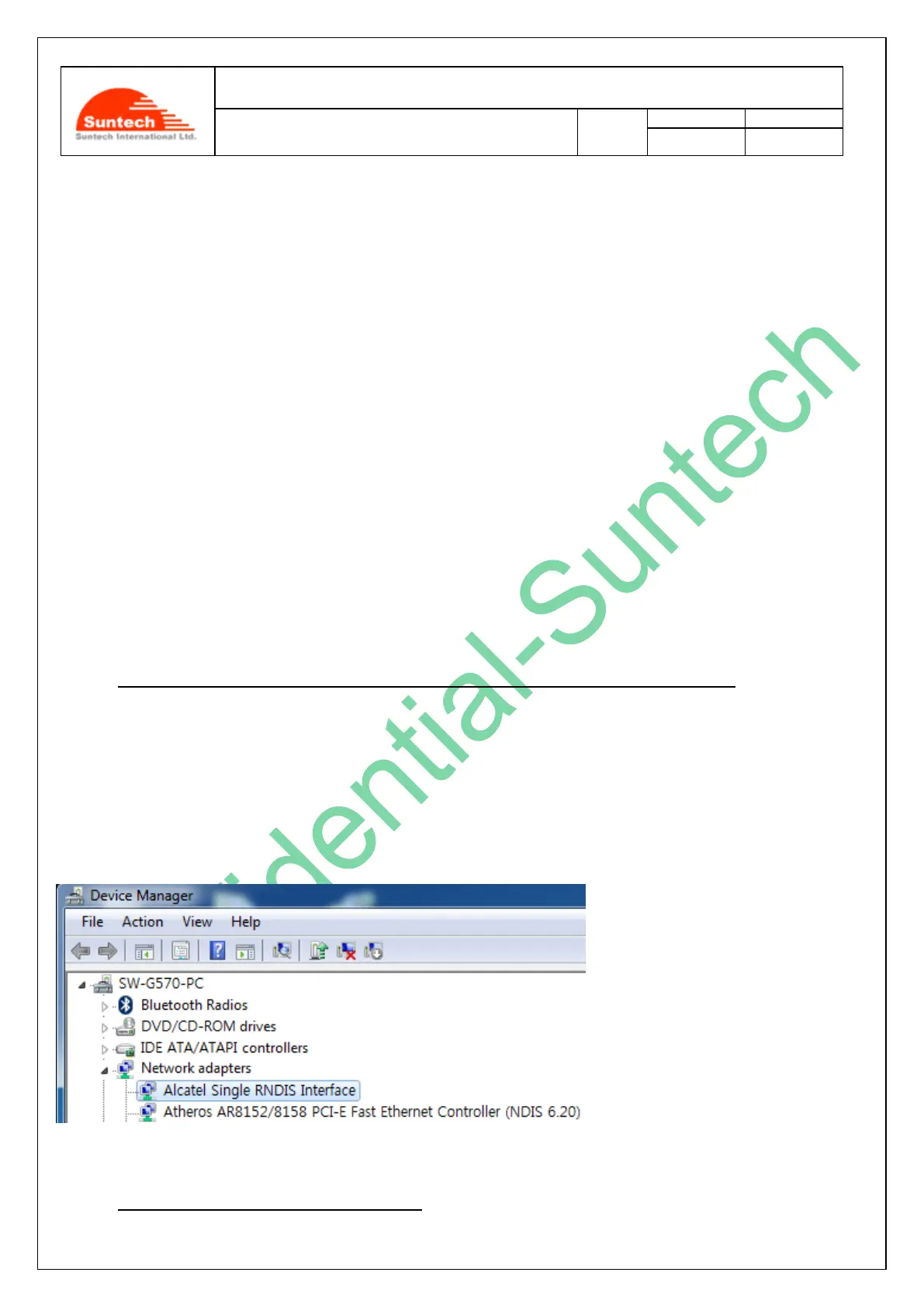
12-2. What to do if PC displays “Alcatel Single RNDIS Interface”
This ‘Appendix 12.2’ covers how to solve a problem that a PC may recognize ‘Alcatel Single RNDIS Interface’ as
‘Network adapters’ when a USB cable is used to connect the ST4940 with a PC. Please, check the steps below to know
if the procedure to connect a PC and the new ST4940 may have a problem.
Step 1. Probable problem in connecting a PC with the ST4940 by using a USB Cable
There is one thing that you, as a user of the ST4940, should be very careful in a case that you have never installed a
‘USB driver’ on a PC to enable the PC and the ST4940 to be connected with each other by using a USB cable. In such
a case, “Network Adapters” of your“Device Manager” of the PC will recognize the ST4940 (whose battery is OFF) as
“Alcatel Single RNDIS Interface” and the ST4940 may not work. The following picture shows how such a case happens
to the PC:
Step 2. How to start solving the problem



 To Next Page