OPERATION OF THE MJB4
24 MJB4 - Operation Rev07 05-10
3
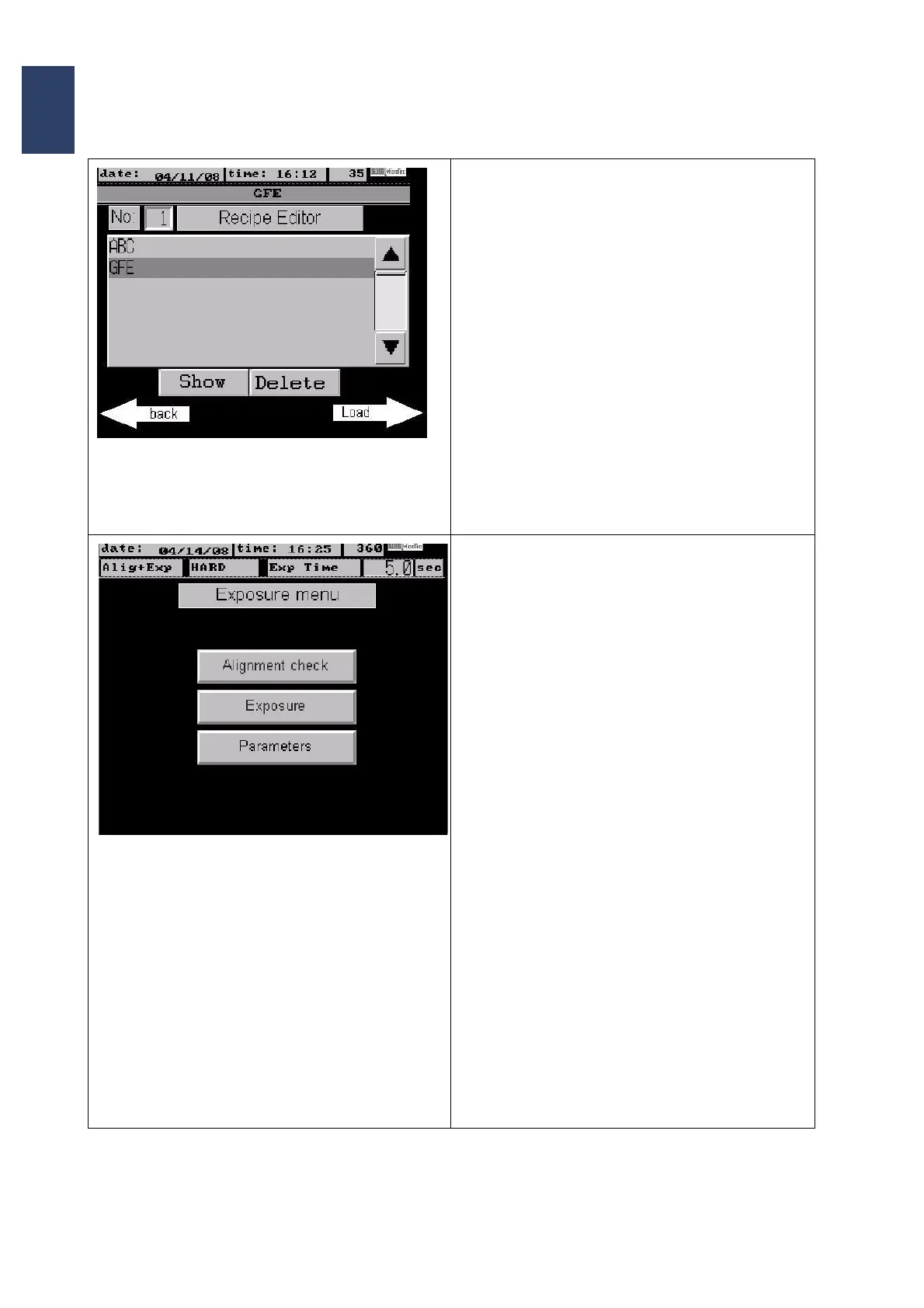
Screen Page: Recipe Editor
• To save a program permanently it has to be
stored with its own name within the recipe edi
-
tor.
• First, select the desired parameters for the new
program
• After pressing the button New a key board ap-
pears and the desired name for the recipe can
be typed in.
• With ENTER you can save the recipe which is
then displayed with its name in the recipe list.
• The selection of a recipe is performed by mov-
ing the cursor with the black arrow keys to the
desired position and pressing the arrow Load.
The program switches back to the main menu
and the actual selected program name is dis
-
played at the upper info line.
Screen Page: Exposure menu
As soon as wedge error compensation and align-
ment have been performed and the substrate is in
contact with the mask the exposure menu appears
on the screen:
• After pressing the button Alignment Check the
exposure program is started (sequence de
-
pends on the selected program) and is stopped
before exposure. The alignment accuracy can
be checked at this point (e.g. for shifting)
• The button Exposure starts the program se-
quence and performs exposure without a stop.
• When pressing the button Parameters the pro-
gram jumps back to the parameter screen and
the actual data can be changed.



 To Next Page