EasyManua.ls Logo

SYMC BC360 - User Manual

SYMC BC360
63 pages
Print Icon
To Next Page IconTo Next Page
Loading...
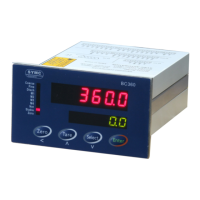
BC360
Electronic Weighing Indicator
Technical/User Manual
Question and Answer IconNeed help?

Do you have a question about the SYMC BC360 and is the answer not in the manual?

Summary

Attentions

Function & Features

Mode & Technical Specifications

Mode

Describes the available BC360 models and their configurations.

Technical Specification

Lists detailed technical specifications, dimensions, and capabilities.

Installation and Connection

Installation

Covers physical dimensions and installation procedures.

Wire Connection

Diagram and details for connecting wires to the unit.

Power Supply

Specifies power requirements and connection points.

Load Cell Connection

Details connecting load cells, including wiring options.

Series Port

Information on RS232 and RS485 serial port connections.

Discrete Input

Explains the function and wiring of discrete input terminals.

BC360.A1 Output Control Pins

Lists output pins and their functions specific to BC360.A1.

BC360.C1 Output Control Pins

Lists output pins and their functions specific to BC360.C1.

Switch and Jumper

Details the configuration options using switches and jumpers.

Operation

Display

Explains the device's display indicators and sequences.

LFT Switch

Describes the function of the LFT switch for mode selection.

Beeper

Information on the beeper function and its settings.

Keypad

Guides on keypad operations in various display and edit modes.

Batching Operation

Explains the mixed and recycle batching modes and processes.

Formula and Parameter Settings

Keypad Setting Operation

Describes keypad usage for navigating and editing settings.

Formula Parameter Setting

How to enter and access formula setup menus.

Formula Parameter Setting [SEEPE]

Detailed settings for individual material targets and feed points.

Step-by-Step Edit Setpoints

A guided procedure for editing material setpoints.

Weight Calibration Menu

Enter Weight Calibration Menu

Steps to access the weight calibration interface.

Weight Calibration

Procedures for zero and load calibration of the scale.

Input Calibration Parameter

How to re-input known calibration coefficients.

Input Sensitivity

Method for entering sensitivity for rough weight results.

Scale Application Parameter F2

Serial Communication Parameter F3

BC360 Continuous Output Format

Defines the data string format for continuous output.

MODBUS Communication Protocol

Explains MODBUS RTU protocol and register mapping for communication.

Command Format

Specifies the ASCII command format for remote control.

[Enter] Printing Format

Describes different data output formats for printing.

Batching Result Printing Format

How to print batching reports and material consumption.

Option - Analog Output Config (F4)

Option - PROFIBUS DP CONFIG (F5)

Data Definition

Defines discrete data transfer for PROFIBUS communication.

Discrete Read (BC360 Output -> PLC Input)

Maps BC360 output data to PLC input.

Discrete Write (PLC Output -> BC360 Input)

Maps PLC output data to BC360 input.

Batching Function Parameter (F6)

Discrete IO Test and Definition (F7)

Discrete Input Test

How to perform and interpret discrete input tests.

Discrete Output Test

How to perform and interpret discrete output tests.

Discrete Output Redefinition

How to redefine discrete outputs for specific models.

Factory Default (F8)

Maintenances

Repair Tools

Lists the tools required for device maintenance.

Clearance

Instructions for cleaning the indicator surface.

FAQ

Frequently asked questions with corresponding solutions.

Error and Reminding Lists

Packing List

Summary

Attentions

Function & Features

Mode & Technical Specifications

Mode

Describes the available BC360 models and their configurations.

Technical Specification

Lists detailed technical specifications, dimensions, and capabilities.

Installation and Connection

Installation

Covers physical dimensions and installation procedures.

Wire Connection

Diagram and details for connecting wires to the unit.

Power Supply

Specifies power requirements and connection points.

Load Cell Connection

Details connecting load cells, including wiring options.

Series Port

Information on RS232 and RS485 serial port connections.

Discrete Input

Explains the function and wiring of discrete input terminals.

BC360.A1 Output Control Pins

Lists output pins and their functions specific to BC360.A1.

BC360.C1 Output Control Pins

Lists output pins and their functions specific to BC360.C1.

Switch and Jumper

Details the configuration options using switches and jumpers.

Operation

Display

Explains the device's display indicators and sequences.

LFT Switch

Describes the function of the LFT switch for mode selection.

Beeper

Information on the beeper function and its settings.

Keypad

Guides on keypad operations in various display and edit modes.

Batching Operation

Explains the mixed and recycle batching modes and processes.

Formula and Parameter Settings

Keypad Setting Operation

Describes keypad usage for navigating and editing settings.

Formula Parameter Setting

How to enter and access formula setup menus.

Formula Parameter Setting [SEEPE]

Detailed settings for individual material targets and feed points.

Step-by-Step Edit Setpoints

A guided procedure for editing material setpoints.

Weight Calibration Menu

Enter Weight Calibration Menu

Steps to access the weight calibration interface.

Weight Calibration

Procedures for zero and load calibration of the scale.

Input Calibration Parameter

How to re-input known calibration coefficients.

Input Sensitivity

Method for entering sensitivity for rough weight results.

Scale Application Parameter F2

Serial Communication Parameter F3

BC360 Continuous Output Format

Defines the data string format for continuous output.

MODBUS Communication Protocol

Explains MODBUS RTU protocol and register mapping for communication.

Command Format

Specifies the ASCII command format for remote control.

[Enter] Printing Format

Describes different data output formats for printing.

Batching Result Printing Format

How to print batching reports and material consumption.

Option - Analog Output Config (F4)

Option - PROFIBUS DP CONFIG (F5)

Data Definition

Defines discrete data transfer for PROFIBUS communication.

Discrete Read (BC360 Output -> PLC Input)

Maps BC360 output data to PLC input.

Discrete Write (PLC Output -> BC360 Input)

Maps PLC output data to BC360 input.

Batching Function Parameter (F6)

Discrete IO Test and Definition (F7)

Discrete Input Test

How to perform and interpret discrete input tests.

Discrete Output Test

How to perform and interpret discrete output tests.

Discrete Output Redefinition

How to redefine discrete outputs for specific models.

Factory Default (F8)

Maintenances

Repair Tools

Lists the tools required for device maintenance.

Clearance

Instructions for cleaning the indicator surface.

FAQ

Frequently asked questions with corresponding solutions.

Error and Reminding Lists

Packing List

SYMC BC360 Specifications

General IconGeneral
BrandSYMC
ModelBC360
CategoryMeasuring Instruments
LanguageEnglish