getting started
14
Synrad Firestar f-Series operator’s manual
Unpacking
Unpacking the f400 laser
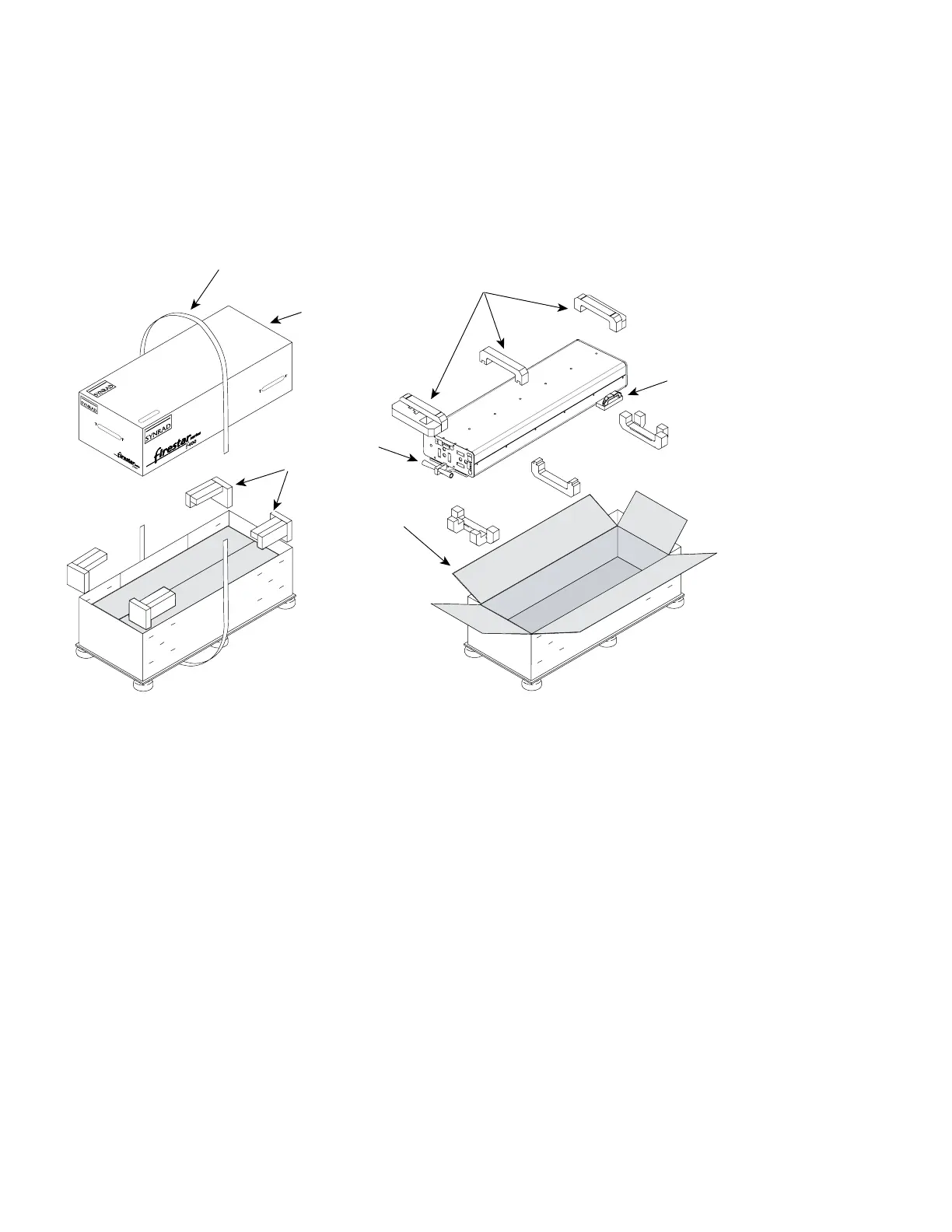
To unbox the f400 laser, refer to Figure 1-1 and perform the following steps:
Figure 1-1 Unpacking the f400 laser
1
Carefully cut the shipping strap wrapped around the container. This strap secures the upper lid to the
shipping crate.
2
Remove the upper lid and set it aside.
3
Remove the four polyurethane foam blocks that center the inner box within the outer crate.
4
Open the four aps of the inner box.
5
Remove the three foam blocks cradling the top of the f400 laser. To remove the center block, rst
slide it forward several inches and then lift.
6
The Firestar f400 laser is shipped with three lifting handles bolted to the mounting feet. Use these
handle grips to hoist or lift the f400 laser from its shipping container. To prevent injury to personnel
or damage to the laser, always use a minimum of three people to handle the f400 laser.
Note: Do not lift or support the f400 laser using the cooling ttings. Lift the laser using the lifting
handles, mounting feet or baseplate only.
7
After removing the f400 laser, pull out all the accessory items packaged with the laser.
2
5
4
3
6
6
SAVE
THIS BO
X
FRAGILE
FRAGILE
FRAGILE



 To Next Page
 Loading...
