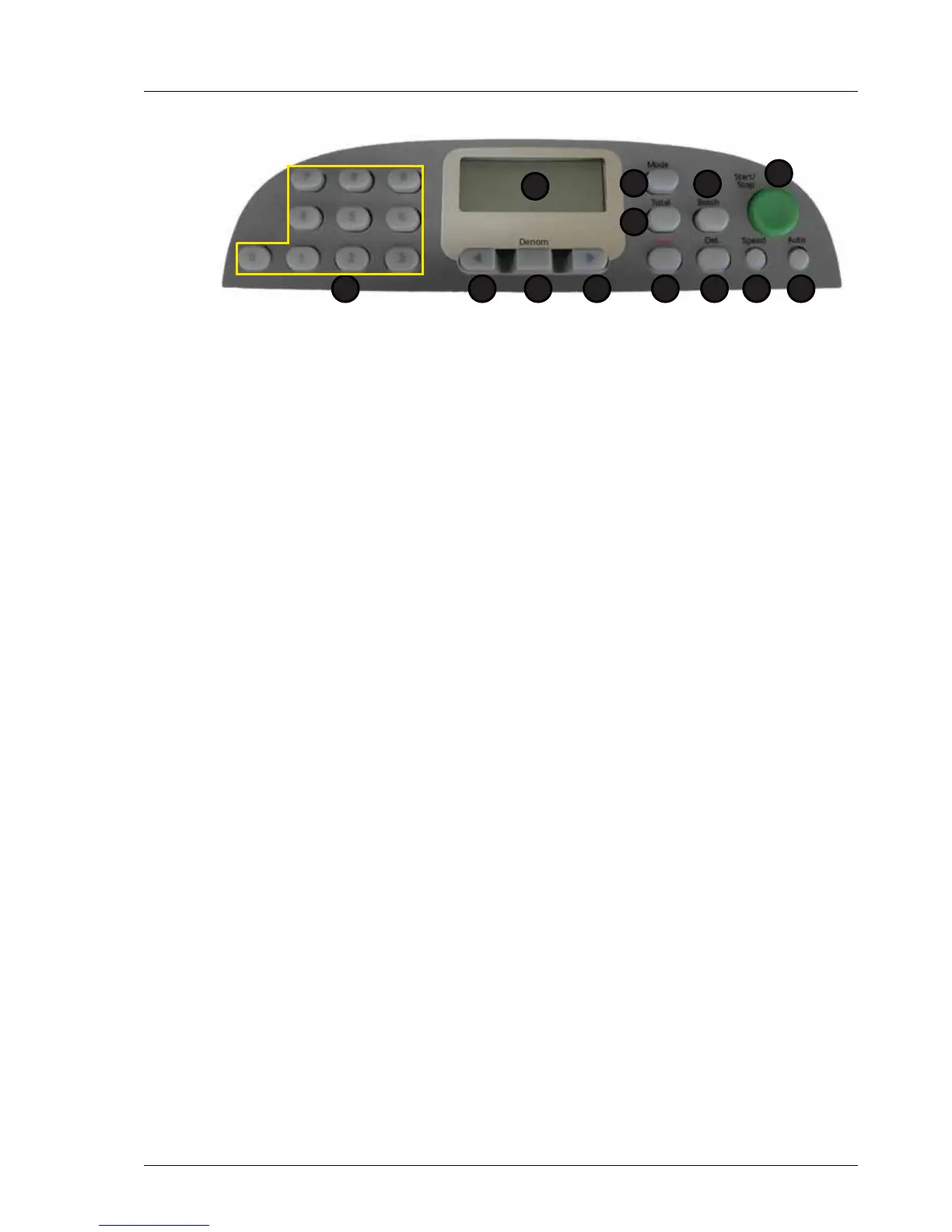
Model: EV8650 Machine Overview
TP05413002 Rev. 03 Page 5 of 62
Copyright © 2009 by Talaris Ltd., Basingstoke (UK)
2.4 Display Control Panel (Keypad)
Display / Control Panel Key Functions
1 LCD Display. For note count / value and other functions.
2 Total. Displays Sub Total of notes counted.
3 Mode Function. For selecting Piece Count Mode or Value Mode
selection. Also used to enter Supervisor Mode.
4 Batch. Set Batch size, press to step through the pre-set
batch sizes.
5 Start / Stop. For Manual Start / Stop, if the Auto Start is not
selected also as a accept or enter key.
6 Auto. Enables / disables automatic note start of note
counting.
7 Speed. Setting the throughput speed, press for pre-set
speeds.
8 Det. For selecting detectors.
9 Clear. Clears display and some error messages.
10 Right Arrow Key For scrolling through various mode options
11 Denom. For selecting Denominational Values in d_Entr,
FdEn Modes, currency selection and exit key.
12 Left Arrow Key. For scrolling through various mode options.
13 Numeric Keypad. For note count / value and other functions.
1
2
5
67
3
8
4
912 101113



 To Next Page