Model: EV8650 Operating Instructions
TP05413002 Rev. 03 Page 33 of 62
Copyright © 2009 by Talaris Ltd., Basingstoke (UK)
3.12 CnS Control Command (Cash Management System)
On-line / Off-line function
Cash Management System RS232 connection.
If the counter is connected to a computer using Legacy (2620) CMS protocol, then the
counter can be manually connected and disconnected from the computer by pressing the
AUTO key for one second.
“OFF Line” or “On Line” will be displayed.
Use the arrow keys to toggle between on and off line.
Press START/STOP to return to normal operation.
The display message rEAdy CnS can be cleared by pressing the CLEAR key
The display will return to the counting display automatically.
The 2620 Legacy CMS can be configured (in the Supervisor settings) to either connect to
PC automatically at power-up or wait until commanded to go On Line.
Two other protocols are also available. 2650 Pro (default) and 8643 Pro.
For help with the CMS connection, contact your local Talaris Office.
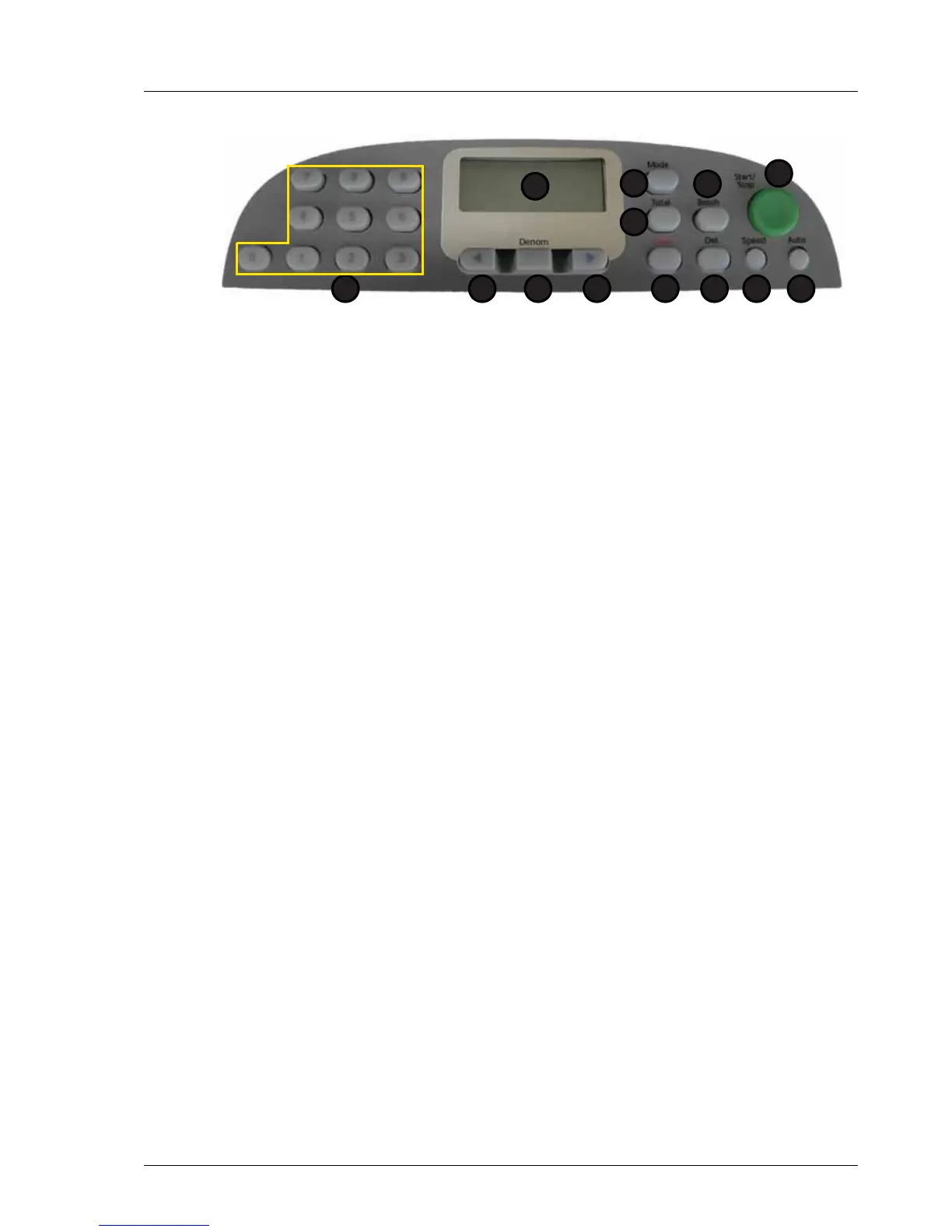
1. Display 7. Speed
2. Total 8. Det
3. Mode 9. Clear
4. Batch 10. Right Arrow
5. Start / Stop 11. Denomination
6. Auto 12. Left Arrow
13.Numeric Keypad
1
2
5
67
3
8
4
912 101113



 To Next Page