Model: EV8650 Supervisor Functions
TP05413002 Rev. 03 Page 41 of 62
Copyright © 2009 by Talaris Ltd., Basingstoke (UK)
4.2.3 dEt (Detector Settings)
Setting The Short cut - Det
Once in Supervisor Mode, use the Left and Right arrow keys to scroll through the
available Supervisor Functions.
Once dEt SEL is displayed, press the START/STOP key to enter that function or press
the DENOM key to exit. Press DENOM to exit Supervisor Function completely.
Alternatively, in the Model EV8650, 12 supervisor functions have a short cut key which
can be used to select the functions directly (see ”Supervisor Functions Summary”
on page 37).
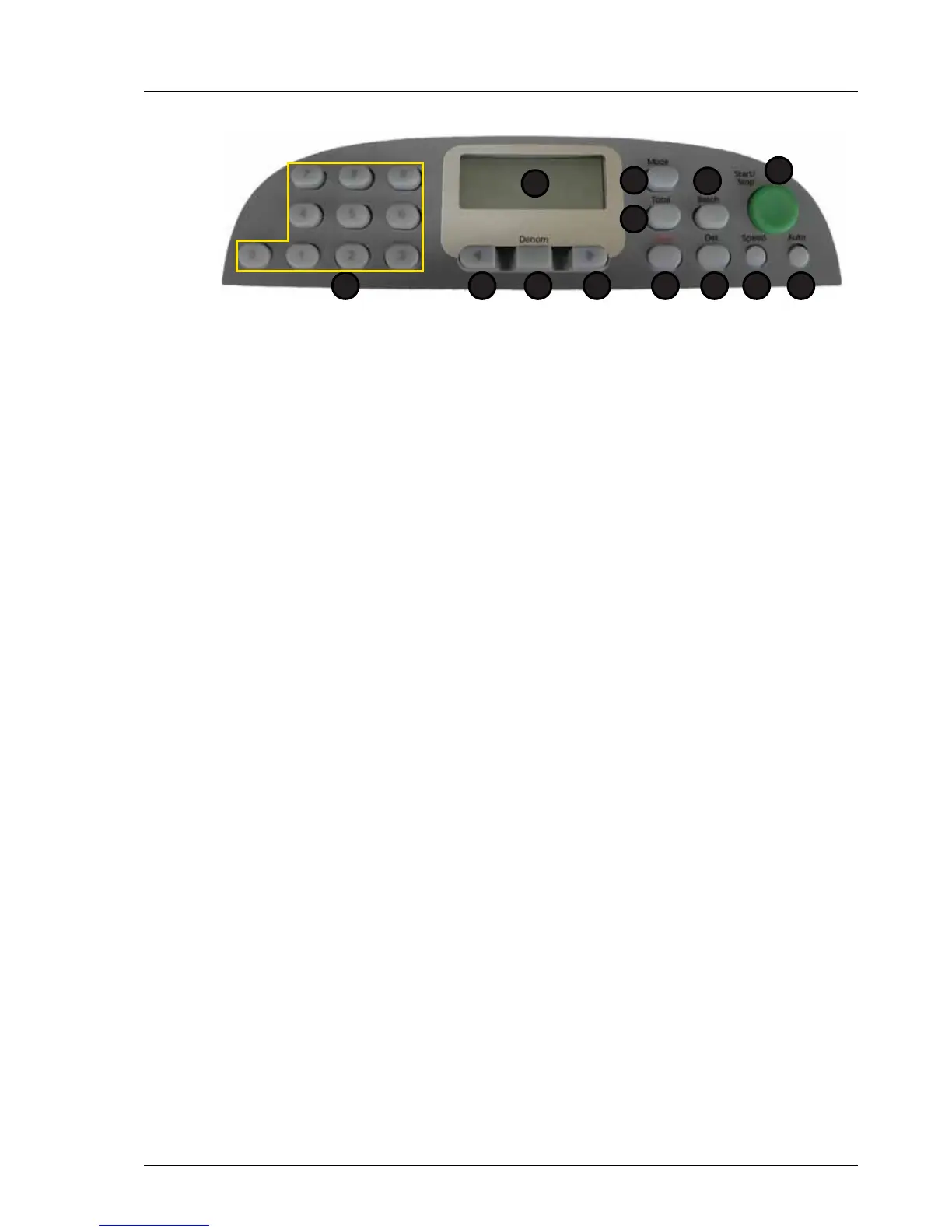
Detector settings. Once in the dEt option, use the left and right arrow keys to select the
detector you wish to adjust. The numerical keypad is used to enter the sensitivity of that
detector.
The lower the number, the more sensitive that detector is.
The thd sensitivity settings 1 - 7 are for normal operation where 1 is the most sensitive
and 7 is the least.
Sensitivity settings 8 - 9 should only be selected when poor quality notes are giving a
higher than expected stop rate.
To exit the dEt option press the DENOM key.
1. Display 7. Speed
2. Total 8. Det
3. Mode 9. Clear
4. Batch 10. Right Arrow
5. Start / Stop 11. Denomination
6. Auto 12. Left Arrow
13.Numeric Keypad
Ub Ultra Violet :Default setting 5: Setting level (1 - 9)
Enh Magnetics :Default setting 5: Setting level (1 - 9)
PrES Magnetic Presence :Default setting 5: Setting level (1 - 9)
thd MTD Metal Thread :Default setting 5: Setting level (1 - 9)
IR Infra Red :Default setting 5: Setting level (1 - 9)
FoiL FoiL :Default setting 5: Setting level (1 - 9)
SndS (SMDS) :Default setting 2: Setting level (1 - 3)
PPd Paper Properties :Default setting 5: Setting level (1 - 9)
MAgI Magnetic Image :Default setting 5: Setting level (1 - 9)
1
2
5
67
3
8
4
912 101113



 To Next Page