Model: EV8650 Operating Instructions
TP05413002 Rev. 03 Page 21 of 62
Copyright © 2009 by Talaris Ltd., Basingstoke (UK)
3.8 Value Count Mode
Selecting Value Modes
The value function of the machine allows you to ‘Value’ a bundle of notes by
denomination, rather than to count the ‘Quantity’ of notes.
Press the MODE key to display the current counting Mode.
Whilst the current counting mode is shown, press MODE key repeatedly to scroll through
the available Quick Access Modes. (preset by supervisor)
Alternatively use the arrow keys to scroll through the available modes.
Press START/STOP to return to the counting display or wait for the display to time out.
To exit Value Mode to count Mode press the MODE key again until it shows PIECE Cnt
on the display.
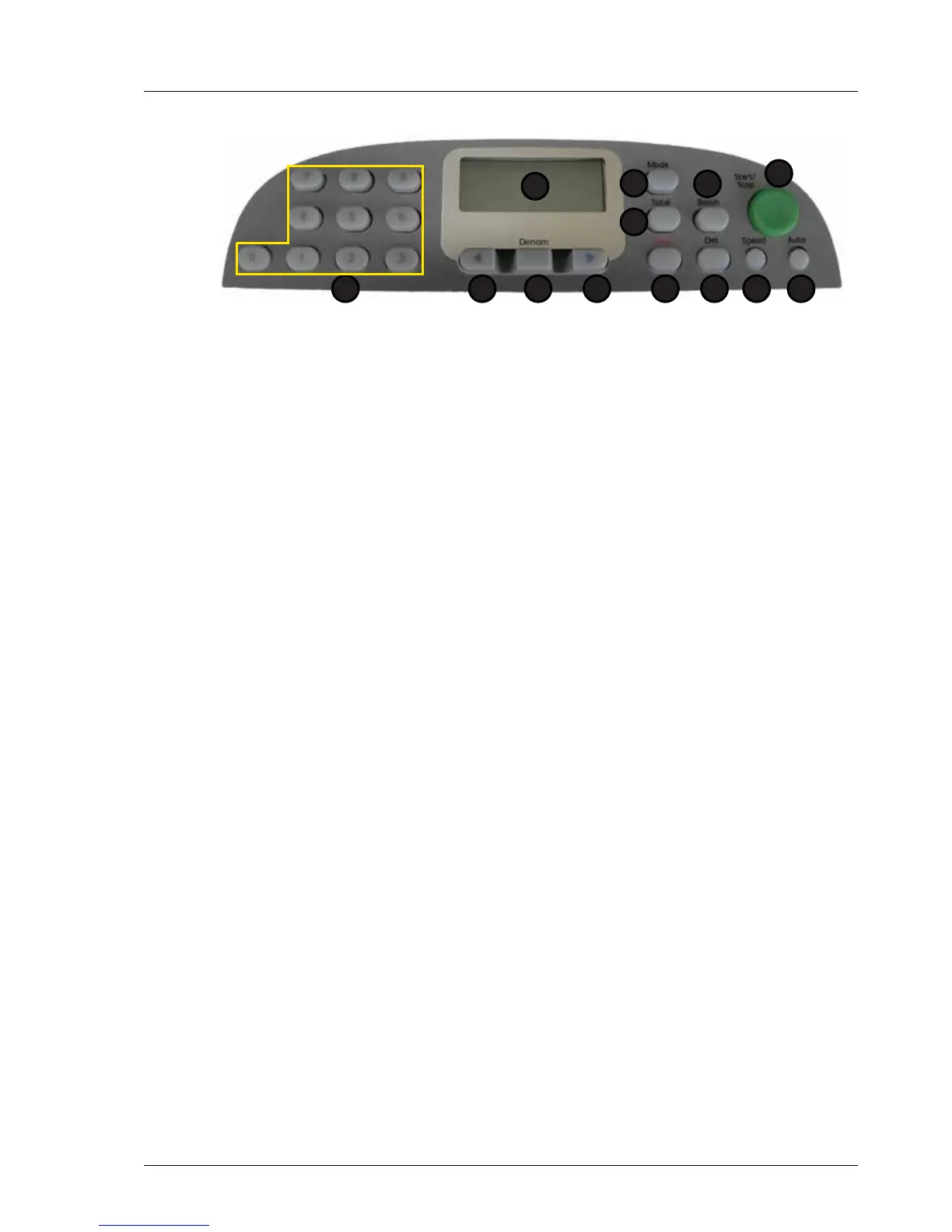
Modes that may be used include:
1. Display 7. Speed
2. Total 8. Det
3. Mode 9. Clear
4. Batch 10. Right Arrow
5. Start / Stop 11. Denomination
6. Auto 12. Left Arrow
13. Numeric Keypad
Value Mode
d Entr val (Denomination Enter) For counting pieces of paper and
displaying the result as a value based on a denomination entered
by the user.
AdEn val (Automatic Denomination) For counting documents, all of the same
denomination as the first fed and displaying the result as a value.
FdEn val (Fixed Denomination) For counting documents, all of a given
denomination as specified by the user and displaying the result as
a value.
SPECL val (Special-Mixed denomination) For counting documents of mixed
denomination and displaying the result as a value.
(3D, SMDS and E11+ machines only.)
DISP val (Dispense) For counting a number of notes of a single
denomination to provide a previously specified total value.
1
2
5
67
3
8
4
912 101113



 To Next Page