Machine Overview Model: EV8650
Page 6 of 62 TP05413002 Rev. 03
Copyright © 2009 by Talaris Ltd., Basingstoke (UK)
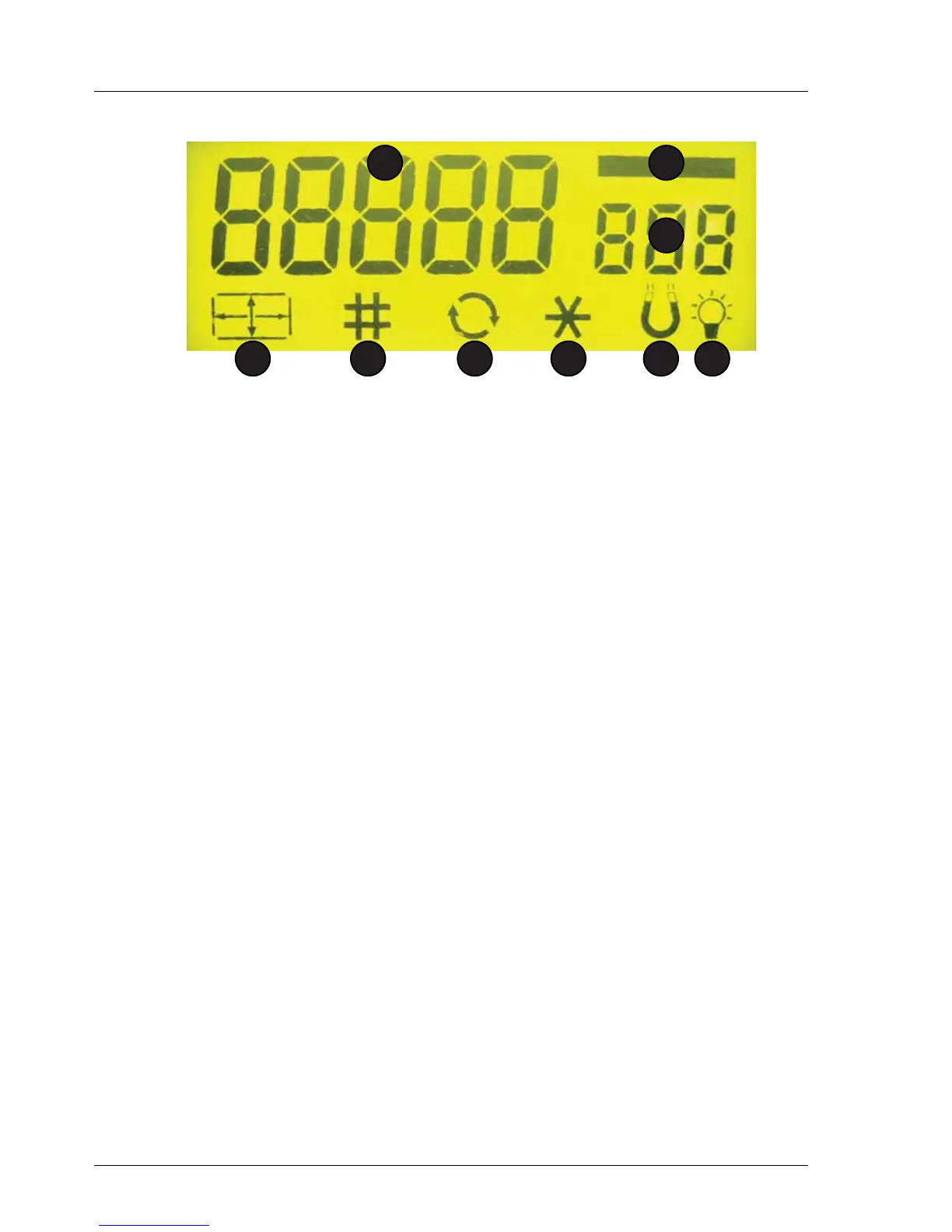
2.5 Display Control Panel (Display Symbols)
1 Batch Display. Displays note batch quantity.100 for count mode. If set to
oFF, no zeros are shown.
2 Bar. Visible in Count and Batch mode, invisible in
Value Mode. Not shown if Batch is set to oFF.
3 Count Display. Displays count and value count figures.
4 Size. Visible if Long / Short edge detection aid is on or when
the SMDS detector is being used to denominate notes.
(Only available on selected versions).
5 CnS. Visible if machine is on-line to a PC. (2620 Pro only)
Keypad Locked or Busy on other versions.
6 Auto Start. Visible if auto note start is on.
7 Infra Red. Visible if the Infra Red Detection aid is on.
(Only available on selected versions).
8 Magnetic/MTD/SMDS. Visible if the Magnetic Detection / Metallic Thread
Detection / SMDS Detection is on.
(Only available on selected versions).
9 UV / PPD. Visible if the Ultra Violet / Paper Property Detector is on.
(Only available on selected versions).
1
23
4 5 6 7 8 9



 To Next Page