Operating Instructions Model: EV8650
Page 30 of 62 TP05413002 Rev. 03
Copyright © 2009 by Talaris Ltd., Basingstoke (UK)
3.10 Detector Display Messages
3.10.1 Denomination Size Errors - dEn
This detector will recognise notes of a different size within a bundle of notes being fed.
The first note of each bundle is used as a reference size.
A SD (Short edge dimension) detector requires a difference of 3mm or more from the
original reference note to recognise a size error.
If during normal operation of the machine, you see a Display Message
dEn 2
It means a suspect note of a different size has been detected, in this case the different
sized note would located in the stacker, being the second note back from the last note
counted in the stacker (see Fig 1 below).
It might display as dEn 1 or dEn 3 this would mean either the first note or the third note
back from the top of the stacker.
As well as showing dEn, the Short Edge Size Icon will flash to indicate a size detection
error.
Examine the suspect notes. Either return the note to the stacker or replace it with correct
size note.
Press START/STOP to continue the count or remove all the notes from the stacker and
re-feed again.
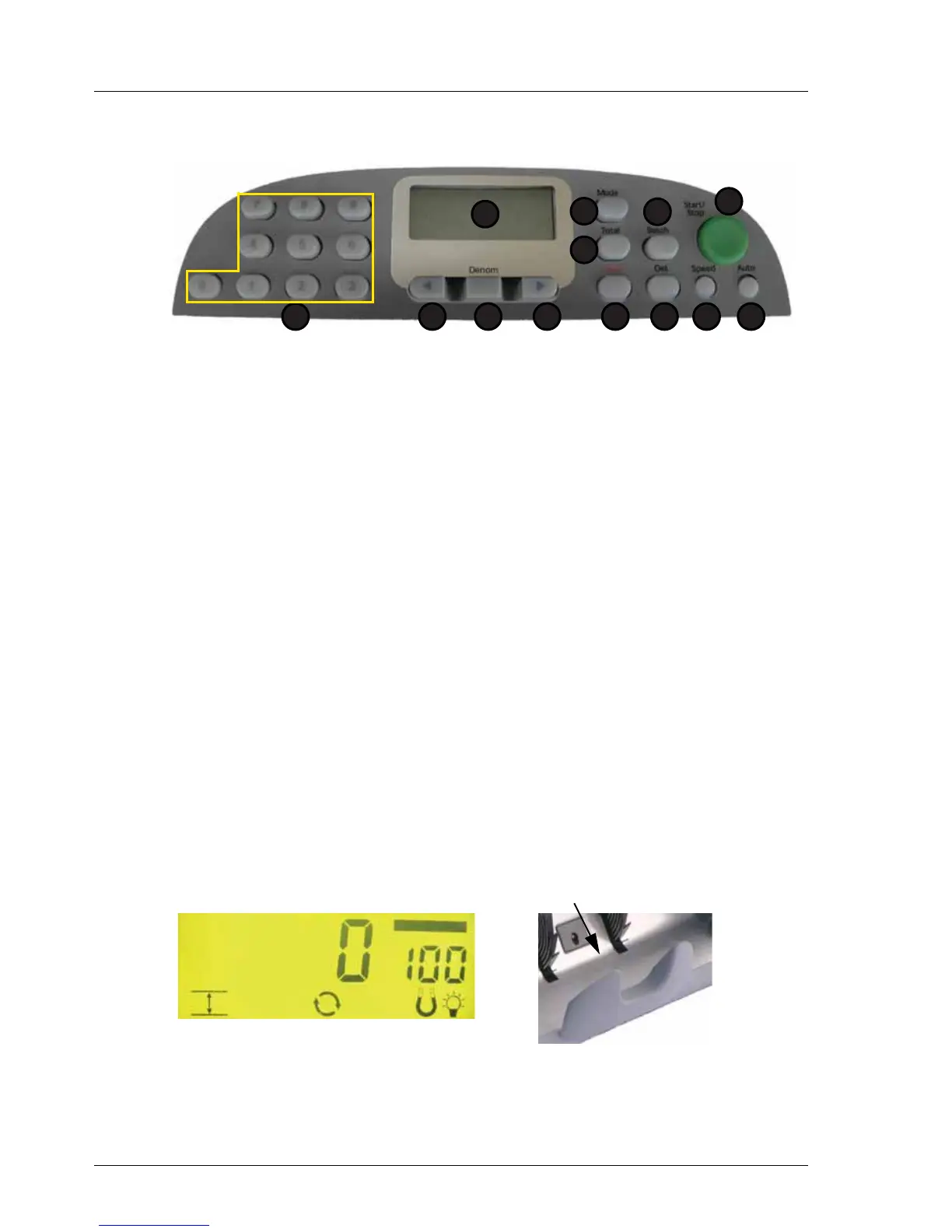
1. Display 7. Speed
2. Total 8. Det
3. Mode 9. Clear
4. Batch 10. Right Arrow
5. Start / Stop 11.Denomination
6. Auto 12. Left Arrow
13.Numeric Keypad
1
2
5
67
3
8
4
912 101113
Fig 1
Short Edge Size Icon



 To Next Page