Model: EV8650 Operating Instructions
TP05413002 Rev. 03 Page 23 of 62
Copyright © 2009 by Talaris Ltd., Basingstoke (UK)
3.8.2 Value Count Mode With Size & SMDS (AdEn, FdEn and SPECL)
For optimum performance in value mode with size detection the notes should be
undamaged.
There are three other options for value operation available:
The list of denominations are specified in a pre-loaded currency table. If there is no table
then there is no currency data and only dEntr can be used. In this case a default list of
denominations will be used:
1; 2; 3; 5; 10; 20; 25; 50; 100; 200; 250; 500; 1000; 2000; 2500; 5000; 10,000; 20,000;
25,000; 50,000
The supervisor can set which denominations are available to the operator.
By default 1; 2; 5; 10; 20; 50; 100; 200; 500
Note: When using an SMDS machine. The machine will automatically use the SMDS
detector when in the above value modes, it cannot be switched off using the DET key.
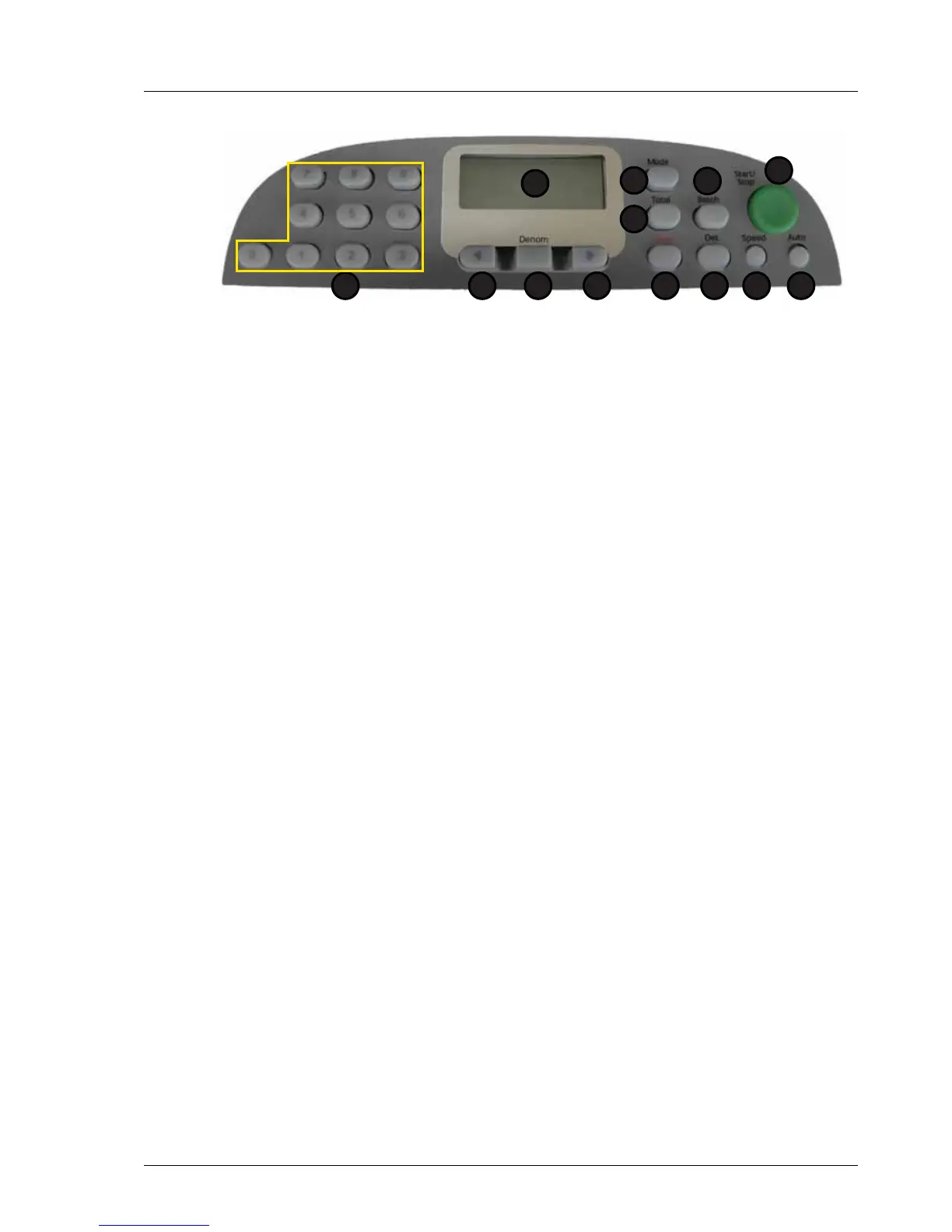
1. Display 7. Speed
2. Total 8. Det
3. Mode 9. Clear
4. Batch 10. Right Arrow
5. Start / Stop 11. Denomination
6. Auto 12. Left Arrow
13. Numeric Keypad
1 Automatic denomination AdEn
2 Fixed denomination FdEn
3 Special (3D, SMDS and SD Machines only) SPECL
1
2
5
67
3
8
4
912 101113



 To Next Page