24
8303460000 Rev A IA672-04-01-Rev. I
6.5.2. DC Power Protection Page
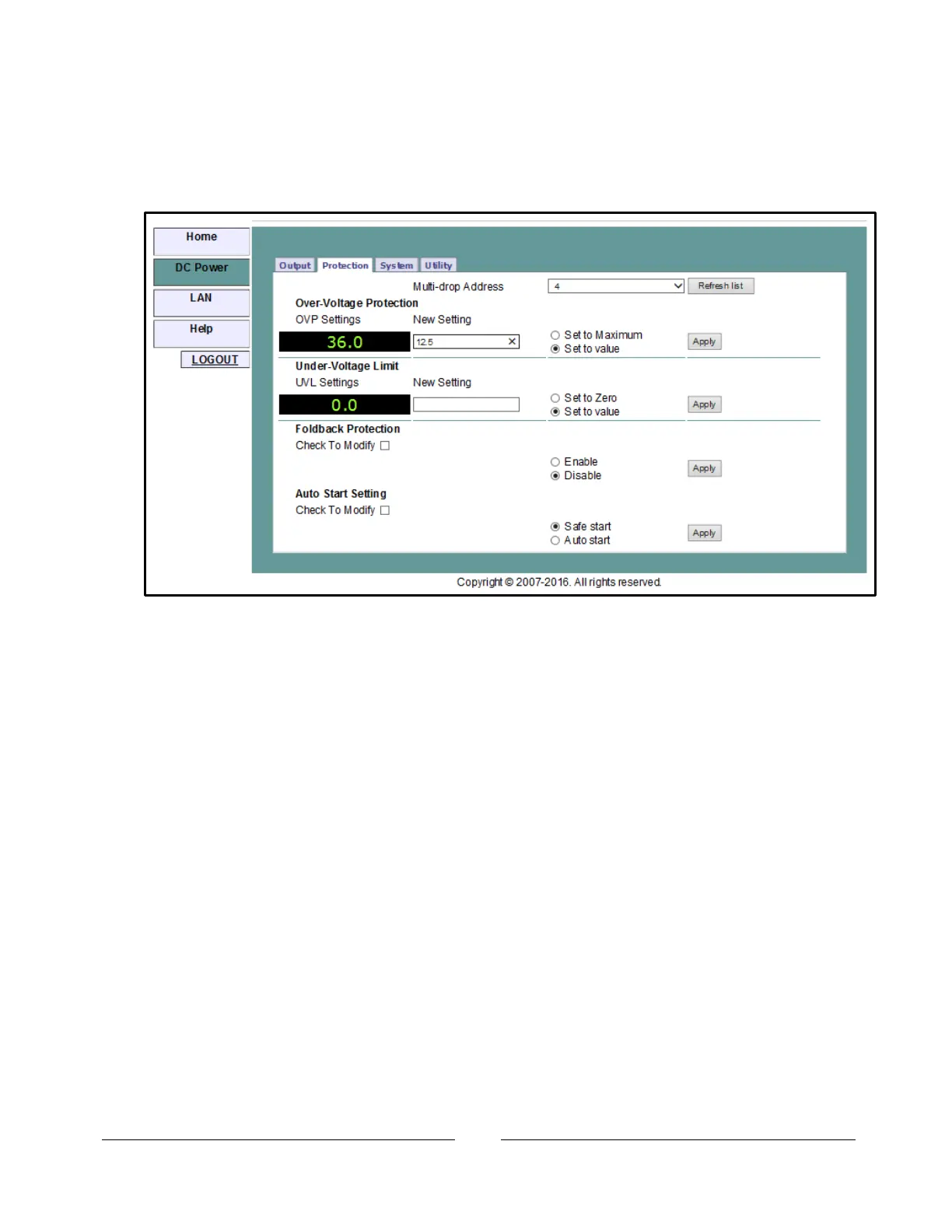
On the “DC Power” tab, a “Protection” button is available at the top of the panel.
When opened, the window that allows you to view and set four protections. The
“Apply” buttons are not enabled until you log in
The four settings are:
A. Over-Voltage Protection (see section 11.5.1)
B. Under-Voltage Limit (see section 11.5.2)
C. Foldback Protection ON or OFF (see section 11.5.4)
D. Auto-Start or Safe-Start (see section 11.4.3)
In a multi-drop chain, these settings affect only the supply selected in the RS-485
address listbox
6.5.3. DC Power System Page
Under the “DC Power” tab, a “System” button is available at the top of the panel.
When it is clicked, the window that allows you to operate four functions:
A. Reset One Instrument (see section 11.7.2)
(this resets only the supply selected in the multi-drop listbox)
B. Reset All Instruments (see section 12.4.7)
(this resets any supplies connected to the multi-drop bus)
C. Save (see section 11.7.3)
(this saves the settings for only the supply selected in the multi-drop listbox)
D. Recall (see section 11.7.4)
(this recalls the settings for only the supply selected in the multi-drop listbox)














 To Next Page