73
4.7.6.6 LAN Page
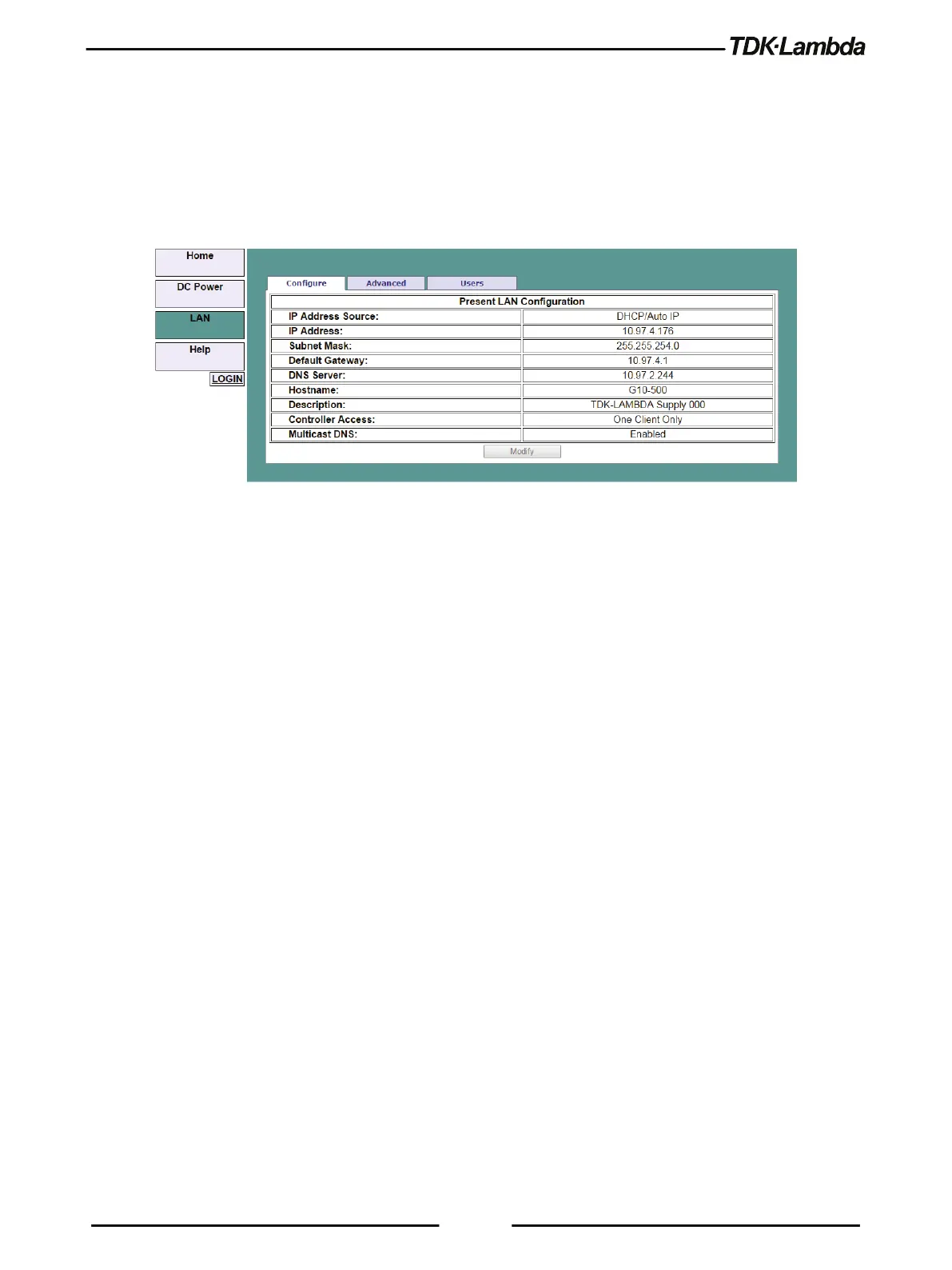
When the LAN tab is selected, the following web page opens. This page and its sub-pages allow
you to view and configure the power supply’s LAN settings.
A. LAN ➔ Configure Page
When the LAN tab is selected, the Configure page opens:
Figure 4–15: LAN - Configure Tab
The following settings are available on the LAN ➔ Configure web page:
•
IP Address Source
Displays the way the IP address was selected. Options are DHCP/Auto-IP or Static IP.
•
IP Address
Displays the IP address assigned to the power supply through either DHCP, Auto-IP or Static
IP sources.
•
Subnet Mask
Displays the subnet mask assigned to the power supply through either DHCP, Auto-IP or Static
IP.
•
Default Gateway
Address of the network router to allow the power supply to communicate outside of the local
subnet.
•
DNS Server
Address of the server running the Domain Naming Service. This is used for hostname
addressing.
•
Hostname
The power supply hostname may be used instead of the IP address to create a communication
link.
•
Description
By default, this is “TDK-LAMBDA Supply <Last 3 digits of the Serial Number>”, but it may be
changed.














 To Next Page