- 35 -
EO1-11115
MA-186-100 SERIES
ex.) .......... indicates $ 39.99 .......... Allows to enter equal to or smaller than
$39.99 in sale entries.
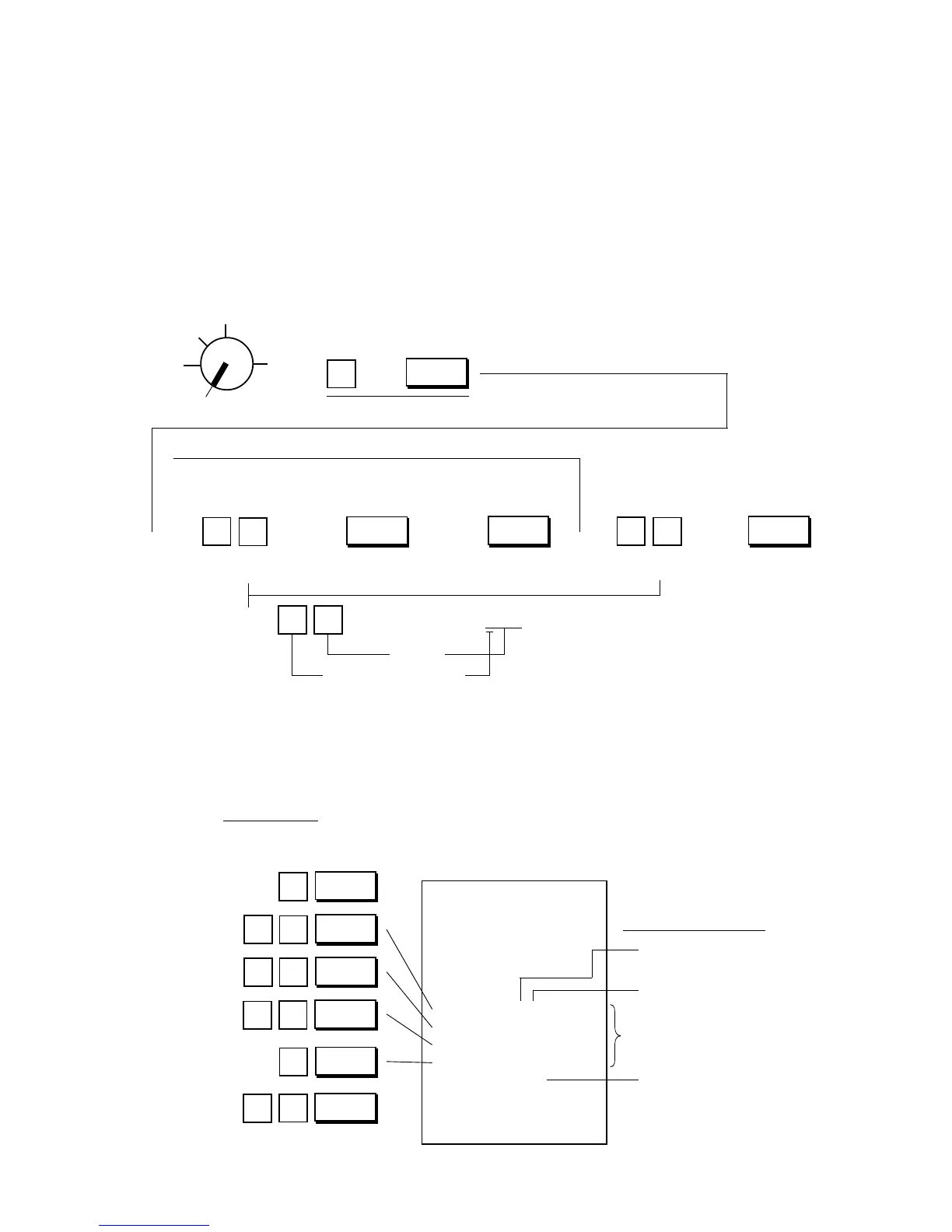
Department LC (Listing Capacity) Programming:
The LC setting is used to check an amount limit error. By setting the LC, an amount entry (due perhaps
to a mistake by the operator) will be prevented at the earliest stage (i.e., an error will result on entering
an excessive amount through the department key).
Condition: After Daily Financial Reset
(refer to “NOTE on Condition” on page 15)
Programming Procedure:
Use the MA Key to turn the Control Lock to “SET”.
Z
OFF
X
REG
SET
→ →
2-digit LC code for
each department
Common 2-digit LC code for
all departments
NOTES 1, 2
NOTES 1, 2
4 digits
Value of the top digit
Declaration of Program No. 8 for Department LC programming
Repeat for setting LCs of other departments.
To designate the
Department
Nos. 21 to 40.
()
AT/TL
8
@/FOR
→
DPT
SHIFT
→ → → → →
43
NOTES: 1. If the individual LC of a department is set, it prevails over the common LC for all departments.
2. To reset a LC once set, enter “0” in place of the 2-digit LC code. Then a maximum of 7-digit amount
can be entered in sale entries.
Department LC Program Receipt Format:
Key Operation
Control Lock: SET
3
8
@/FOR
4
6
0
Top digit value
Thank you
Call again
05.- 28.- 9 7
0.8
★
01 73
02 94
03 57
04 00
86
001.1
08-5 2
Number of
maximum digits
Common LC for all departments
Listing Capacity Code
for each department
4
7
9
5
8
AT/TL
Dept. 4
Dept. 3
Dept. 2
Dept. 1
Dept.



 To Next Page