JOG EXCITE: Service & Maintenance Manual - rev. 1.1
Page 9.10
DEFAULT SETTING ?
press ENTER to load the default parameter values, and return to the upper menu level by pressing
CLEAR for a few seconds.
To write these parameters to the low kit, use the “Write to low kit” function.
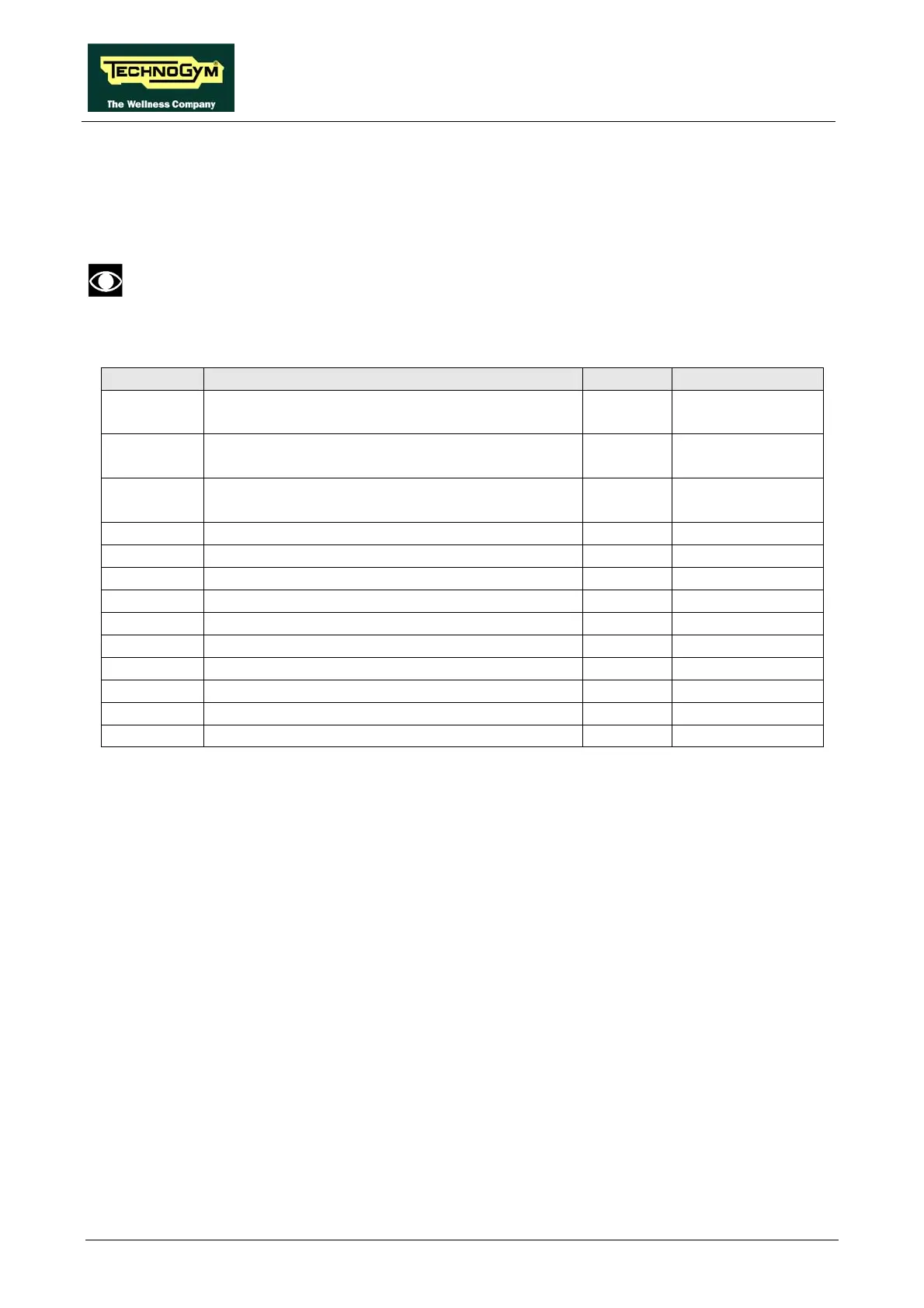
9.2.1.4. Table of configuration parameters
Parameter Description Range Default value
Par 01 Default speed for Quick Start workout.
[Km/h*10]
0 - 300 8
Par 02 Default acceleration and deceleration for tread
belt motor. [Km/h*100/sec]
0 - 3000 100
Par 03 Default zero reference position for tread-belt
incline. [*2]
-10 - +40 0
Par 04 PID proportional gain. [*100] 0 - 9999 7
Par 05 PID Integral gain. [*100] 0 - 9999 150
Par 06 Ramp Type 0 - 100 0
Par 07 Error status on DC motor encoder 0 - 1 0
Par 08 Serial communication timeout [10*msec] 0 - 255 0
Par 09 DC motor encoder error timeout. [msec] 0 - 255 15
Par 10 FREE - 0
Par 11 Driving roller diameter. [mm] 0 - 1000 74
Par 12 Pulley ratio 0 - 9000 211
Par 13 Error status on AC motor encoder 0 - 1 0
9.2.2. UPDOWN SETTINGS
This function allows access to the parameters in the UpDown table which define the number of
encoder pulses that correspond to different machine incline positions. To access this menu, when
the LED display shows:
UPDOWN SETTINGS
press ENTER. This function is structured as follows:










 To Next Page