EasyManua.ls Logo

Tecnoware EVO DSP PLUS MODULAR - Main Screen (Home)

Tecnoware EVO DSP PLUS MODULAR
104 pages
Print Icon
To Next Page IconTo Next Page
To Previous Page IconTo Previous Page
Loading...
ENGLISH
User’s manual 20 UPS EVO DSP PLUS Modular
5.2.2 Main Screen (Home)
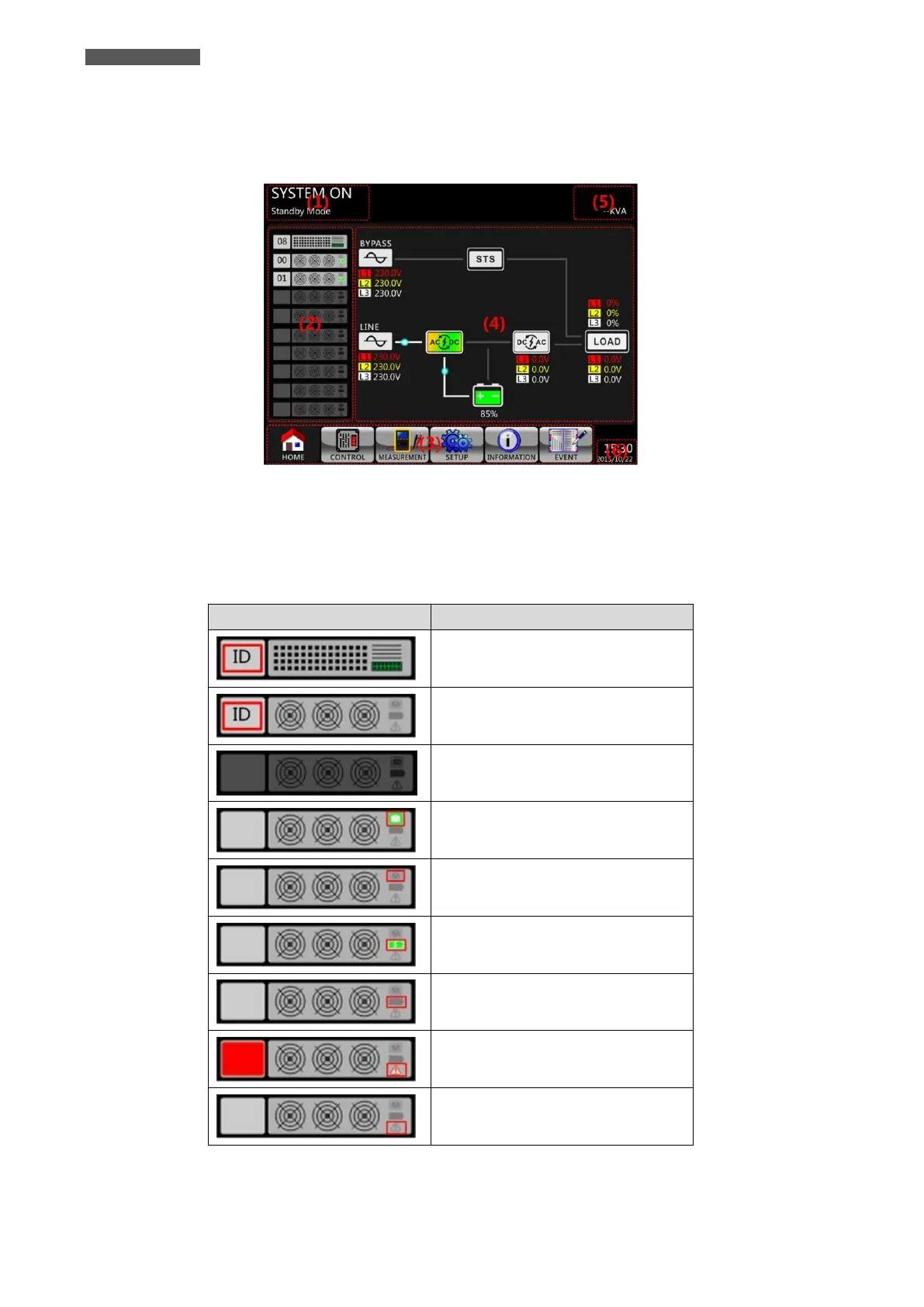
After initialization, the Main Screen (Home) will display as shown in figure 5.3. Main Screen is divided into six
parts.
Figure 5.3 Main Screen (Home)
(1) UPS Mode: it shows current operation Mode.
(2) Module Status: it shows active Modules with the ID numbers. Touch each Module icon to enter Measurement
Screen. The meanings of each icon are listed as below.

Module icon
Explanation
STS icon with ID number.
Power Module icon with ID no.
No Power Module
Power Module Output ON
Power Module Output OFF
Power Module Charger ON
Power Module Charger OFF
Power Module fault
Power Module is operated normally.

Related product manuals