ENGLISH
User’s manual 28 UPS EVO DSP PLUS Modular
SETTING PROCEDURE
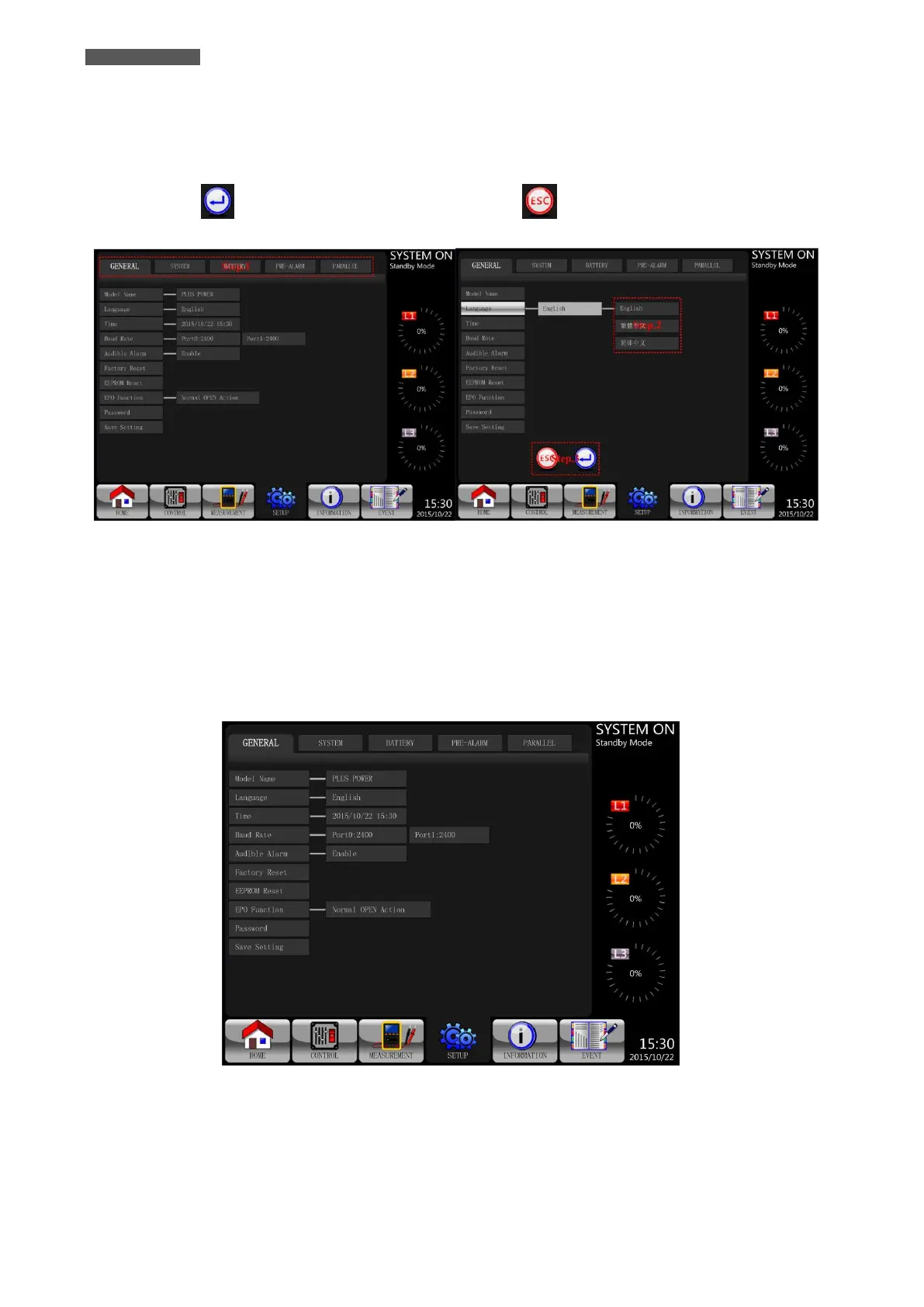
Step 1: choose the setting item from GENERAL, SYSTEM, BATTERY, PRE-ALARM and PARALLEL.
Step 2: select modified item and it will show current value and setting in the screen. Simply choose current
setting and it will list all alternatives. Please choose the modified setting.
Step 3: choose icon to confirm the setting change or choose icon to cancel the setting.
Figure 5.13 – Setting Procedure
5.2.5.1 SETUP-GENERAL Submenu
The SETUP-GENERAL Screen and Setting options are shown in Figure 5.14.
SETUP-GENERAL Setting can be set in any operating mode.
Please check Table 5-6 “SETUP-GENERAL Setting List” for the details.
Figure 5.14 - SETUP-GENERAL Screen













 To Next Page