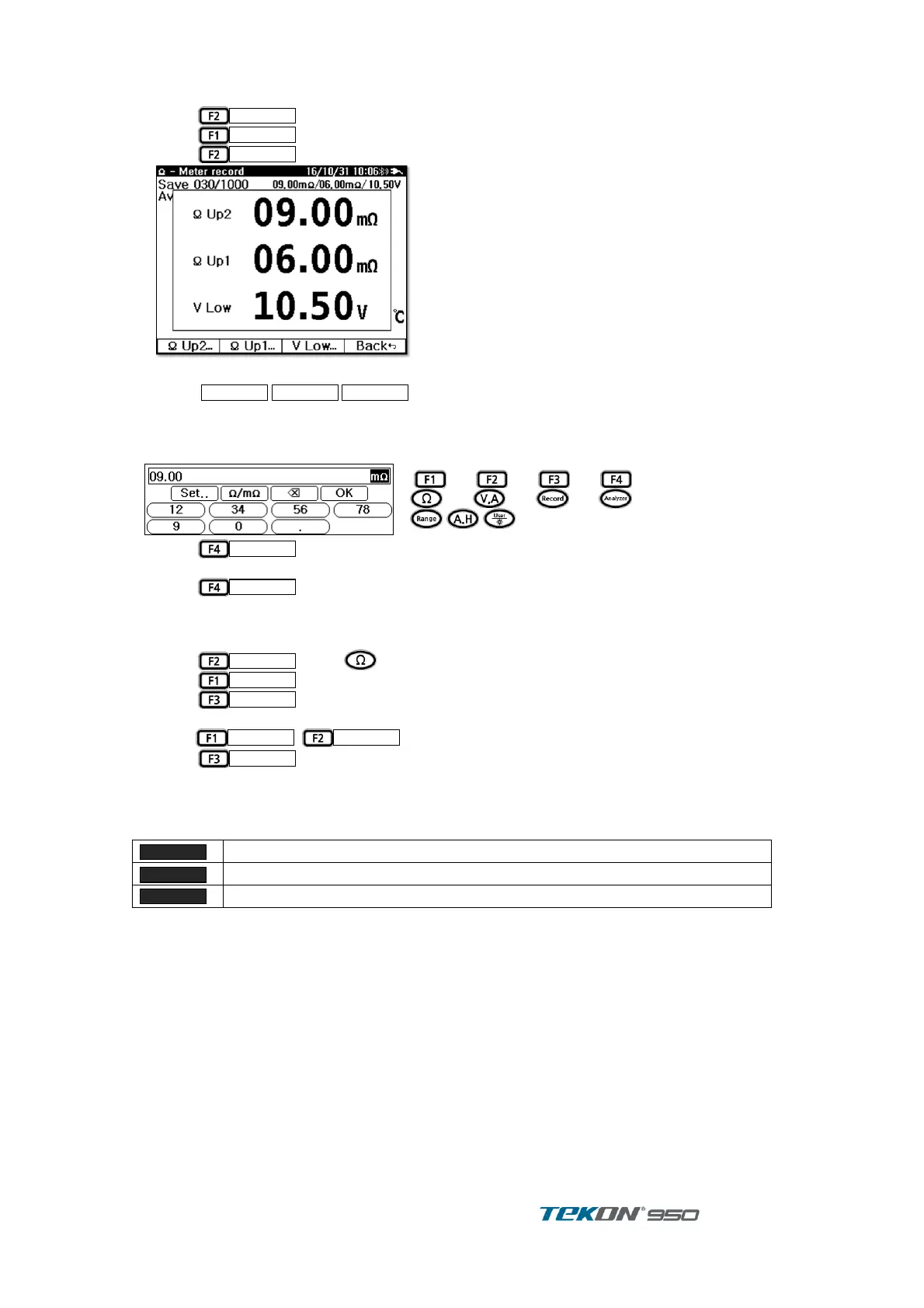
[ LIMIT set up - direct input ]
Press
in Ω display ①
Press
key to enter LIMIT function
②
Press
key . ③
Figure 14. Limit Edit
Select
, ,
to edit . ④
When Keyboard is up, input desired value. ⑤
Buttons on display correspond to respective keys on unit
⑥
Press
to set up the desired input value. ⑦
Repeat above procedure Upper 2 / Upper 1 / Lower . ⑧
Press
2 times to return Initial Display. ⑨
[ LIMIT setting – refer String ]
Can copy Limit vaue from Preset String .
Press
key in display ①
Press
key to enter LIMIT function ②
Press
key ③
existing String Limit value list is displaying. ④
press
,
to select desired one. ⑤
Press
to adopt selected Limit value ⑥
[REMARK]
When measurement data is saved through AutoRec, different Buzzer sounds depend on
Decision Result [PASS, WARNING, FAIL]
Short (100ms) 2 times and Long (400ms) 1 time ( Total 3 times )



 To Next Page