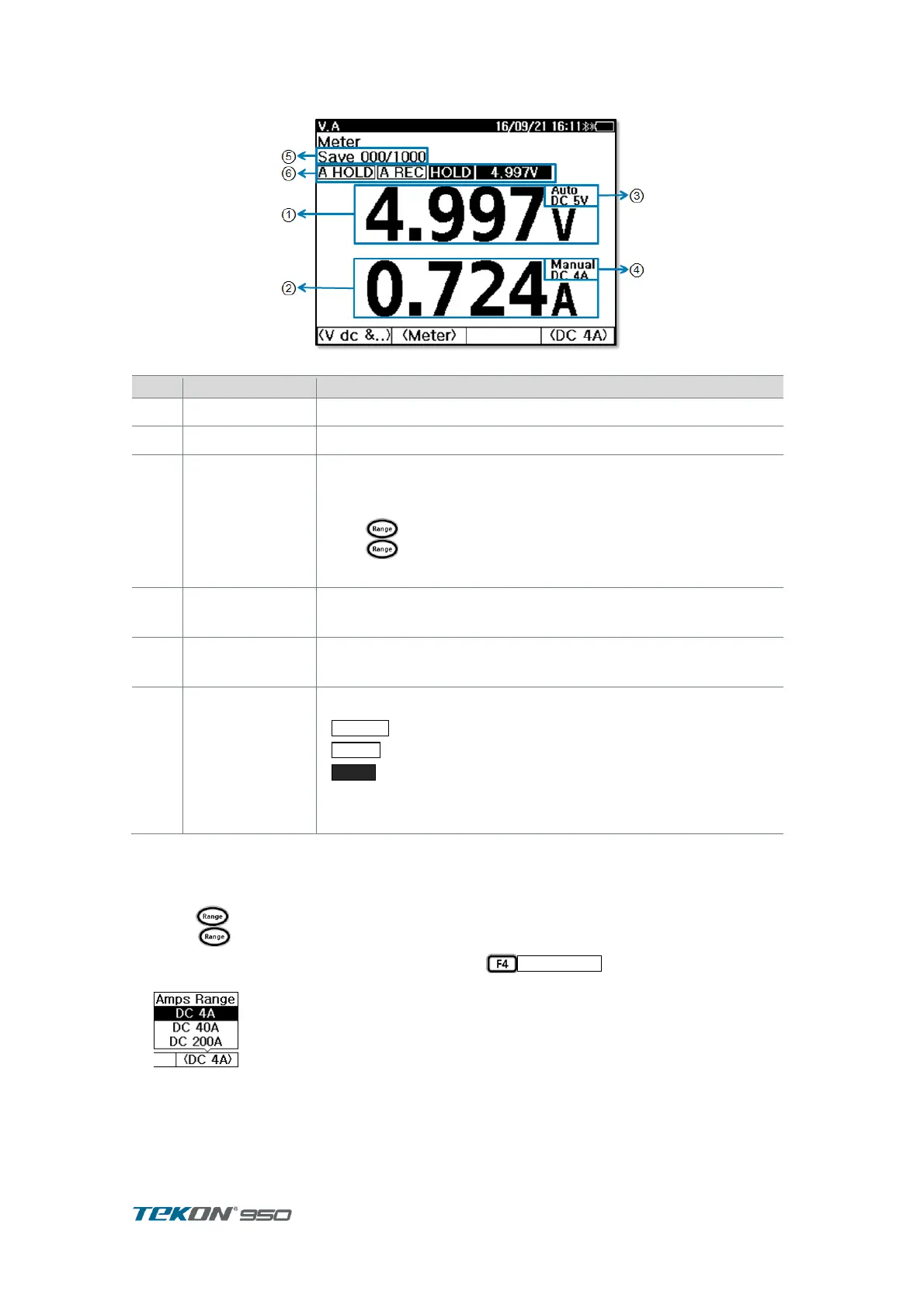
4.3. Meter Record
Figure 21. V.A Meter record
display V DC ,V AC measurements .
display V ripple ,A DC, A AC measurement
Indicates Measurement 1 range.
In DC Voltage & DC Current measurement set,
press long to change Auto / Manual
press short time to change DC Voltage range in order.
Indicates Measurement 2 range
In Ampere measurement, press F4 key to change
Indicates number of record saved in the unit.
In meter mode, can save upto 1000 .
Indicates present Set Up status of measurement function
AutoHold is displaying during in the mode.
Auto Record is displaying during in the mode.
indicates when present measurement is in holding.
Present measurement data of measurement 1 is displaying in
smaller size
4.3.1. Range adjustment
In DC Voltage & DC Currents Testing set
press button for a short time to change DCV range in order.
Press for a long time to AUTO Range mode ON/OFF.
Current Clamp range can manually change with
.
indicates proper range of Selected Clamp described on User Manual



 To Next Page