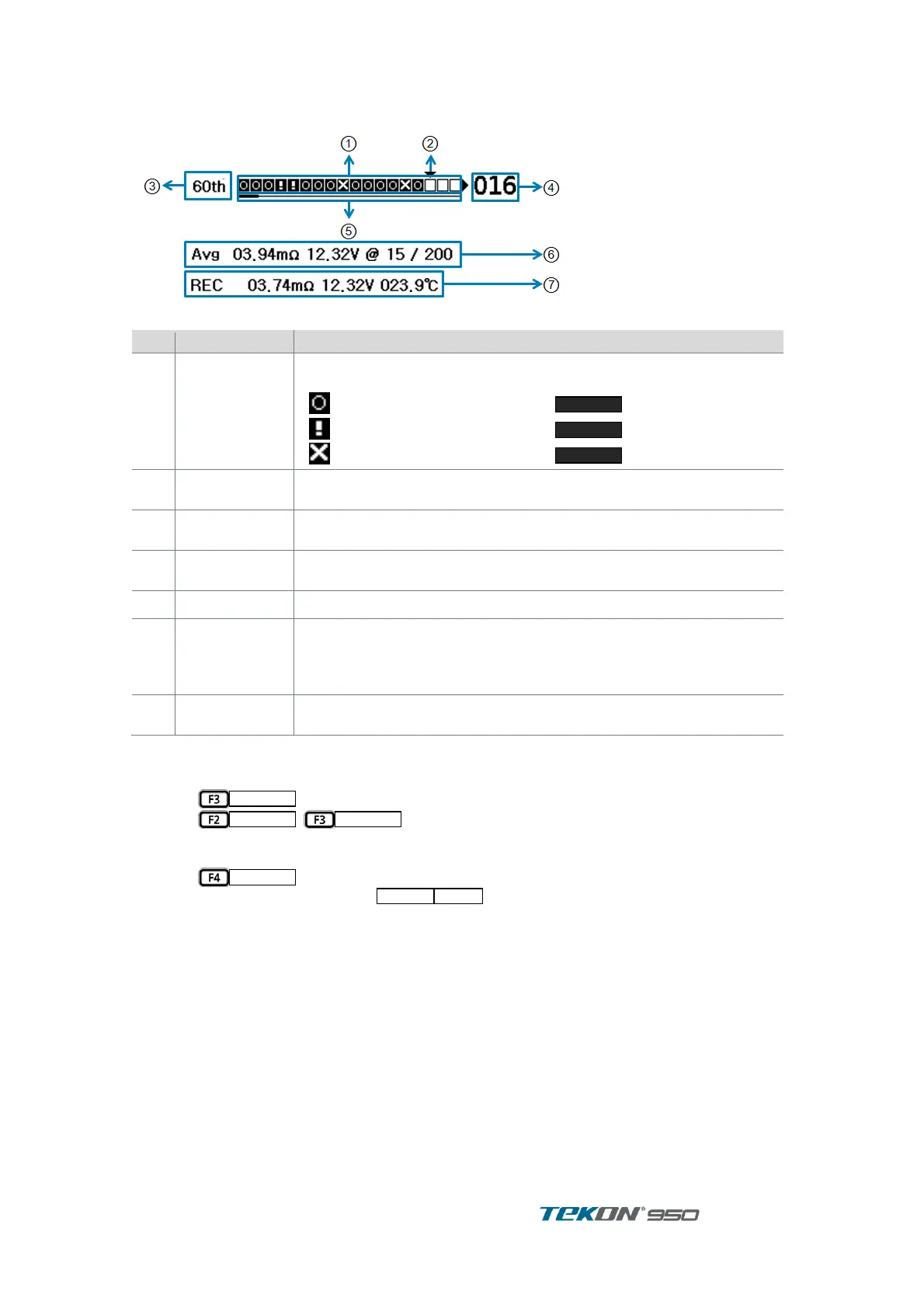
3.6.2. Recording Process Bar
Record processing bar (line) indicates present Record Processing status and Limit result
Figure 16. Record Processing Indication Line
Empty cell means the Cell is not measured.
Measured cells shows following Limit result
AutoRec. Measurement data indicates Cell will be saved. Use when
select next cell will be saved or check cell saved.
Indicates number of measurement of String
Indicates Cell Number of Cursor location
Use when can not indicate whole number of Cells
indicates Average of Number of measurements and Number of
Records of the Cell being measured
<Avg Impedance, Avg Voltage@ number of records / Total Cell
number>
indicates record of cell where Cursor is located
Impedance, Voltage, Temperature
[ CURSOR ]
Move cursor of Record Indication Line to select next measurement cell or check measurement
data of saved cell
Press
.
①
Press
,
to move Cursor ②
When there is Data where Cursor moved, it is present measurement data. When there is no ③
Data where Cursor moved, display Average of present number of measurements.
Press
to return Initial Menu . ④
If continue measurements while
is ON, can save measurements in the order ⑤
of Cursor location. For example, If any wrong measurement data saved by mistake, move
Cursor to the Cell to measure again. Then, it can overwrite the date with new measurement.



 To Next Page