70 MPH200 series video encoders WebUI user manual
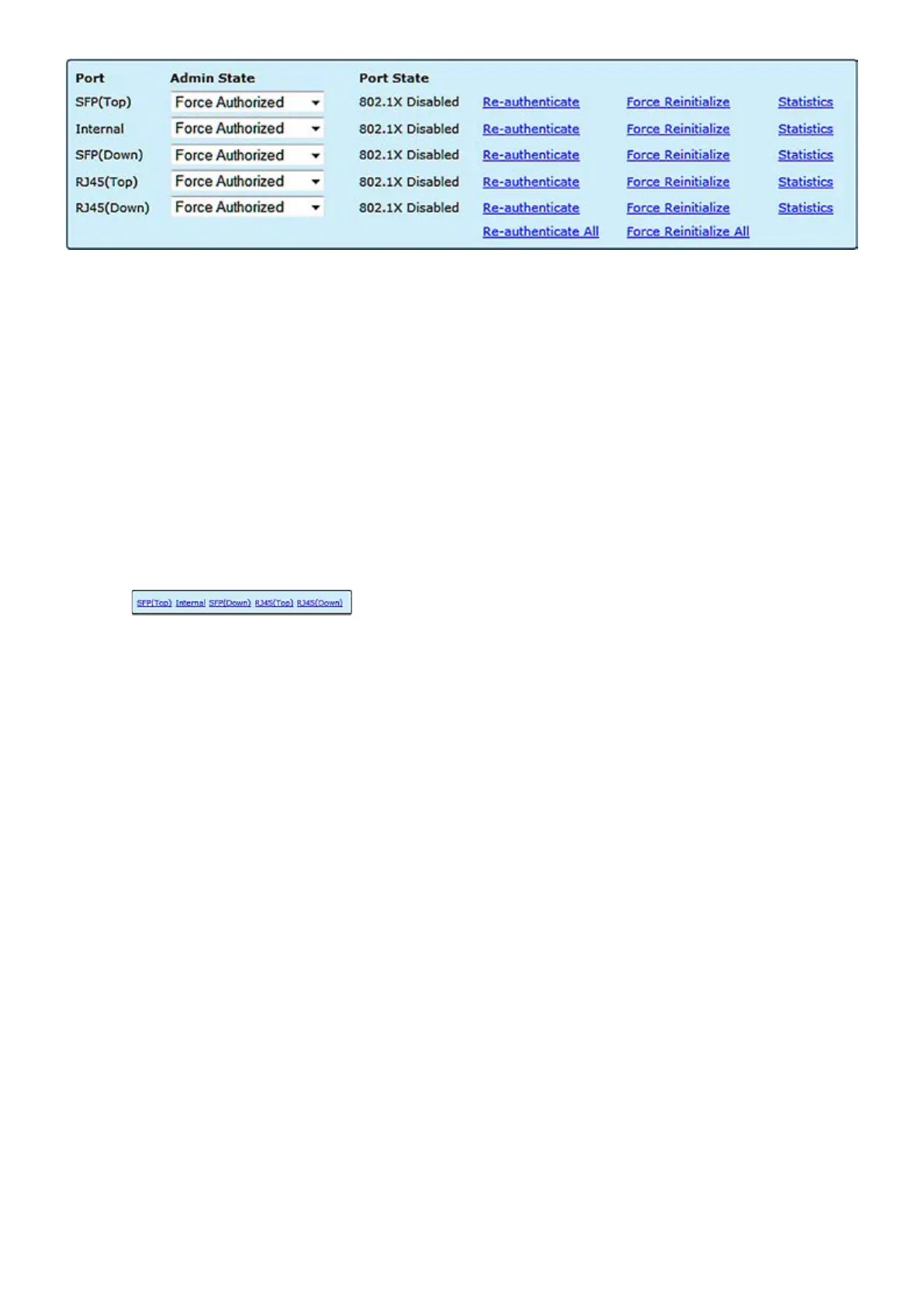
The port number.
Sets the authentication mode to one of the following options:
Auto: Requires a 802.1X-aware client to be authorized by the authenti-
cation server. Clients that are not 802.1X-aware will be denied access.
Force-Authorized: Forces the port to grant access to all clients, either
802.1X-aware or otherwise.
Force-Unauthorized: Forces the port to deny access to all clients,
either 802.1X-aware or otherwise.
The state of the port.
Re-Authenticate: Schedules a reauthentication to whenever the
quiet-period of the port runs out.
Force-Reinitialize: Bypasses the quiet-period of the port and enables
immediate reauthentication regardless of the status for the quiet-period.
Displays 802.1X statistics. Statistics can be viewed on a per-port basis.
Authenticator counters: General statistics for authenticator.
Backend Authenticator counters: General statistics for RADIUS server.
802.1X MIB counters: MIB module dened for 802.1X.
Port:
Admin State:
Port State:
Statistics
:
Select the port that you want to view:



 To Next Page