EX-TRAFIRE
®
105HD 6 Setting up the power supply
21
6.5 Connecting the cutting torch
Risk of material damage if used without TCS Latch with Key
Assembly
The TCS Latch with Key Assembly is important for the proper working of
the EX-TRAFIRE
®
105HD. If used without, the EX-TRAFIRE
®
105HD will be
damaged. If the TCS Latch with Key Assembly is not used, the connectors
will be quickly damaged, as lead sets will detach from the power supply
damaging the connectors.
Only use the EX-TRAFIRE
®
105HD with the TCS Latch with Key assembly
installed and properly secured.
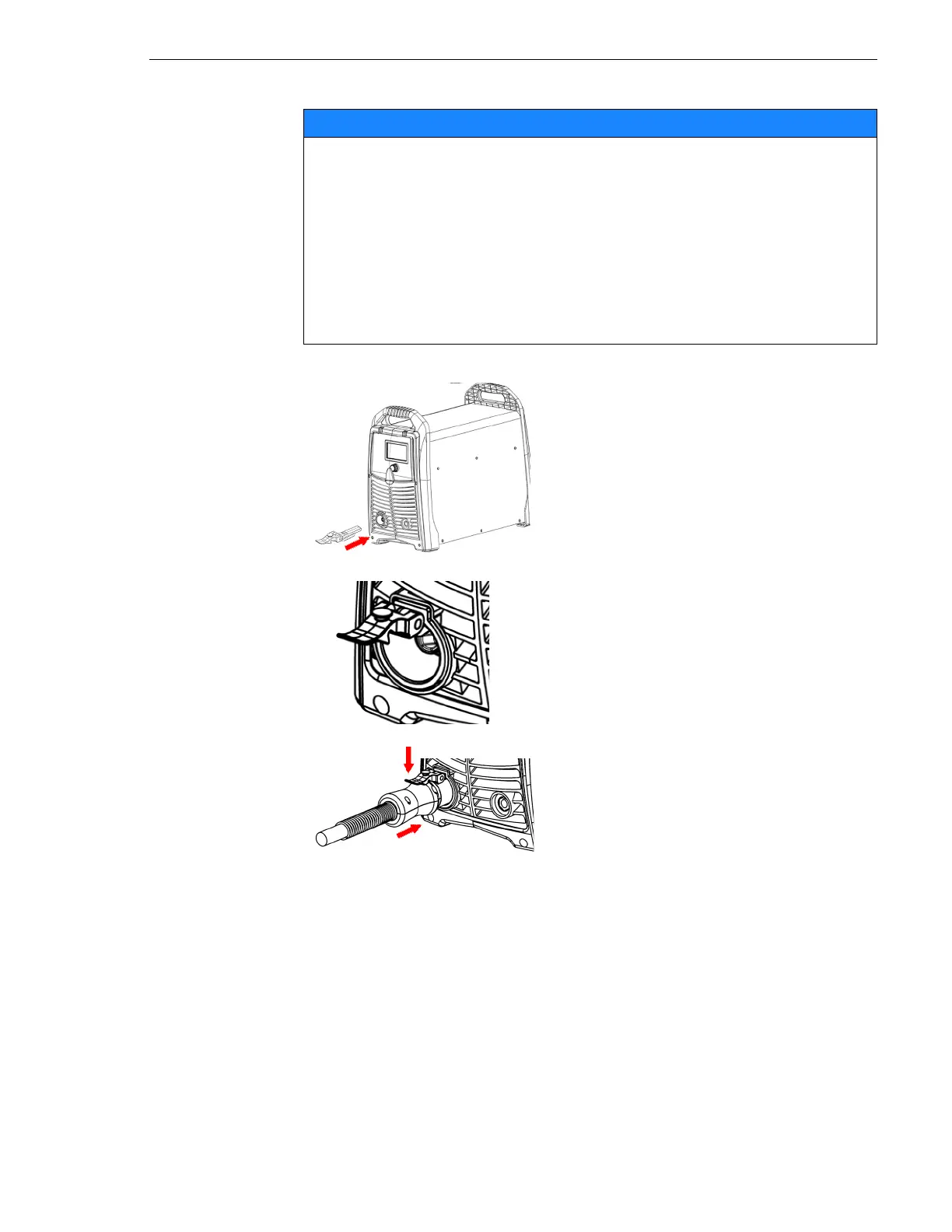
1 Switch off the power supply.
2 Insert the TCS Latch with Key
Assembly into the TCS socket.
The TCS Latch with Key Assembly must
sit firmly in the TCS socket.
3 Insert the TCS plug into the
connector.
4 Push the plug while simultaneously
pressing down the Latch into locked
position.



 To Next Page