22
6 Setting up the power supply EX-TRAFIRE
®
105HD
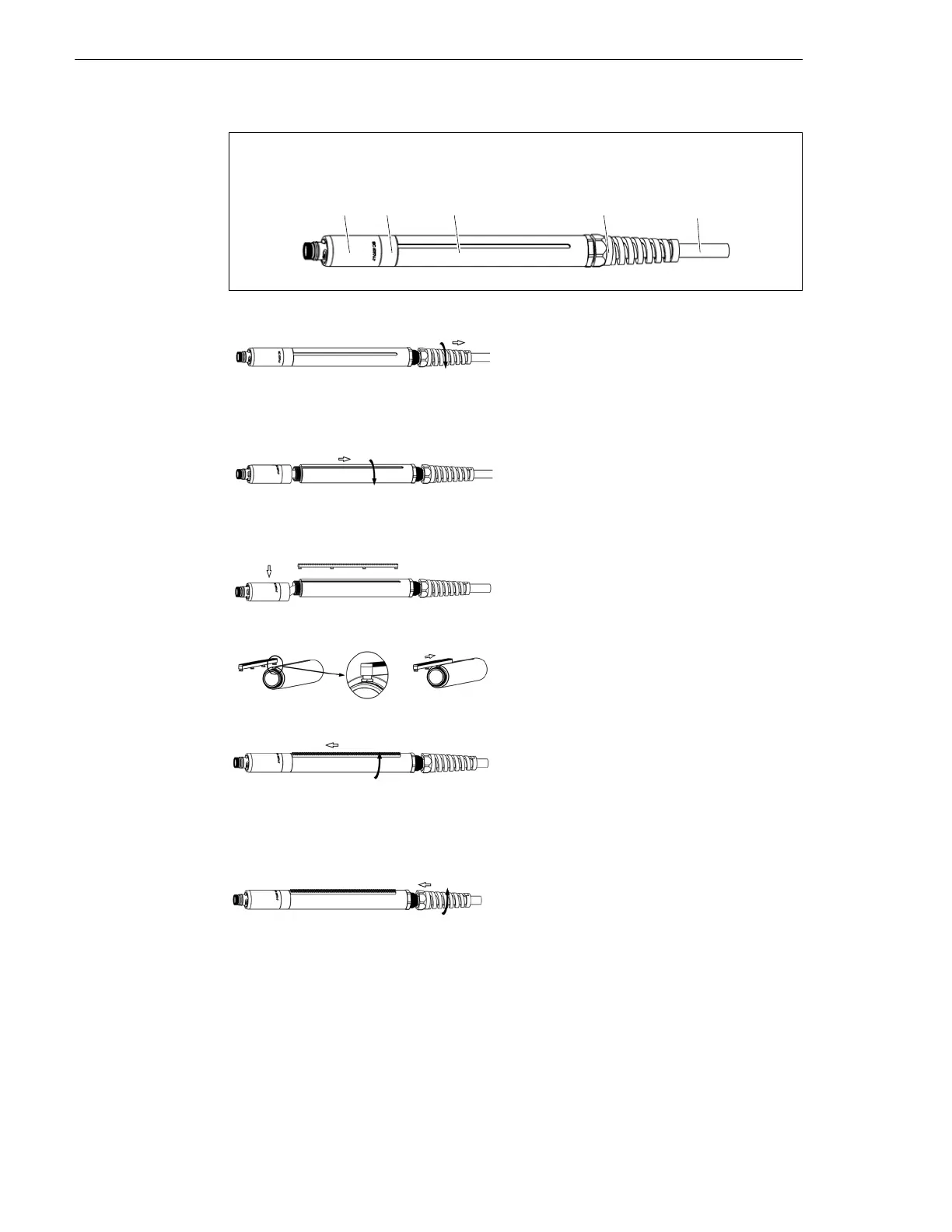
6.5.1 Installing the cutting torch's gear rack
Fig. 7 Cutting torch
A Mounting sleeve with torch body
B Reduction nut
C Mounting tube
D Strain relief
E Cable
1
Disconnect the machine cutting torch
from the cutting power supply.
2 Place on a flat surface.
3 Unscrew the strain relief so that it can
move freely along the torch cable.
4 Unscrew the mounting tube from the
reduction nut. Hold the reduction nut
and the mounting sleeve in order not
to damage the cables.
5 Carefully hold the reduction nut and
mounting sleeve with the torch body
to the side.
6 Push the gear rack into the groove of
the mounting tube.
7 Screw the mounting tube with gear
rack into the reduction nut. Hold the
reduction nut and the torch mounting
sleeve with torch body in order not to
damage the cables.
8 Tighten the mounting tube by hand.
9 Screw in the strain relief. Hold the
mounting tube tight to avoid
damaging the cables.
10Tighten the strain relief by hand.



 To Next Page