26
Smart AC1/TD
w w w . t i m e t e c c l o u d . c o m
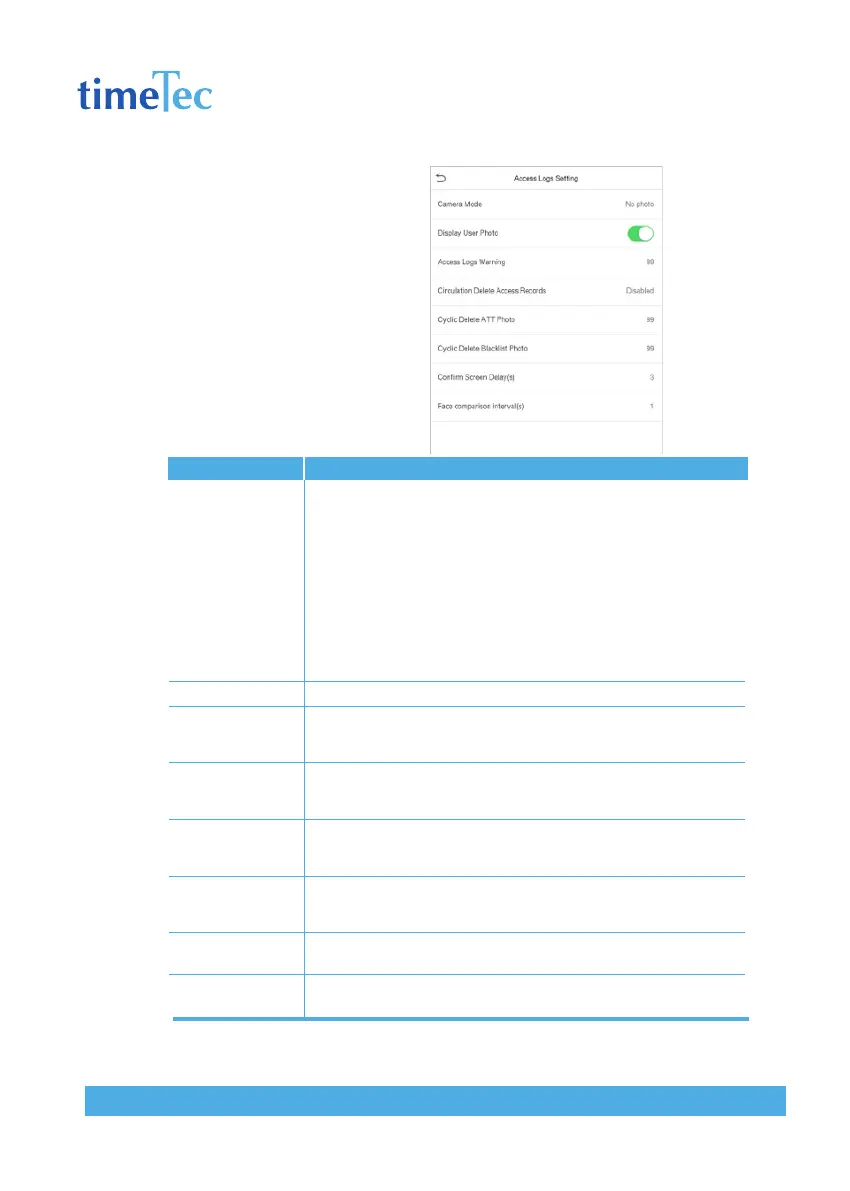
6.2 Access Logs Setting
Click Access Logs Setting on the
System interface.
Items
Camera Mode
Display User Photo
Access Logs
Warning
Circulation Delete
Access Records
Cyclic Delete
ATT Photo
Cyclic Delete
Blacklist Photo
Confirm Screen
Delay(s)
Face comparison
Interval (s)
Descriptions
Whether to capture and save the current snapshot image during
verification. There are 5 modes:
• No Photo: No photo is taken during user verification.
• Take photo, no save: Photo is taken but is not saved during verifi-
cation.
• Take photo and save: Photo is taken and saved during verification.
• Save on successful verification: Photo is taken and saved for each
successful verification.
• Save on failed verification: Photo is taken and saved during each
failed verification.
Whether to display the user photo when the user passes verification.
When remaining record space reaches a set value, the device will
automatically display a remaining record memory warning. Users may
disable the function or set a valid value between 1 and 9999.
When access records have reached full capacity, the device will auto-
matically delete a set value of old access records. Users may disable
the function or set a valid value between 1 and 999.
When attendance photos have reached full capacity, the device will
automatically delete a set value of old attendance photos. Users may
disable the function or set a valid value between 1 and 99.
When blacklisted photos have reached full capacity, the device will
automatically delete a set value of old blacklisted photos. Users may
disable the function or set a valid value between 1 and 99.
The length of time that the message of successful verification dis-
plays. Valid value: 1~9 seconds.
To set the facial template matching time interval as needed. Valid
value: 0~9 seconds.



 To Next Page