20
Smart AC1/TD
w w w . t i m e t e c c l o u d . c o m
5 Communication Settings
Set parameters of the network, serial
communication, PC connection, WIFI,
cloud server and Wiegand. Tap COMM.
on the main menu.
5.1 Network Settings
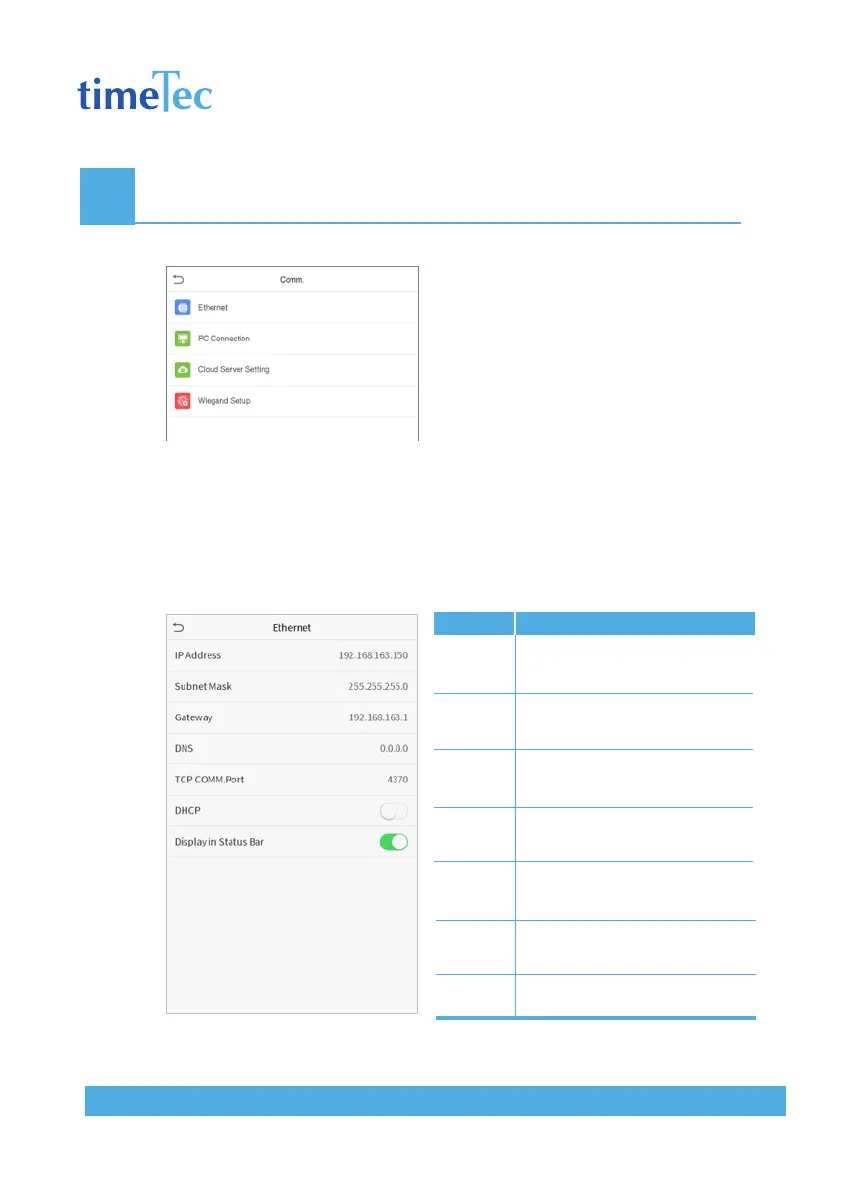
When the device needs to communicate with a PC over the Ethernet, you need
to configure network settings and ensure that the device and the PC are con-
necting to the same network segment.
Click Ethernet on the Comm. Settings interface.
Items
IP Address
Subnet
Mask
Gateway
DNS
TCP
COMM.
Port
DHCP
Display in
Status Bar
Descriptions
The factory default value is
192.168.1.201. Please adjust it accord-
ing to the actual network situation.
The factory default value is
255.255.255.0. Please adjust it accord-
ing to the actual network situation.
The factory default address is 0.0.0.0.
Please adjust it according to the actual
network situation.
The factory default address is 0.0.0.0.
Please adjust it according to the actual
network situation.
The factory default value is 4370.
Please adjust it according to the actual
network situation.
Dynamic Host Configuration Protocol,
which is to dynamically allocate IP
addresses for clients via server.
To set whether to display the network
icon on the status bar.



 To Next Page