38
Smart AC1/TD
w w w . t i m e t e c c l o u d . c o m
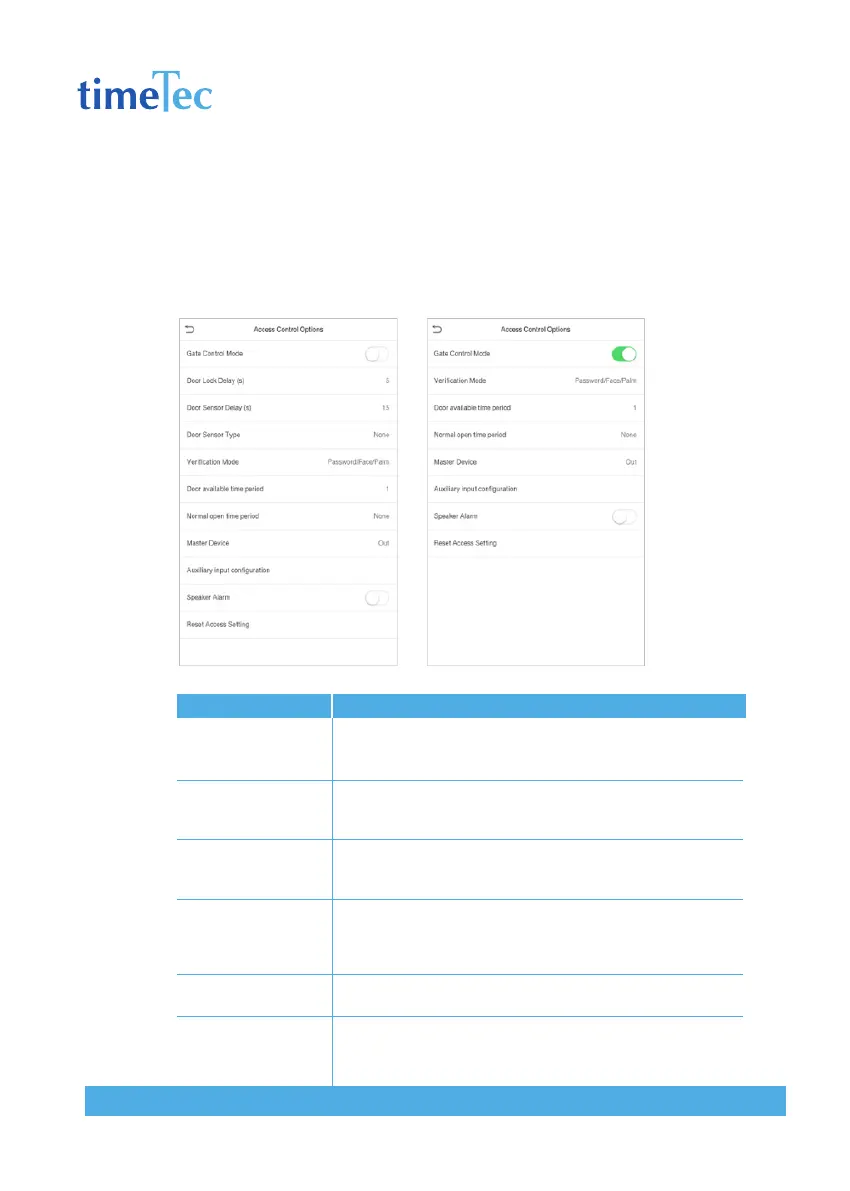
9.1 Access Control Options
To set the parameters of the control lock of the terminal and related equipment.
Click Access Control Options on the Access Control interface.
Descriptions
Whether to turn on the gate control mode or not, when set to
ON, on this interface will remove Door lock relay, Door sensor
relay and Door sensor type function.
The length of time that the device controls the electric lock
to be unlock. Valid value: 1~10 seconds; 0 second represents
disabling the function.
If the door is not closed and locked after opening for a certain
duration (Door Sensor Delay), an alarm will be triggered. The
valid value of Door Sensor Delay ranges from 1 to 255 seconds.
There are three types: None, Normal Open, and Normal Closed.
None means door sensor is not in use; Normal Open means the
door is always opened when electricity is on; Normal Closed
means the door is always closed when electricity is on.
The supported verification mode includes password/face, User
ID only, password, face only, and face + password.
To set time period for door, so that the door is available only
during this.
Items
GateControl Mode
Door Lock Delay (s)
Door Sensor Delay (s)
Door Sensor Type
Verification Mode
Door available time
period



 To Next Page