TH2827 Series Operation Manual Chapter 5 Execute LCR Operation and Some Examples
57
5.5 Operation example of testing capacitance by
multi-frequency list sweep
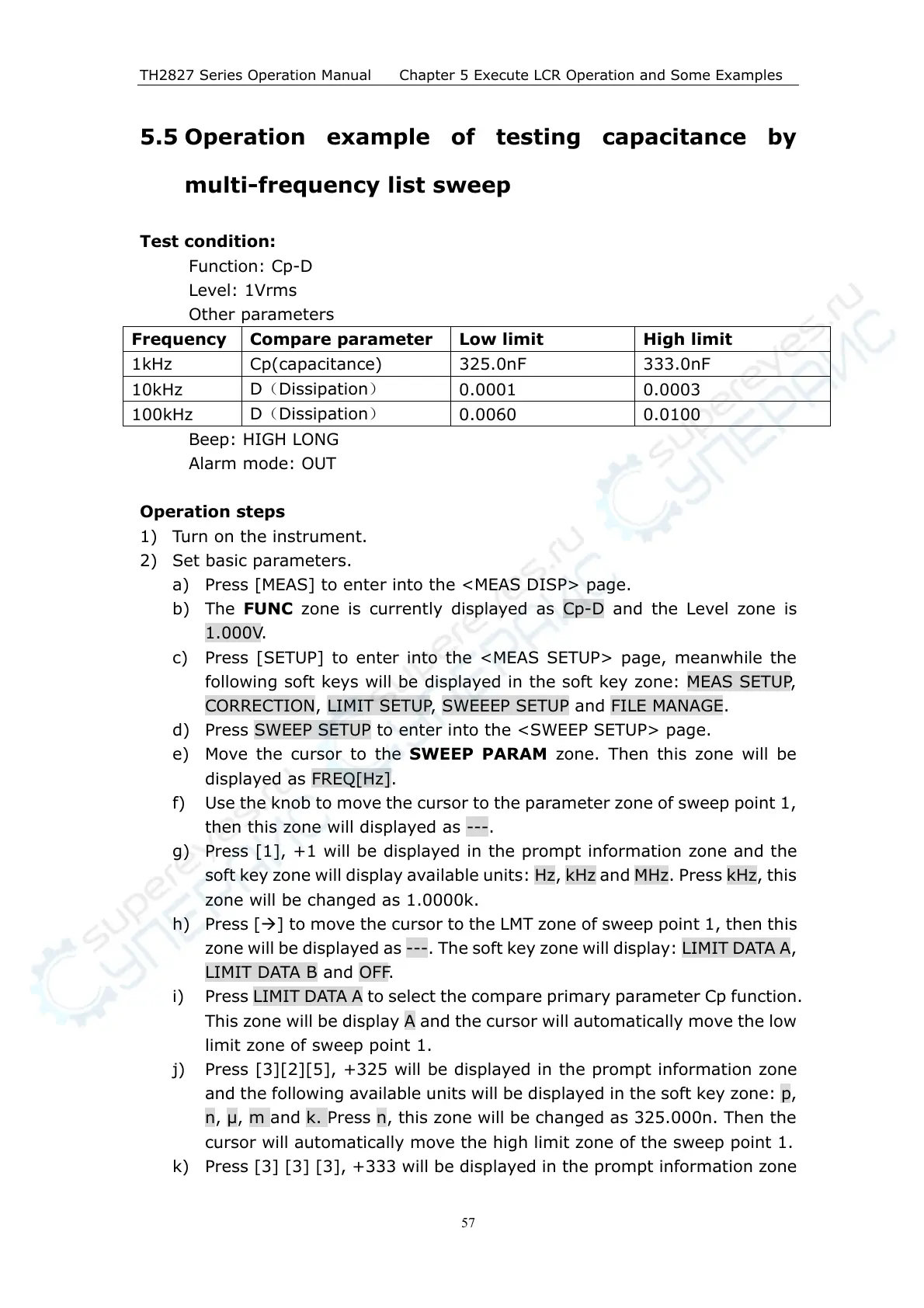
Test condition:
Function: Cp-D
Level: 1Vrms
Other parameters
Frequency Compare parameter Low limit High limit
1kHz Cp(capacitance) 325.0nF 333.0nF
10kHz
D(Dissipation)
0.0001 0.0003
100kHz
D(Dissipation)
0.0060 0.0100
Beep: HIGH LONG
Alarm mode: OUT
Operation steps
1) Turn on the instrument.
2) Set basic parameters.
a) Press [MEAS] to enter into the <MEAS DISP> page.
b) The FUNC zone is currently displayed as Cp-D and the Level zone is
1.000V.
c) Press [SETUP] to enter into the <MEAS SETUP> page, meanwhile the
following soft keys will be displayed in the soft key zone: MEAS SETUP,
CORRECTION, LIMIT SETUP, SWEEEP SETUP and FILE MANAGE.
d) Press SWEEP SETUP to enter into the <SWEEP SETUP> page.
e) Move the cursor to the SWEEP PARAM zone. Then this zone will be
displayed as FREQ[Hz].
f) Use the knob to move the cursor to the parameter zone of sweep point 1,
then this zone will displayed as ---.
g) Press [1], +1 will be displayed in the prompt information zone and the
soft key zone will display available units: Hz, kHz and MHz. Press kHz, this
zone will be changed as 1.0000k.
h) Press [] to move the cursor to the LMT zone of sweep point 1, then this
zone will be displayed as ---. The soft key zone will display: LIMIT DATA A,
LIMIT DATA B and OFF.
i) Press LIMIT DATA A to select the compare primary parameter Cp function.
This zone will be display A and the cursor will automatically move the low
limit zone of sweep point 1.
j) Press [3][2][5], +325 will be displayed in the prompt information zone
and the following available units will be displayed in the soft key zone: p,
n, , m and k. Press n, this zone will be changed as 325.000n. Then the
cursor will automatically move the high limit zone of the sweep point 1.
k) Press [3] [3] [3], +333 will be displayed in the prompt information zone



 To Next Page