TH2827 Series Operation Manual Chapter 4 [SYSTEM] and [FILE MANAGE]
44
Chapter 4 [SYSTEM] and <FILE MANAGE>
4.1 <SYSTEM SETUP>
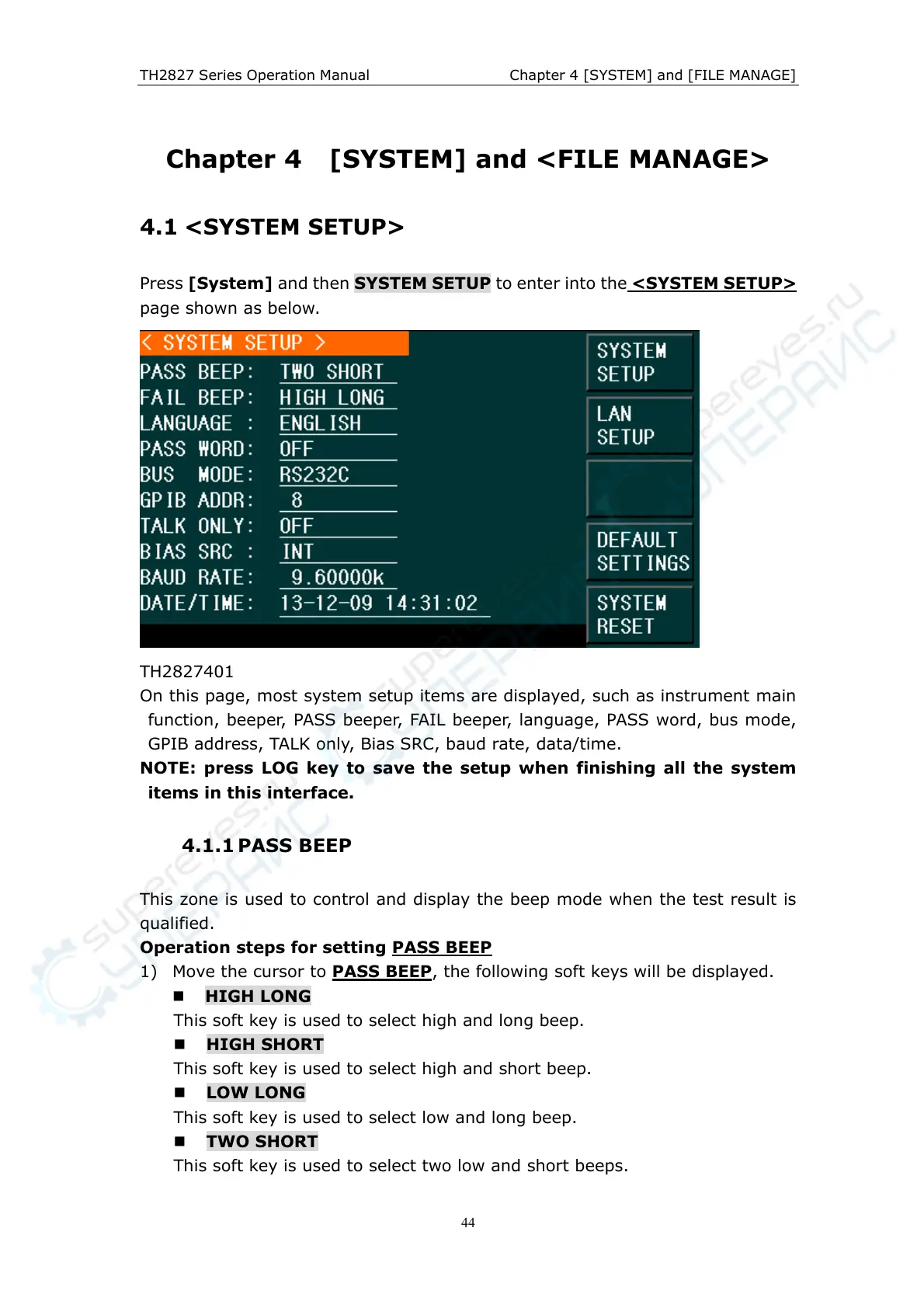
Press [System] and then SYSTEM SETUP to enter into the <SYSTEM SETUP>
page shown as below.
TH2827401
On this page, most system setup items are displayed, such as instrument main
function, beeper, PASS beeper, FAIL beeper, language, PASS word, bus mode,
GPIB address, TALK only, Bias SRC, baud rate, data/time.
NOTE: press LOG key to save the setup when finishing all the system
items in this interface.
4.1.1 PASS BEEP
This zone is used to control and display the beep mode when the test result is
qualified.
Operation steps for setting PASS BEEP
1) Move the cursor to PASS BEEP
, the following soft keys will be displayed.
HIGH LONG
This soft key is used to select high and long beep.
HIGH SHORT
This soft key is used to select high and short beep.
LOW LONG
This soft key is used to select low and long beep.
TWO SHORT
This soft key is used to select two low and short beeps.



 To Next Page