4. Communication With a PC
60
4. Communication With a PC
4.1 Communication Commands
This instrument can communicate with a PC. The communication format is either the BM-7A
mode and the former BM-7fast mode.
Changing the Communication Format
☞
「3.12 Communication Format」
This chapter described the commands for creating communication program with the BM-7A on
user own.
BM-7A Mode Communication Commands
☞
「4.2 BM-7A Mode Communication Commands」
BM-7fast Mode Communication Commands
☞
「4.4 BM-7fast Mode Communication Commands」
Communication Using CM-700
☞
『CM-700 Instruction Manual』
4.2 BM-7A Mode Communication Commands
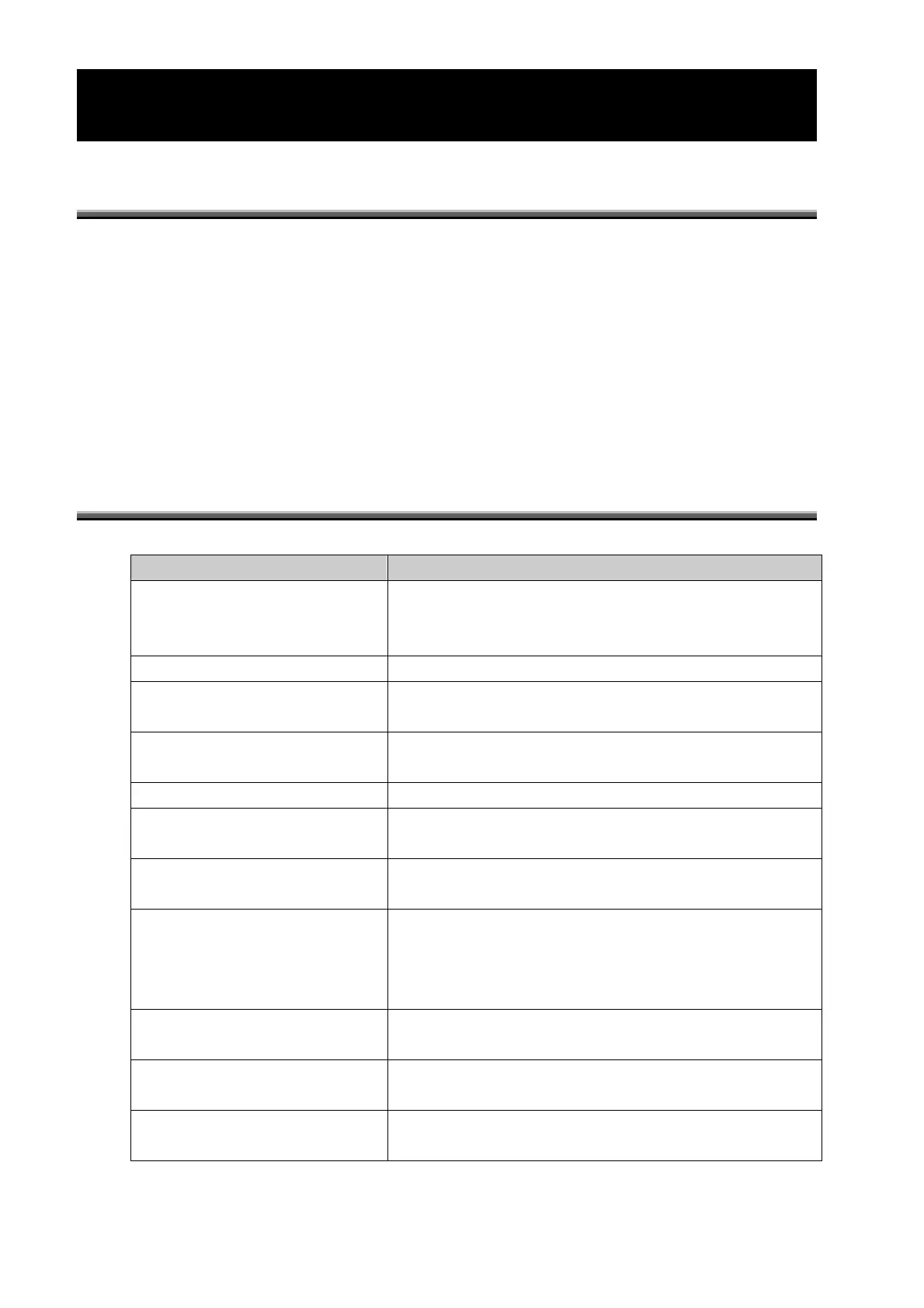
A list of communication commands in the BM-7A mode is given below.
Communication Commands Function
ST Sets the instrument to the measurement state.
After measurement is finished, transmits the measurement
data from the instrument.
CA Performs calibration.
TF Switches the response speed of the photo-receiver circuit to
the FAST mode.
TS Switches the response speed of the photo-receiver circuit to
the SLOW mode.
MA Switches the measurement range to the AUTO range.
MM‗X[l]‗Y[m]‗Z[n] Switches the measurement range to the MANUAL range.
l、m、n: Measurement range (1 to 5)
FR Reads the number of the correction factor currently being
used.
F[n] Writes the number of the correction factor currently to be
used.
n: Number of the correction factor currently to be used (0 to
15)
R[n] Reads the correction factor.
n: Number of the correction factor to be read (1 to 15)
W[n]‗#### Writes the correction factor.
n: Number of the correction factor to be written (1 to 15)
CF[n] Clears the correction factor.
n: Number of the correction factor to be cleared (1 to 15)



 To Next Page