Troubleshooting
Motorgrader System Five Operator’s Manual
7-2
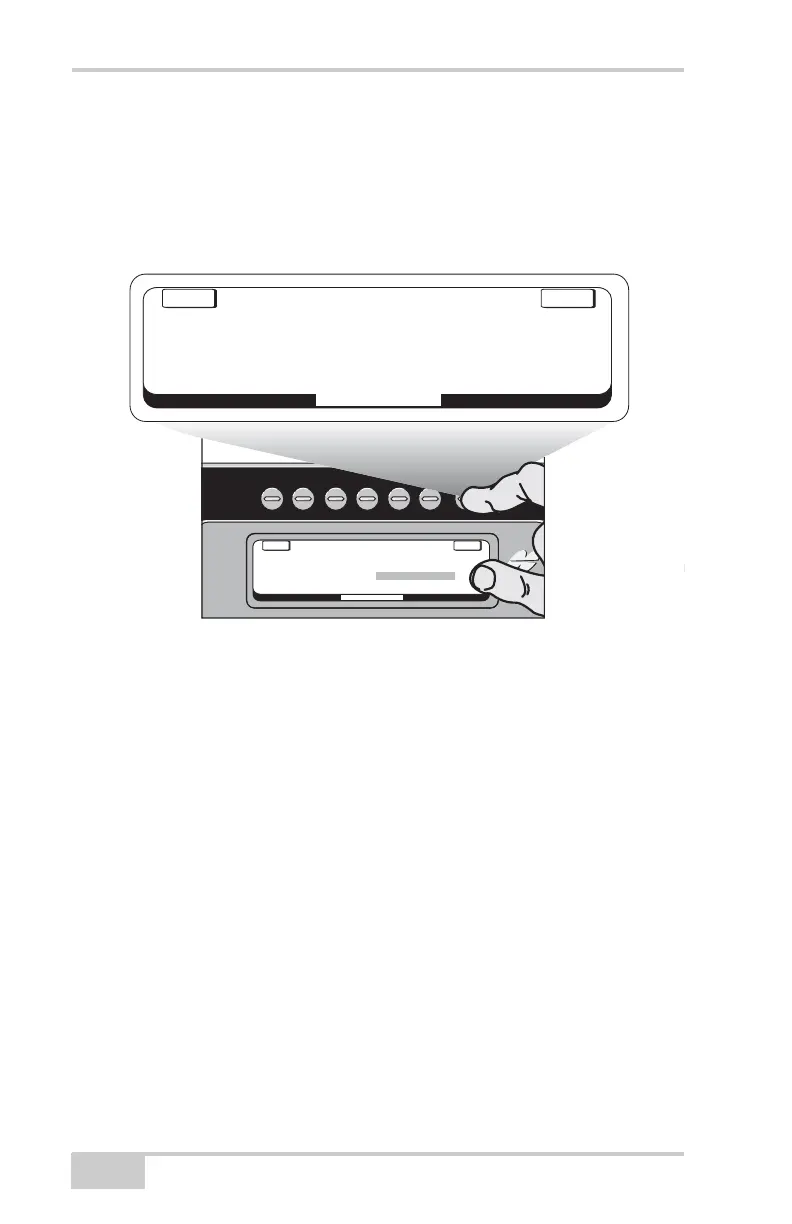
Accessing the System Test
1. Press "Setup" from Main Menu.
2. Use the grade knob to select "System Test".
3. Press the button above "ENTER".
Figure 7-1.
In System Test Mode, the LCD will display System Five's component
readings. The readings on the left side of the display are for the
components on the left side of the grader. The reading on the right
side of the display are for components on the right side of the grader.
The Cross Slope System Sensor readings are displayed in the center
of the LCD.
Each component should have a number or indicator next to it showing
that it is communicating to the Control Box. If a component has
"ERROR" displayed, that indicates it is not communicating to the
Contol Box. This problem could be a defective component or a
defective cable attached to the component.
System
Five
System
Five
System
Five
MACHINE SETUP
E
NT
E
R
E
XIT
ADJUST GAIN
CALIBRATION
SET POINTS
MEASUREMENT UNIT
CHECK HOURMETERS
ADJUST LED BRIGHTNESS
SYSTEM TEST
BEEPER
System
Five
E
NT
E
R
E
XIT
KNOB
VALVE
LASER
SONIC
MAINFALL
ROTATION
SLOPE
KNOB
VALVE
LASER
SONIC
SYSTEM TEST
¥ | ¥
PASS
ERROR
2.58
¥ | ¥
PASS
0
ERROR
2.7%
5°
1.5%


 To Next Page