5. Install the hairpin cotter pin and clevis pin to
secure the lift arms on each side; refer to Figure
92 .
6. Connect the universal joint of the driveshaft from
the cutting-unit gearbox; refer to Connecting the
Driveshaft to the Cutting-Unit Gearbox ( page
72 ) .
7. Install the grass chute; refer to Clearing the
Grass Chute ( page 34 ) .
8. T ilt the seat rearward.
9. Start the engine.
10. Lower the hopper .
1 1. Raise the cutting unit.
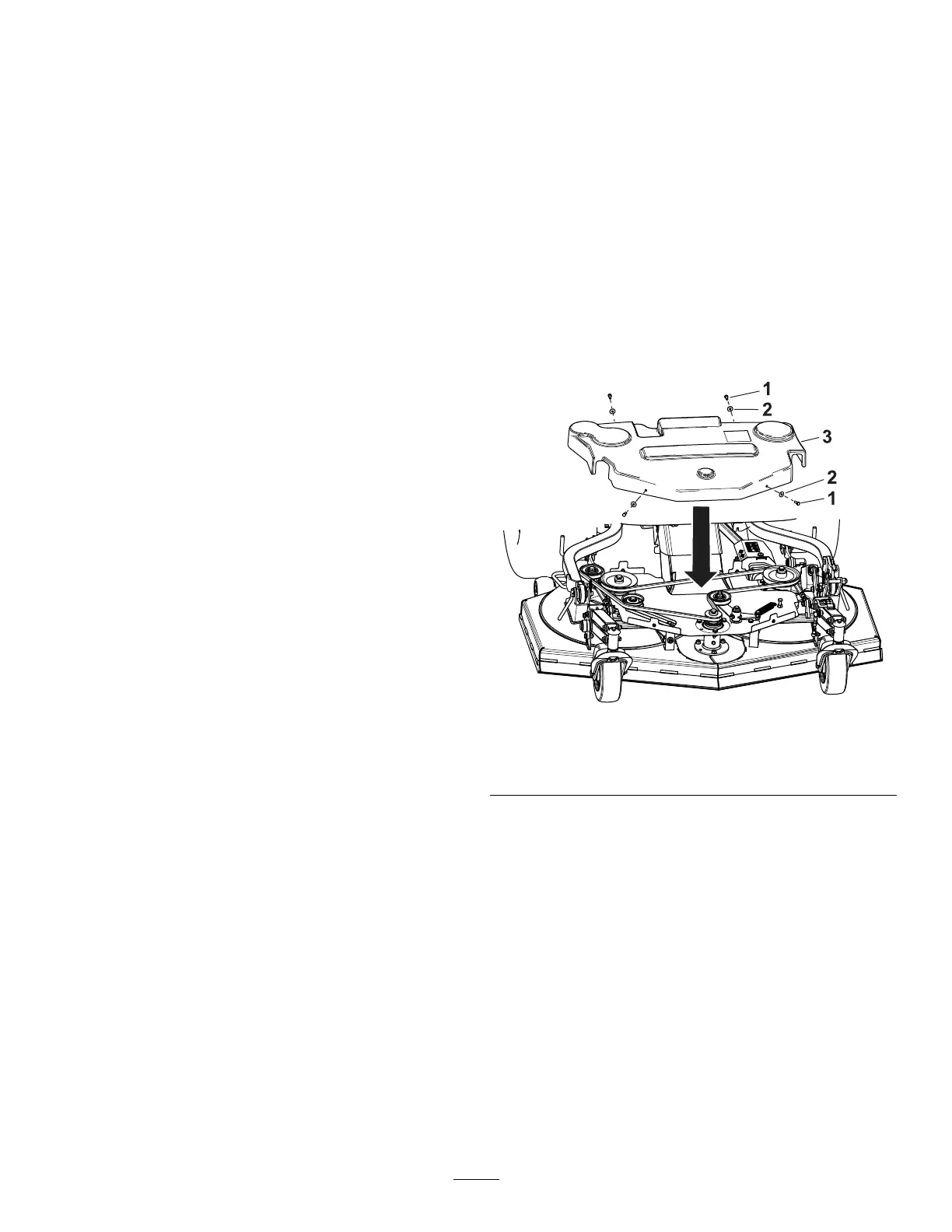
Removing the Belt Cover
1. Remove the 2 bolts and washers on the front of
the cover ( Figure 93 ).
2. Remove the 2 bolts and washers on the back of
the cover ( Figure 93 ).
3. Remove the belt cover from the cutting unit.
Installing the Belt Cover
1. Install the cover over the belt Figure 93 .
2. Install the 2 bolts and washers on the front of
the cover ( Figure 93 ).
3. Install the 2 bolts and washers on the back of
the cover ( Figure 93 ).
g433246
Figure 93
1. Bolt
3. Cover
2. W asher
73




 To Next Page