Adjusting the Hopper
Sensor
If the hopper sensor activates and the PT O
automatically disengages when the hopper is not full
or if the chute clogs before the sensor activates, you
need to adjust the sensor position.
Adjust the sensor as follows:
1. Open the hopper door and use the prop rod to
hold it open.
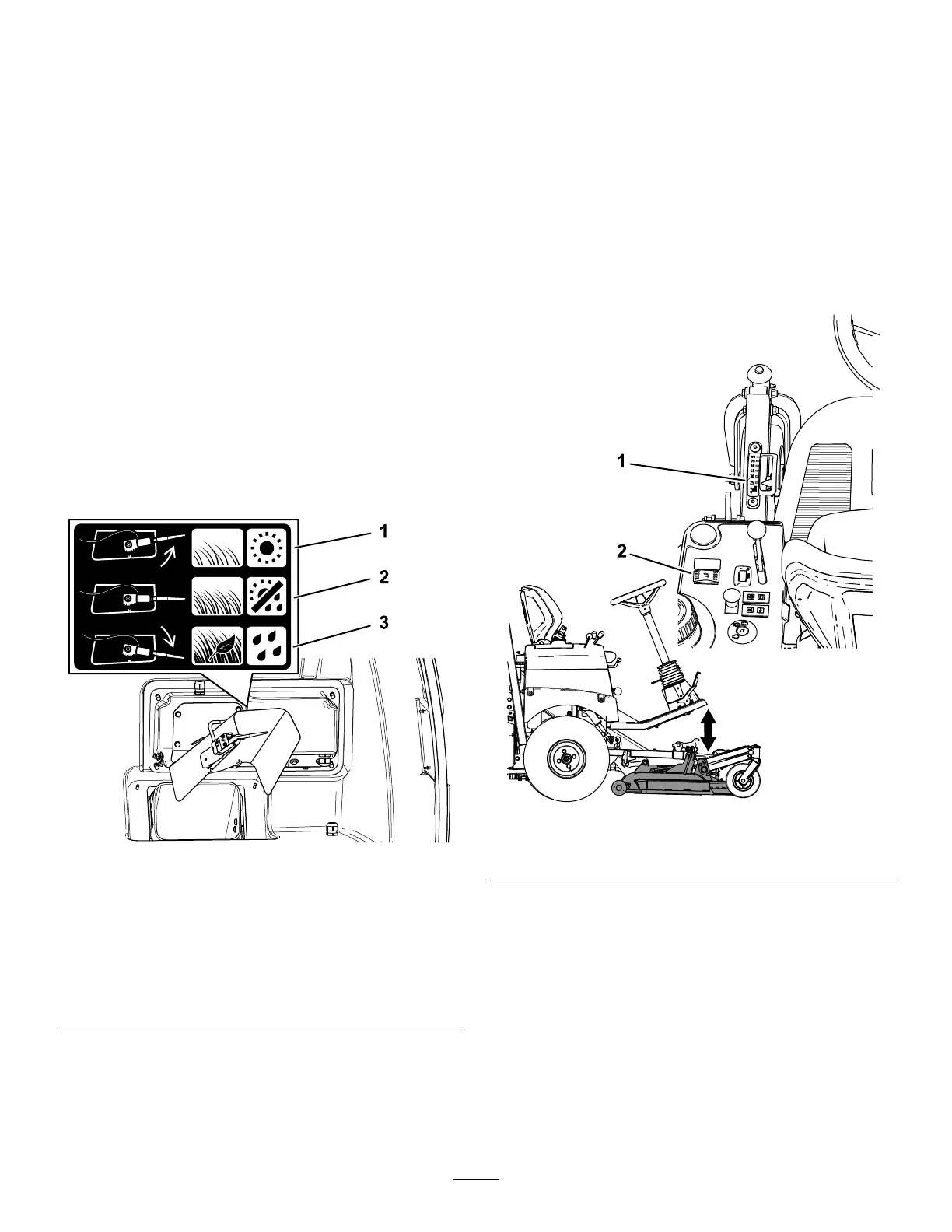
2. Adjust the hopper sensor based on the following:
• For normal grass and weather conditions,
rotate the sensor to the mid-point position
( Figure 28 ).
• For wet, dense grass conditions, when
picking up leaves, or if the hopper lls before
the sensor activates, rotate the sensor
downward ( Figure 28 ).
• For dry , sparse grass conditions, or if the
cutting unit disengages before the hopper
lls, rotate the sensor upward ( Figure 28 ).
g431655
Figure 28
1. Position the hopper sensor
upward when grass is thin
or conditions are dry .
3. Position the hopper sensor
downward when grass is
thick, contains leaves, or
conditions are wet.
2. Position the hopper sensor
in the middle when grass
and weather conditions
are normal.
Adjusting the Height of Cut
Y ou can adjust the height of cut continually from 2.5
to 9 cm (1 to 3-1/2 inches) by using the height-of-cut
switch.
Push the height-of-cut switch ( Figure 8 ) forward to
lower the height of cut. Push the height-of-cut switch
rearward to increase the height of cut.
Read the height of cut indicator on the height-of-cut
gauge to ensure that it is set at the desired height.
Monitor the height-of-cut gauge as you mow and
adjust the height of cut if needed.
g474737
Figure 29
1. Height-of-cut gauge 2. Height-of-cut switch
35




 To Next Page