Controls System
Maintenance
Adjusting the T raction
Pedal
Adjusting the T raction-Pedal Stop
Y ou can adjust the traction pedal for operator comfort
or to reduce or increase the maximum forward speed
of the machine.
Y ou can also adjust the traction pedal to reduce or
increase the maximum reverse speed of the machine.
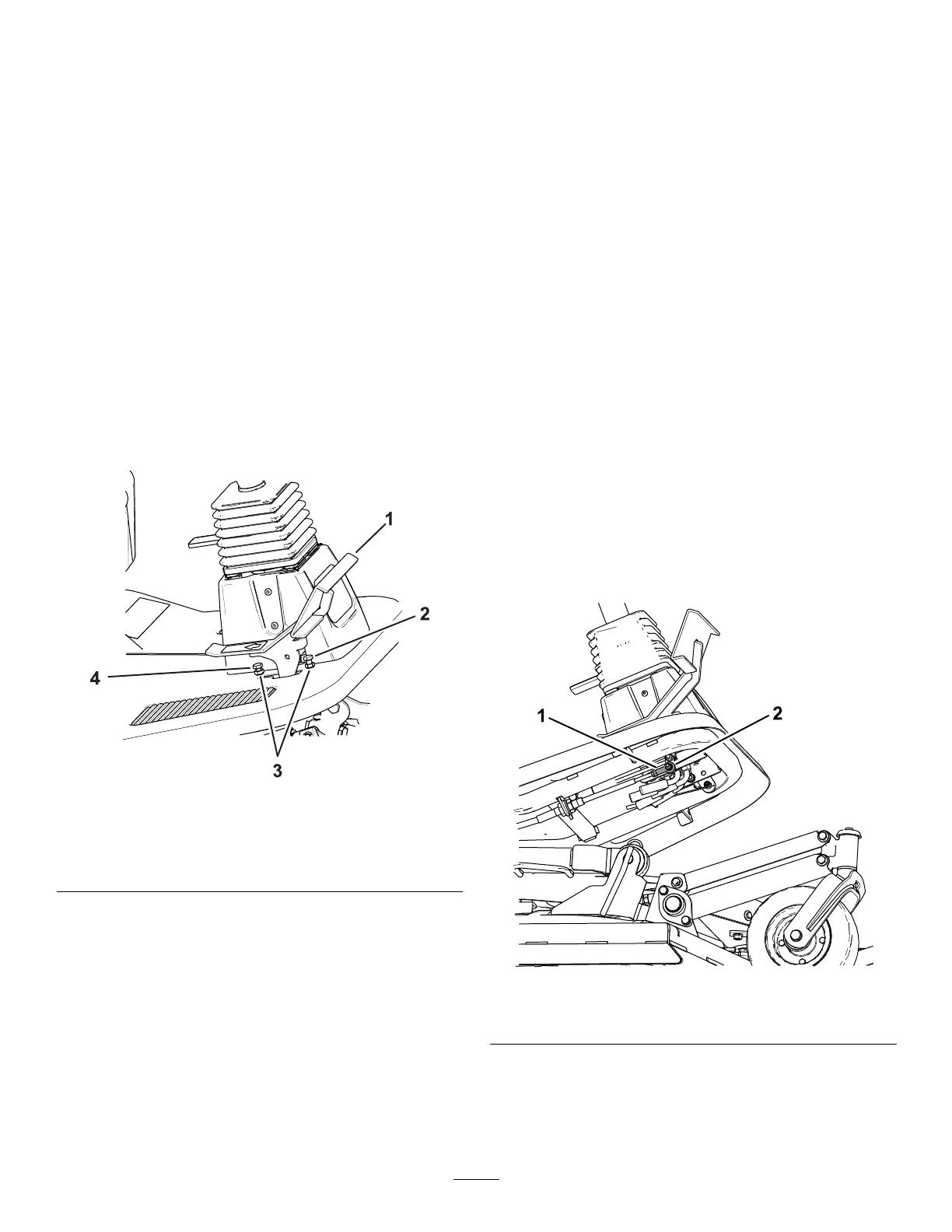
1. Move the traction pedal fully forward ( Figure 79 ).
For maximum speed, there should be a 3 mm
(1/8 inch) gap between the traction pedal and
the traction-pedal stop.
g474740
Figure 79
1. T raction pedal 3. Jam nuts
2. Forward traction-pedal
stop
4. Reverse traction-pedal
stop
2. If you want to reduce the forward speed of the
machine, perform the following:
A. Using a wrench, hold the forward
traction-pedal stop and loosen the jam nut
on the back side of the bracket ( Figure 79 ).
B. Move the traction pedal to the desired
position ( Figure 79 ).
C. Adjust the jam nut on the back of the
bracket until traction-pedal stop contacts
the traction pedal ( Figure 79 ).
Note: Shortening the traction-pedal stop
position will increase the forward speed of
the machine.
D. While holding the traction-pedal stop, torque
the jam nut at the front of the bracket to 37
to 45 N∙m (27 to 33 ft-lb).
Adjusting the T raction Cable
If more adjustment is required, adjust the traction as
follows:
1. Park the machine on a level surface.
2. Disengage the PT O, lower the cutting unit, and
engage the parking brake.
3. Shut of f the engine and remove the key .
4. Loosen the jam nut securing traction cable
rod-end bearing to the pedal ( Figure 80 ).
5. Remove the bolt and nut securing traction cable
rod-end bearing to the pedal ( Figure 80 ).
6. Rotate the rod-end bearing until you achieve the
desired length.
7. T ighten the jam nut ( Figure 80 ) and secure the
rod-end bearing to the traction pedal with the
bolt and nut removed to lock the angle of the
foot pedal.
g435802
Figure 80
1. Rod-end bearing 2. Nut and bolt
65




 To Next Page