12
© 2009 - 2011 TOSHIBA TEC CORPORATION All rights reserved e-STUDIO555/655/755/855
TRANSFER/TRANSPORT UNIT
12 - 5
12.5 Disassembly and Replacement
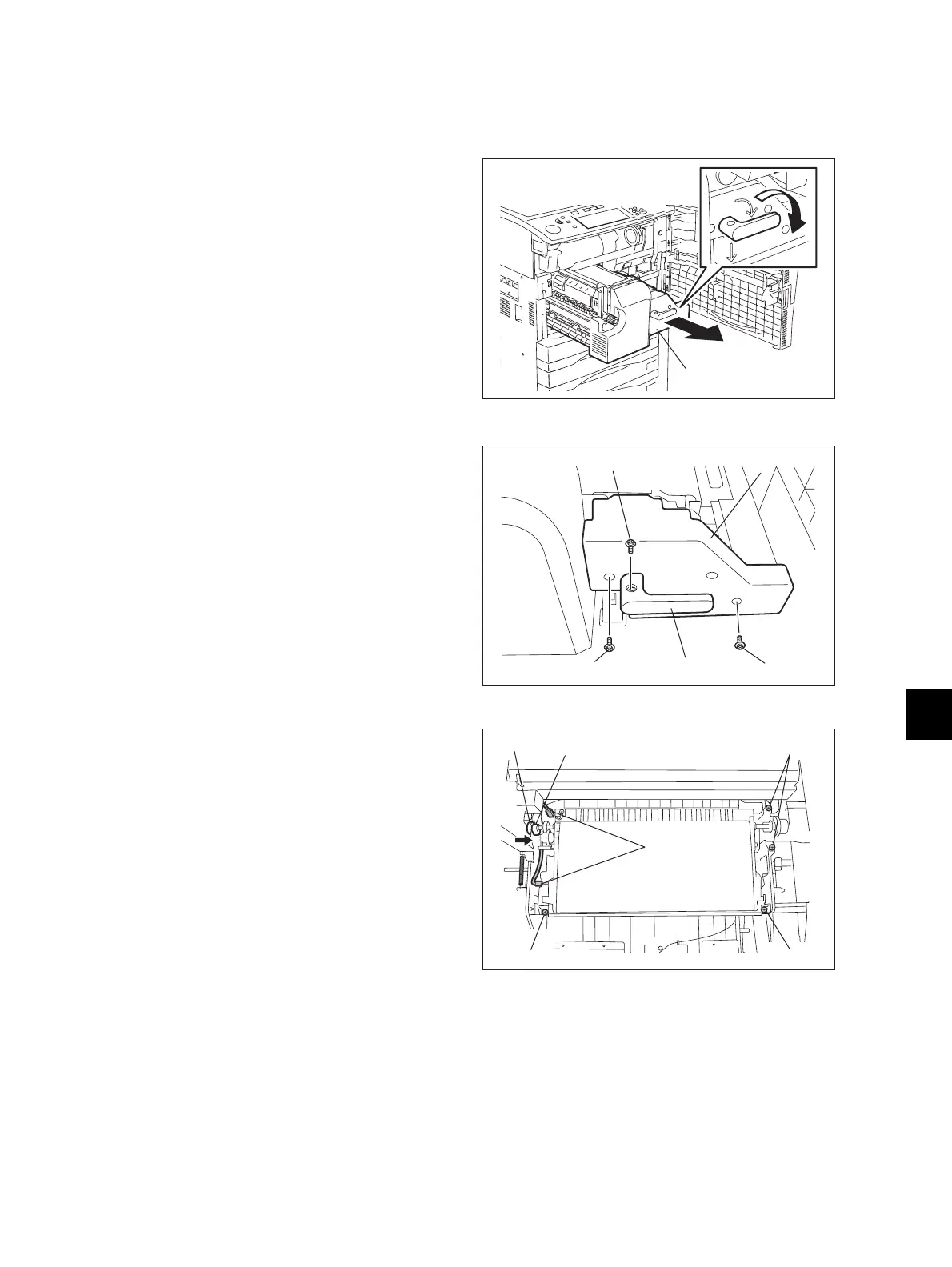
[A] Transfer unit
(1) Open the front cover and take out the
transfer/transport unit by turning the lever
clockwise.
Fig. 12-3
(2) Remove 1 screw to take off the handle.
(3) Remove 2 screws to take off the cover.
Fig. 12-4
(4) Disconnect 2 connectors. (Raise the belt
when disconnecting the connector on the
right side.)
(5) Remove 1 clip and slide the bearing on the
front side to inside.
(6) Remove 4 screws.
(7) Slide the transfer unit to the rear side and
raise the front side to take it off.
Fig. 12-5
Transfer/transport unit
Handle
Screw
ScrewScrew
Cover
Screw
Screw
Screw
Bearing Clip
Connector



 To Next Page
 Loading...











