87
Figure 4-78
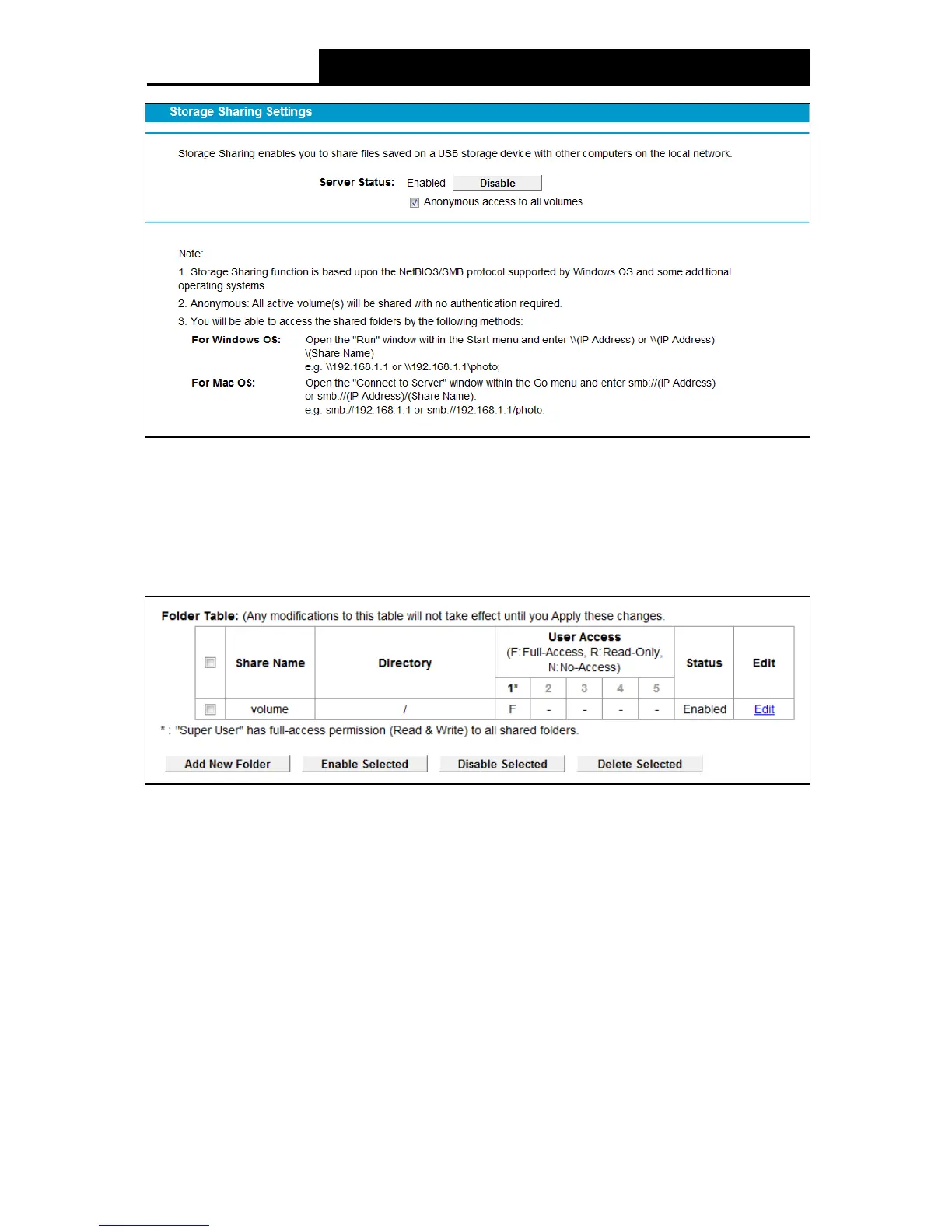
Se rv er Status: Indicates the Storage Sharing's current status.
Anonymous access to all the volumes: This function is enabled by default, so users can
access all activated volumes of Storage Sharing without accounts. If you want to add a
shared folder which does not allow anonymous login, uncheck the box to disable this
function. And Folder Table will be displayed as shown below.
Figure 4-79
Share Name: This folder's display name.
Directory: The real full path of the specified folder.
User Access: The authorization of the user is displayed.
* Users mean Super Users who have the full-access permission to all activated volumes and
share folders. Grey users mean the users who have no right to use this function. Others are
common users.
Status: The status of the entry is enabled or disabled.
Edit: Click Edit in the table, and then you can modify the entry.
To add a new folder, follow the instructions below.
1. Click Add New Folder in Figure 4-79.



 To Next Page