c. F1.00 = 2
(I) Motor rotating direction are controlled by multi-function input terminals
(X1~X4).
(II) Start command by “RUN” key of the operation panel and the rotation direction
by forward or reverse command defined by multi-function input terminals
(X1~X4).
(III) The motor stops running when the multi-function input terminals
(forward/reverse commands) are set closed or open simultaneously.
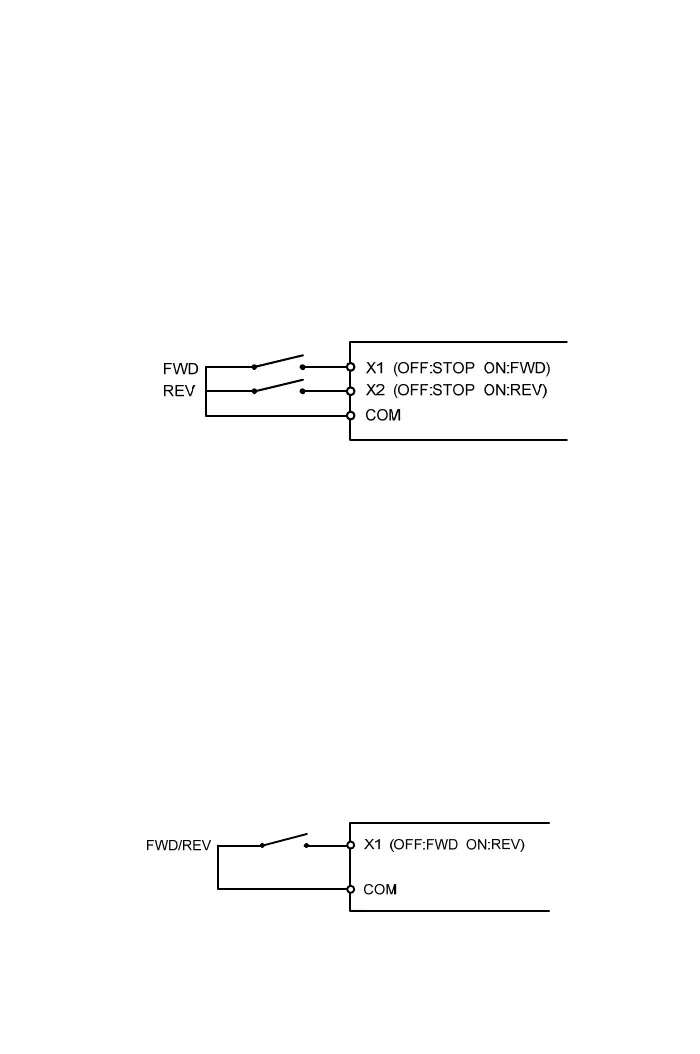
Example: Parameter value: F5.19=22(define X1 as forward command),
F5.20=23(define X2 as reverse command) and the drive control is
shown as the below diagram.
d. F1.00 = 3
(I) Start command by “RUN” key of the operation panel and the motor rotates at
the forward direction (clockwise).
(II) Forward and reverse commands are disabled.
e. F1.00 = 4
(I) Start command by “RUN” key of the operation panel and the motor rotates at
the reverse direction (counterclockwise)
(II) Forward and reverse commands are disabled.
f. F1.00 = 5
(I) Multi-function input terminals (X1~X4) define as the reverse command and the
motor runs at the reverse direction (counterclockwise).
(II) Start command by “RUN” key of the operation panel and the rotation direction
is controlled by reverse command (defining multi-function input terminals as
reverse command).
Example: Parameter value: F5.19=23 (define X1 as the reverse command) and
drive control is shown as the below diagram
g. F1.00 = 6~7
Reserved
41



 To Next Page