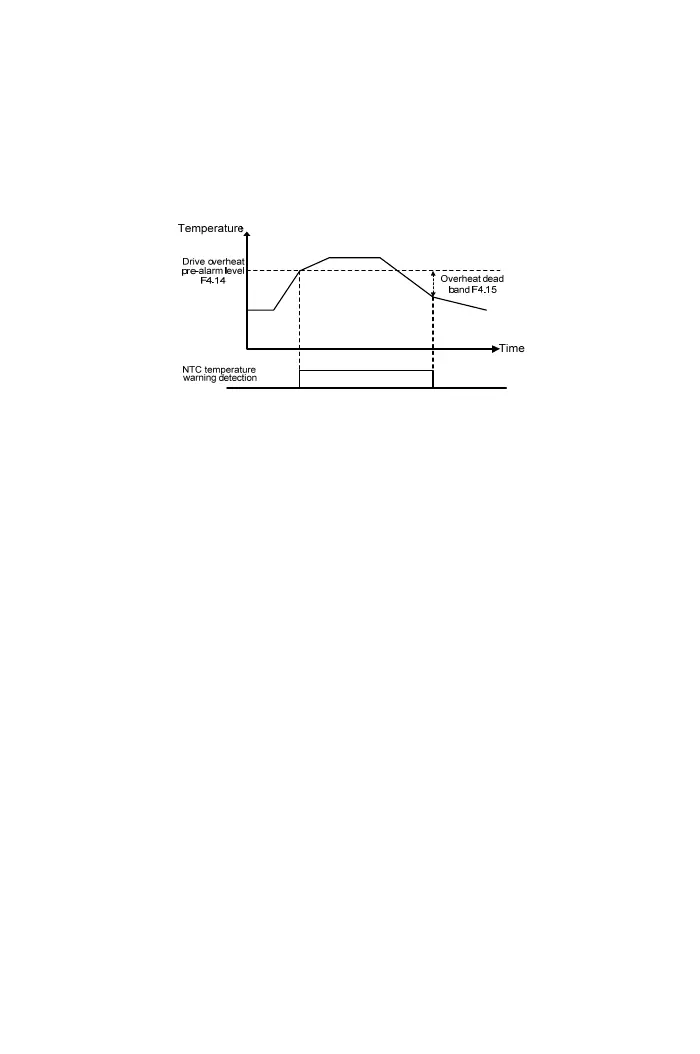
increase when the cooling fans is damage or the heat sink is covered by foreign
objects. User can maintain the cooling fans of drive in advance. The setting range is
45~105℃
【F4.15】 Drive Overheat Dead Band
When the drive heat sink temperature is over the pre-alarm level, the drive displays
“ OHt ” until the temperature drops below the drive overheat dead band (F4.15).
The setting range: 0.1~10℃
【F4.17】 Fan Control Selection
a. Function: Increase the lifetime of drive cooling fans, save energy and extend the
maintenance cycle time of heat sink.
b. The settings are listed as below:
0: Forced air cooling
Start and continuously operate the cooling fans of drive when power ON.
1: Operation air cooling
Cooling fans of drive is start when the drive is operation. Cooling fans will stop
when the drive disable and after waiting at the minimum operation time
(F4.19).
2: Temperature control
Drive cooling fans activate when the drive temperature is over the temperature
level of fan activation (F4.18). Cooling fans will stop when the temperature of
drive drops below the overheat dead band of drive(F4.15) after waiting at the
minimum operation time (F4.19).
【F4.18】 Temperature Level of Fan Activation
Set the temperature level for drive cooling fans startup, and the setting range is
25~60℃
61



 To Next Page