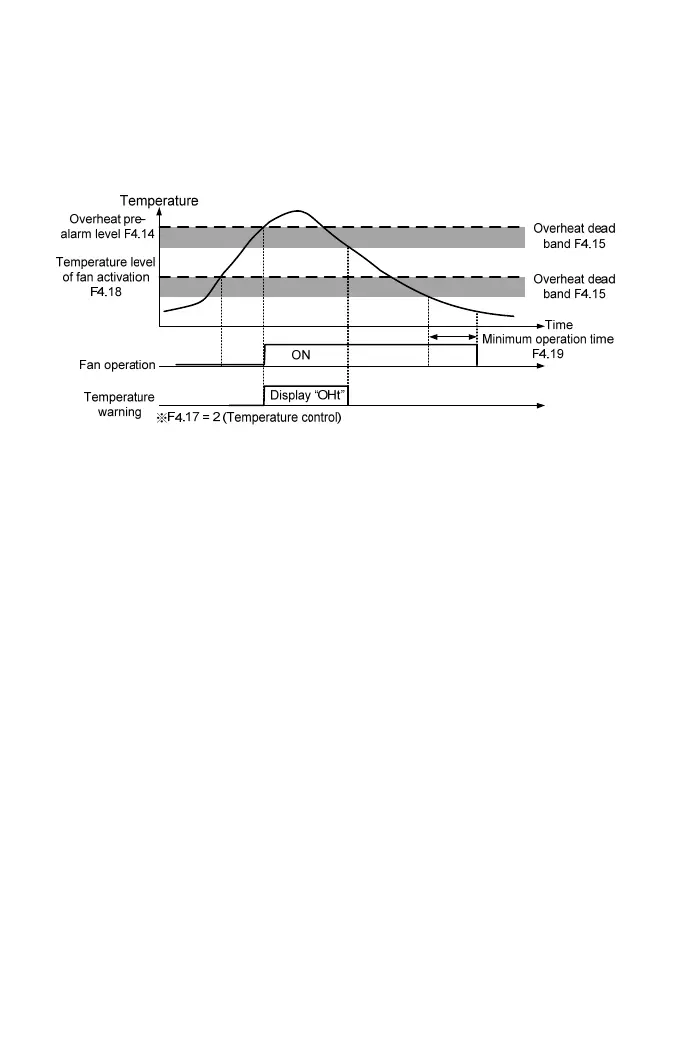
【F4.19】 Minimum Operation Time of Fan
Set the minimum operation time of drive cooling fans activation, and then according
to the setting of F4.17 to set the operation method of cooling fan. The setting range
is 0.1~25 min.
【F4.25】 System Overload Detection(OLO)
a. The settings are listed as below:
0: Disable
1: Enable (OLO)
b. System overload detection is to prevent the system from any possible damages
caused by system overload. The detection level (F4.28) and time (F4.29) can be
set based on operation requirements.
【F4.26】 System Overload Detection Status
The settings are listed as below:
0: Detection at constant speed only.
1: Detection at operation: Including the system overload at acceleration,
deceleration or constant speed.
【F4.27】 Output Setting of System Overload
The settings are listed as below:
0: Drive continues running after the system overload is detected
1: Drive trips after the system overload is detected.
【F4.28】 System Overload Detection Level
Setting the level of current for system overload detection, and the setting range is
30~200% of drive rated current.
62



 To Next Page