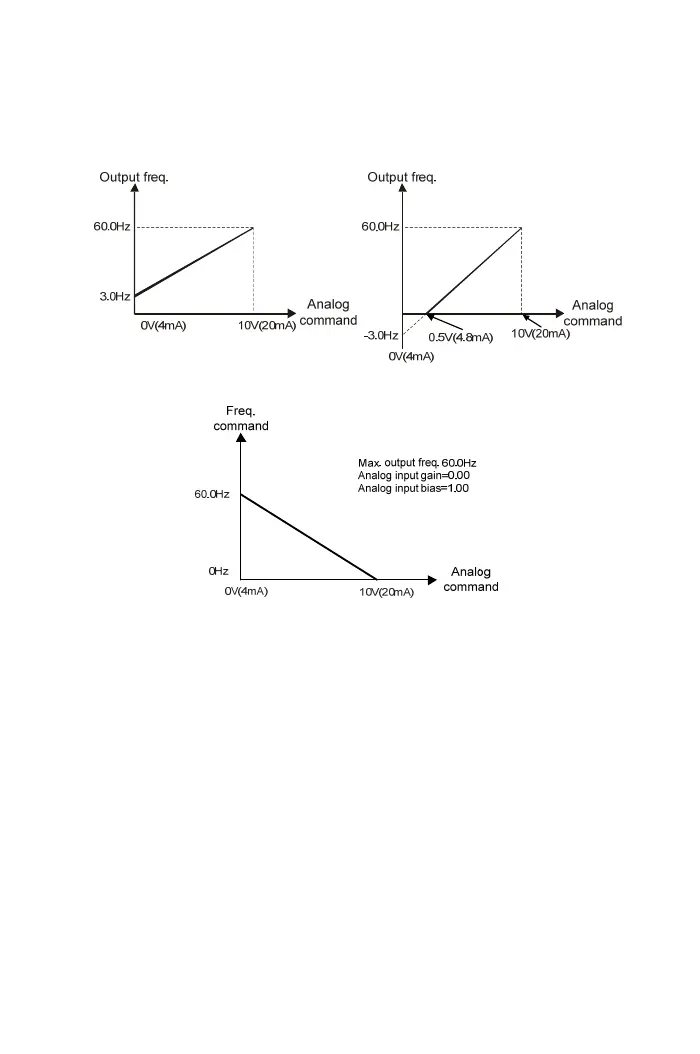
Example: Analog input gain= 1.00
Max. output frequency= 60.0Hz Max. output frequency= 60.0Hz
Analog input gain= 0.05 Analog input gain= -0.05
Example: Inverse control application
【F5.07】 Filter Setting of Analog Frequency
a.
“Pot knob” or AI is set for frequency command control (F1.01=0): signal filtering
b. Higher setting value of F5.07 reacts to the slow response. F5.07 = 0: no filtering.
The setting range is 0~255.
【F5.19】 Multi-function Input Terminal X1
| |
【F5.21】 Multi-function Input Terminal X3
a. “+” represents a contact(normal open)
“-” represents b contact(normal close)
b. The settings of multi-function terminals X1 ~X3 are listed as below:
±1: Jog command (see the function descriptions of F2.16)
±2: Secondary acceleration / deceleration command switching(see the function
description of F2.26 and F2.27)
±3: Multi-speed level 1 command(see the function description of F2.00 ~ F2.07
for multi-speed setting)
±4: Multi-speed level 2 command(see the function description of F2.00 ~ F2. 07
66



 To Next Page