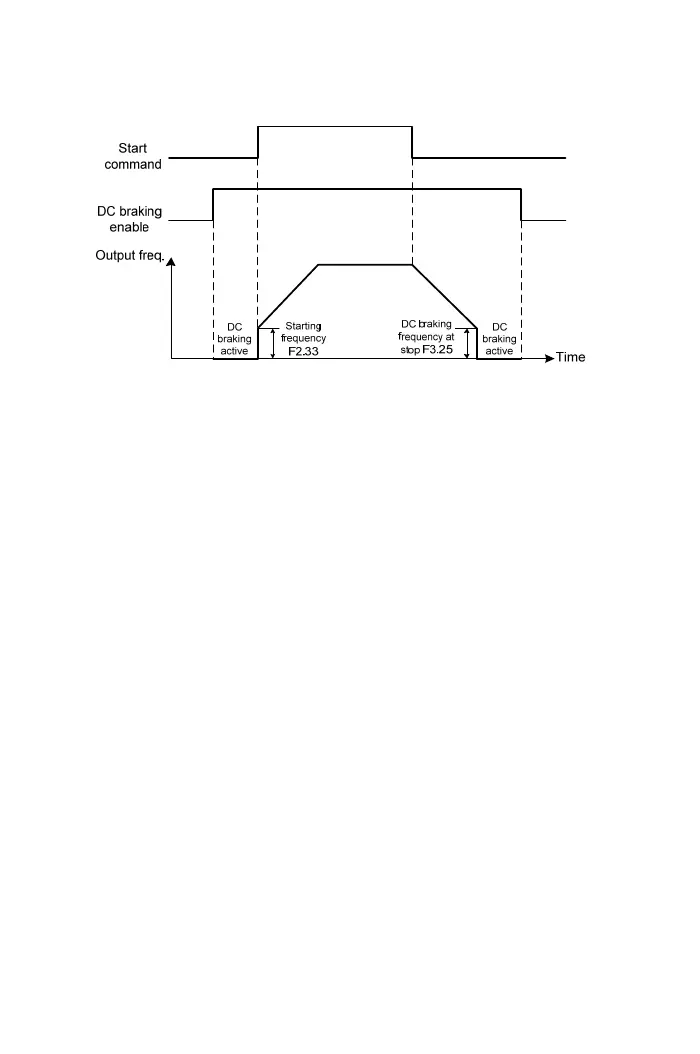
±25: DC braking enable (Stop)
(1) When the drive stops and DC braking command is ON, DC braking is
active to stop the motor.
(2) The setting value of output current must be according to the function
setting of F3.21, when the DC braking is active.
(3) When the start or jog command is active, DC braking command will be
clear, and the motor will run to the setting frequency.
(4) The drive output frequency decreases to the setting value of F3.25(DC
Braking Frequency at Stop) when the start or jog command is inactive.
±26: Counter input
(1) Using external triggering signal from multi-function input terminal to
activate drive countering function.
(2) Selecting the input voltage of counter between 4V and 13V.
(3) External triggering signal: the signal can be from optoelectronic sensor or
approximate switch to drive
±27: Counter clear
Clear the counting value
±28: Current limit enable
(1) The multi-function input terminal is activation and either F5.00 or F5.01 is
set to 2.
a. Current limit enable
b. Monitoring the value in the monitor mode(range: 1~150).
(2) Multi-function input terminal inactive
a. ”Current limit enable” is disable.
b. The setting value is same as function F3.04 (range: 30~200) in the
monitor mode.
71



 To Next Page