Installation, Operation and Maintenance 5 - 17
prevent Tracer, External, or Chilled Water Reset
from asserting control on the chilled water setpoint.
Service Settings (Non Password
Protected Service Settings Group)
All service settings are accessed by pressing the
<Service Settings> key on the CLD.
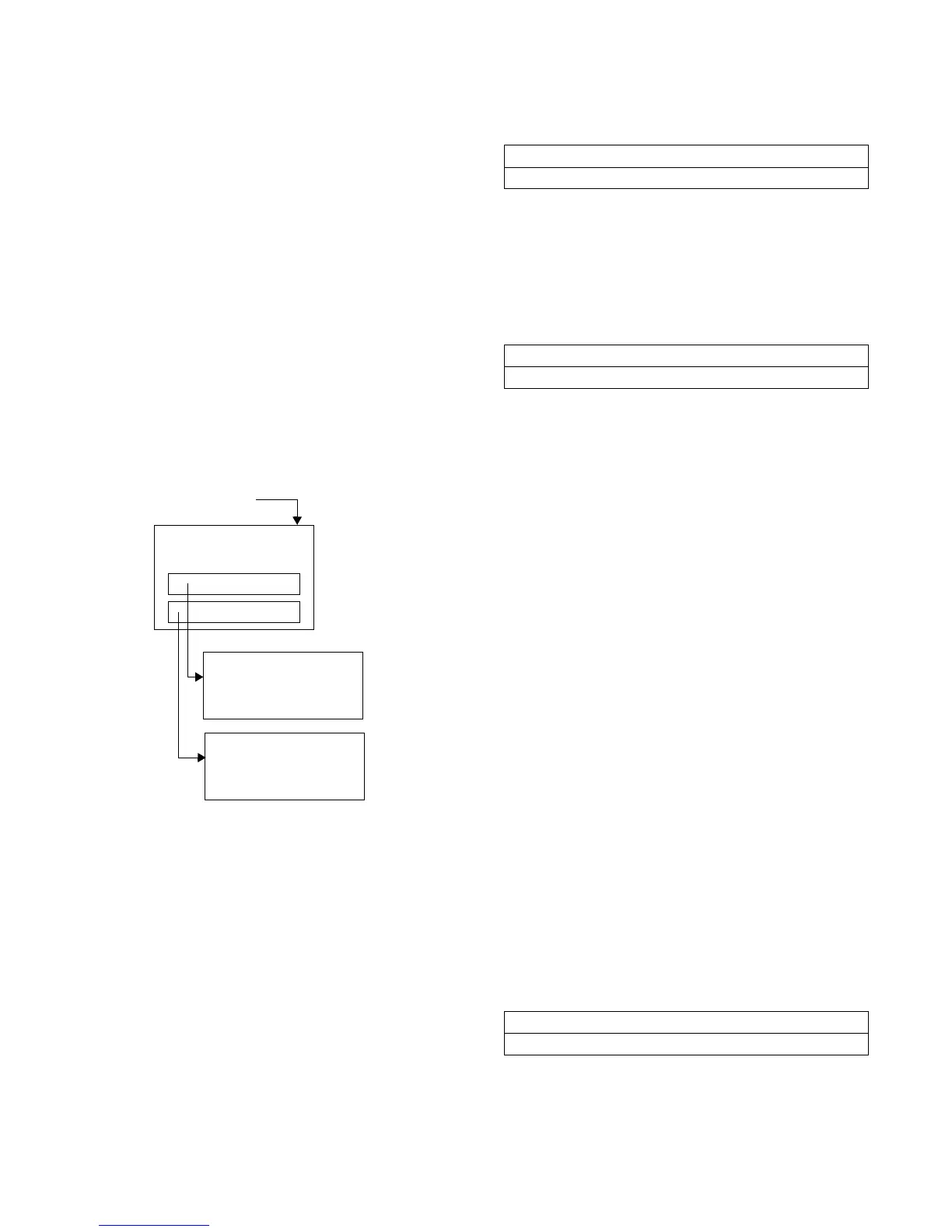
The service settings menu has three distinct
grouping of items as shown in
Figure 31
. The first
group is the non-password protected group that
consists of all of the settings, feature enables,
setpoints, etc., that are unlikely to be changed often
by a user or operator, changes in them do not
seriously affect the standard protection or reliability
of the chiller.
Figure 31
Service Settings Key Menu Structure
The other two groupings are protected, each with a
separate password. These two groups are for
changing parameters and settings for field
commissioning and fundamental protection and
control of the chiller subsystems (Service Set-up) or
for programming of the UCM (machine configuration)
if, for example, a UCM must be replaced.
Once properly set, the items in these protected
menus should NEVER be changed again without
specific knowledge of the effects of the changes.
These are accessible only for field commissioning
and to allow for field programming of service
replacement UCMs.
Once the Service Settings key is pressed, the group
heading display appears
Menu Settings Password
Only if the menu settings password is enabled in the
service setup group, will the following be displayed
after each setting group heading:
Likewise, if the menu settings password is disabled
in the service setup group (See page X), the above
screen not appear.
Status can be “locked” or “unlocked.” If the password
status is locked, the password message will be
“Enter Password to Unlock.” Press <-> <+> <-> <+>
<-> <+> followed by the <Enter> key to do so. An
incorrect password will result in the message
“Incorrect Password” message to be displayed for 1
second.
Once the password status is unlocked, the password
message will be “Press Enter to Lock.” Pressing
<Enter> will lock all of the setpoint menus. Likewise,
if the password status is locked and the correct
password is entered, all of the setpoint menus will be
unlocked.
Whenever a password is in use the “Press (+) (-) to
change setting” message will not appear on setpoint
screens. Any attempt to change a setpoint will result
in the message “Setting is Locked” being displayed
for 1 second. The password, once entered, will
remain valid until canceled.
Keypad/Display Lockout
This feature allows you to lock the keypad and
display. After access to the service settings is given,
the following display appears
If the <Enter> key is pressed to lock the keypad, the
following message is displayed, and all further input
Service Settings Key
Service Settings
Group
(+)(+)(-)(-)(+)(+)
(+)(-)(+)(-)(+)(-)
Password Screen
Password Screen
Field Startup Group
Machine Configuration
Group
Service Settings: Basic Setups
Press (Next) (Previous) to Continue
Settings In This Menu Are (status)
Enter Password to Unlock
Press (Enter) to Lock Display & Keypad
Password will be required to Unlock


 To Next Page