8 Pocket PC basics GeoExplorer Series Getting Started Guide
Pocket PC basics
The GeoExplorer series handheld’s operating system is based on the
Windows Mobile 2003 software for Pocket PC.
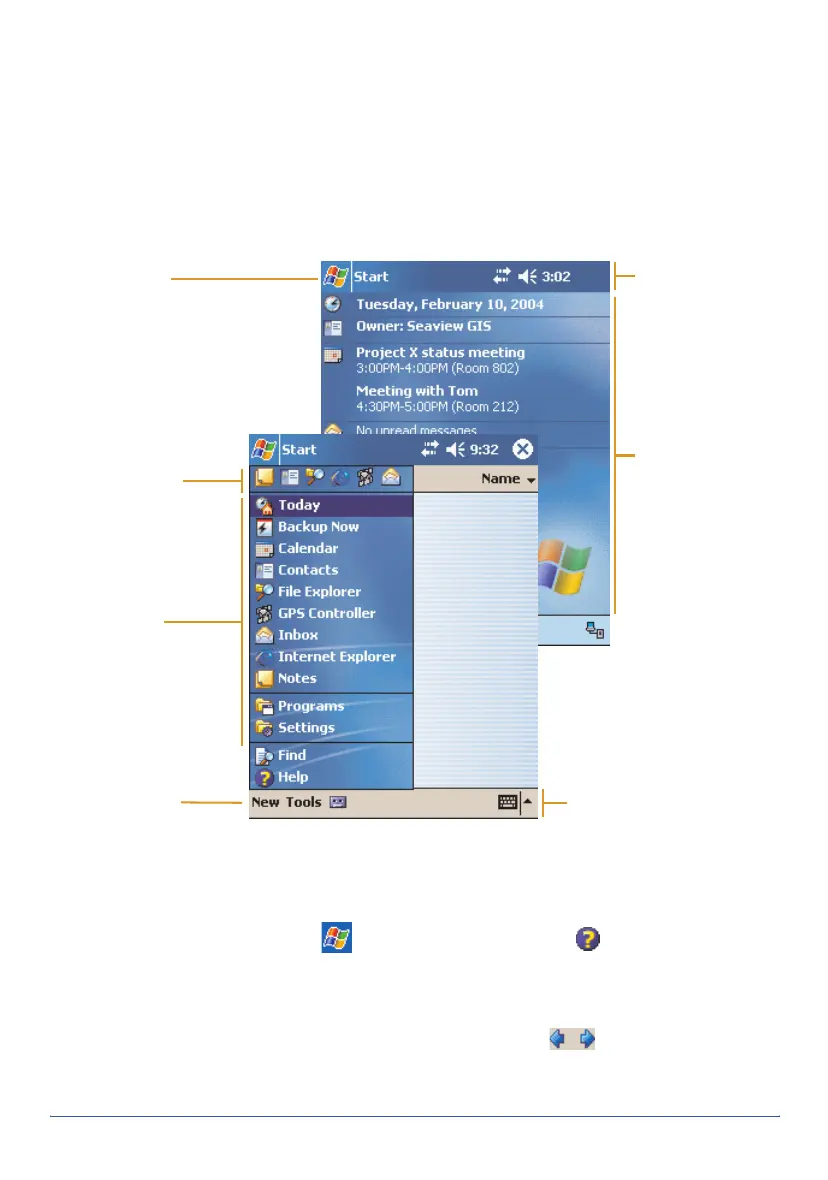
Parts of the screen
The main parts of the screen are shown below:
Accessing help
To access help, tap /
Help
or, if available, tap in the application
window. If there is an application running, context-sensitive help for the
current screen appears. Otherwise the main Help Contents page appears.
Online help on the handheld works in the same way as a Web page. Tap
hyperlinks to navigate around the help and use to retrace your steps.
Tap
View
/
Contents
to return to the Contents page for the application, and
View
/
All Installed Help
to return to the main Contents page.
Start menu
Tap any item on
the menu to
open it.
Input Panel button
Tap to view/hide the
keyboard, or to select an
input method.
Start button
Tap to open the Start menu,
where you can access
programs and system
controls.
Navigation bar
Contains status
icons for
important system
functions.
Command bar
Contains menu
commands and buttons.
Today screen
Summarizes your
appointments,
tasks, notes, and
e-mails for the day.
Tap any item to
open it.
Recently used
programs list
Tap any icon to
open the program.



 To Next Page