ТМ
11.3 Ingredients weighing
To ensure precise ingredients dosage it’s necessary to conduct periodical weighing of the ingredients,
used for making drinks.
Ground coffee dosage weighing (not INSTANT):
1. Remove the espresso group (see section 5.9)
2. Place a container under the dosing unit funnel
3. Enter the menu technician (see the Manual) into the Recipes section
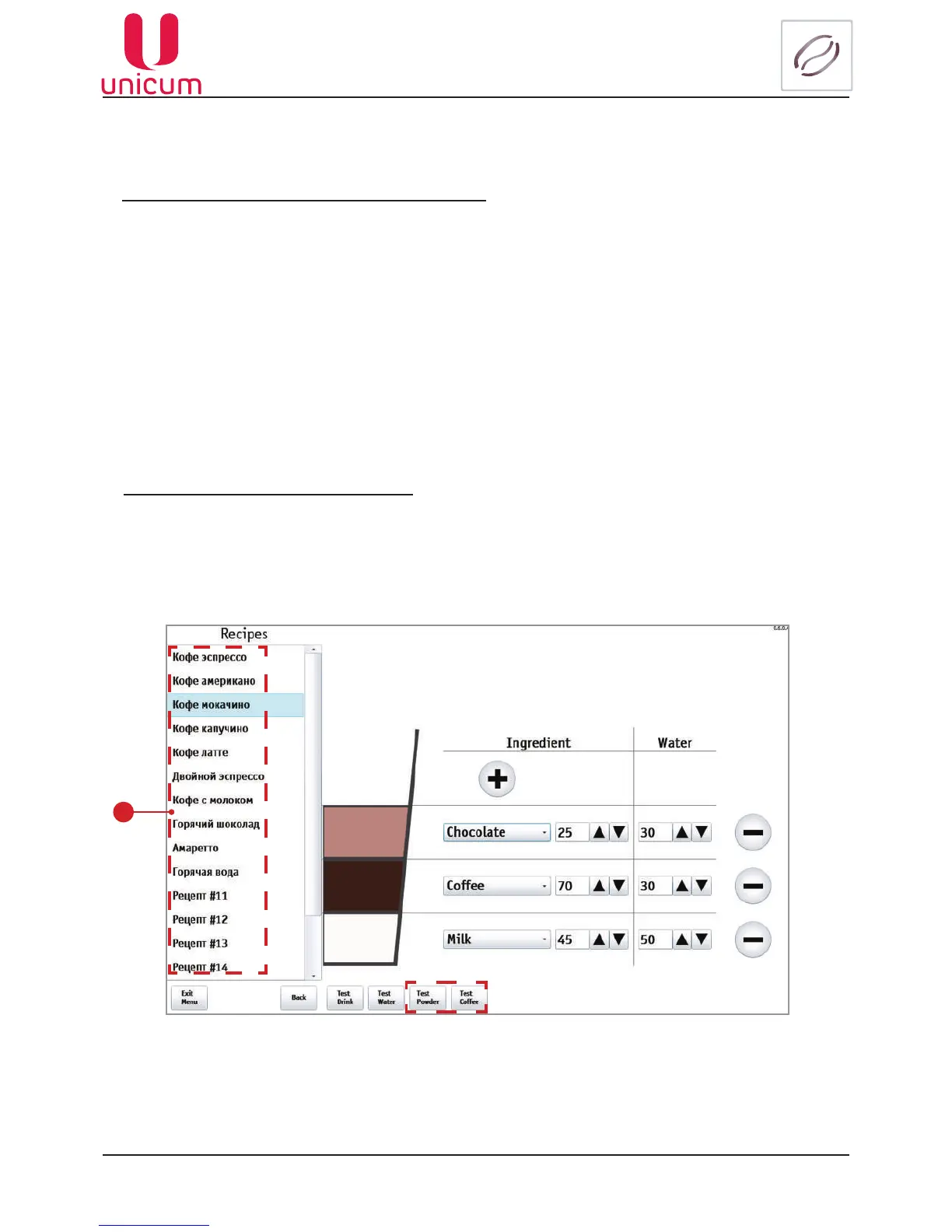
4. From this page choose the coffee beans based drink (1) and press the Test Coffee button
5. Conduct the coffee weighing
Note:
1. To conduct more correct measurement make 5 - 10 weighings and calculate the mean.
2. Setting the dosing unit cam into position 5 or 6 without the brewing camera volume increase is PRO-
HIBITED - THIS MAY LEAD TO ESPRESSO GROUP BREAKAGE!
Setting the dosing unit cam into position 7 or higher is STRICTLY PROHIBITED under any condi-
tions!!!
Soluble ingredients dosage weighing:
1.Removethelidofthemixer,locatedunderthecontainerwiththeveriedingredient.
2. Place a container under the container with the ingredient.
3. Enter the menu technician (see the Manual) into the Recipes section.
4. From this page choose the soluble ingredient based drink and press the Test Powder button.
5. Conduct the ingredient weighing.
6
Fig.11.5 - Ingredients weighing
1



 To Next Page