ТМ
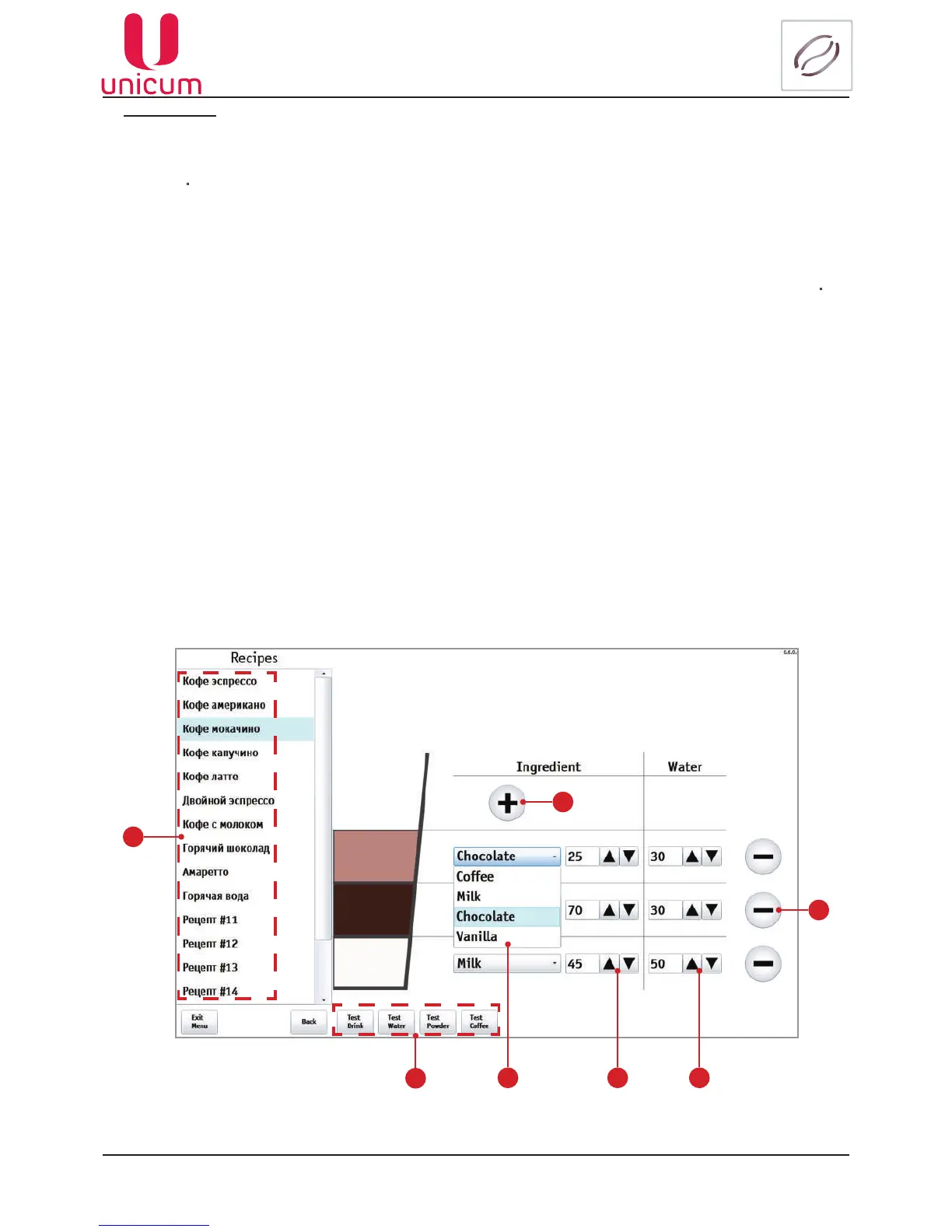
9.1.4 Recipes
Heredrinkrecipesarespecied,whichmayconsistofseveralsteps(ingredients).Eachrecipemayhaveadiffer-
ent number of ingredients (up to 4). The sequence of the ingredients in the recipe corresponds to the sequence of the
drink making.
Toadjusttherecipe:
1. Select a drink (1) which recipe you want to adjust, in the left part of the page.
2. Then choose an ingredient, added into the drink, from a drop-down list of ingredients (2).
3. By using buttons (3)settherequiredamountoftheselectedingredient(the▲buttonincreasestheamountof
theingredient,andthe▼buttondecreasestheamount).Setintenthsofasecondofthegivingoutmotorspintime.
For coffee drinks, it depends on the mode, selected in the Brewer section, the Adjustablecoffeedose setting.
If set to NO, this parameter makes no difference. If set to (7..9), then for the values from 0 to 70 the dosage of 7
g of ground coffee will be grinding. For the values from 70 to 90 the dosage of coffee in tenths of a gram is specified
here. For the values above 90, the dosage of 9 g of coffee will be ground.
If it has the VARIO-BREWER installed, then in this setting the values from 70 to 150, which is a dosage of coffee
intenthsofagram,arespeciedhere(allthatislessthan70means7g,andallthatisabove150means15g).
4. By using the buttons (4) set the amount of water added to the drink:
- for hot water-setinthemilliliter;
- for fresh milk - here the time in tenths of a second, during which the vending machine supplies steam to the
cappuccinatore, is set.
5. The button (5) is used for adding an ingredient in the drink recipe Ingredienteld.
Note: To make the ingredient addition to a drink visual, the addition of another ingredient will be shown
as the new sector of the cup, which color will correspond to the added ingredient.
6. The button (6) is used for removing an ingredient from the drink recipe Ingredienteld.
Note: The button appears when there’s more than one ingredient in the drink recipe, otherwise the button
willnotshow(seeg.9.14.2).
Fig.9.14.1 - Recipes
1
7
2 3 4
6
5



 To Next Page