ТМ
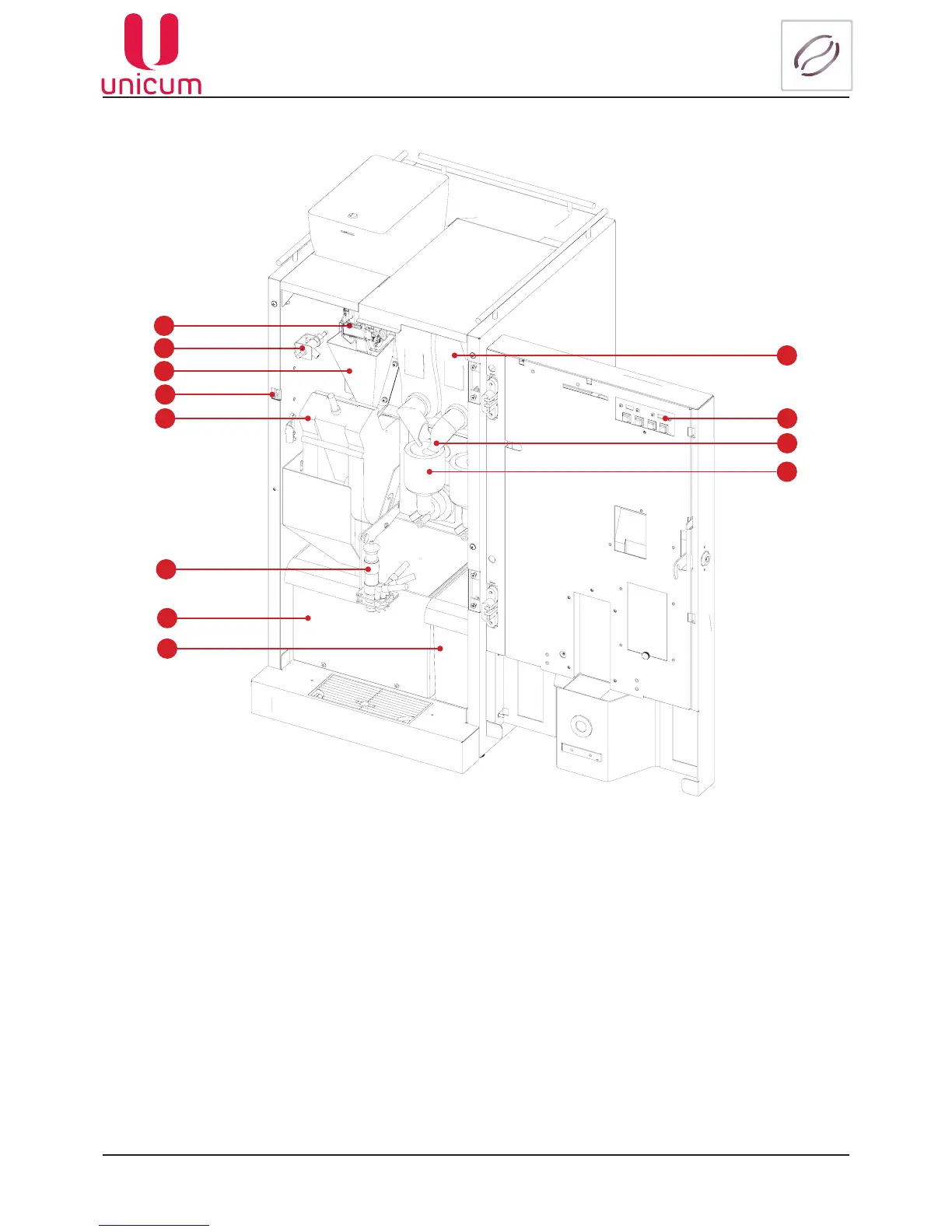
5.2 Internal view (with option FRESH MILK)
1
2
3
4
5
6
7
8
9
10
12
11
1. Coffee grinder and dosing mechanism
2. Milk foam intensity adjustment (FRESH MILK)
3. Coffee funnel
4. Door trip (for service key)
5. Espresso group
6. Cappuccinatore (FRESH MILK option)
7. Container for solid (coffee) wastes
8. Container for liquid wastes
9. Container for soluble ingredients
10. Quick access keypad
11. Container lip
12. Mixer
Note:Theconnectingtubesarenotshowninthegure(seevendingmachinehydraulicdiagram).
Following are installed inside the body: drinks preparation units, ingredients’ containers, waste containers.
The vending machine’s body is divided into two sections: front and rear.
Itissufcienttoopenthemachine’sdoortoaccessthefrontsection.
To access the rear section of the machine it is necessary to remove the machine’s rear panel.
Fig.5.2



 To Next Page