ТМ
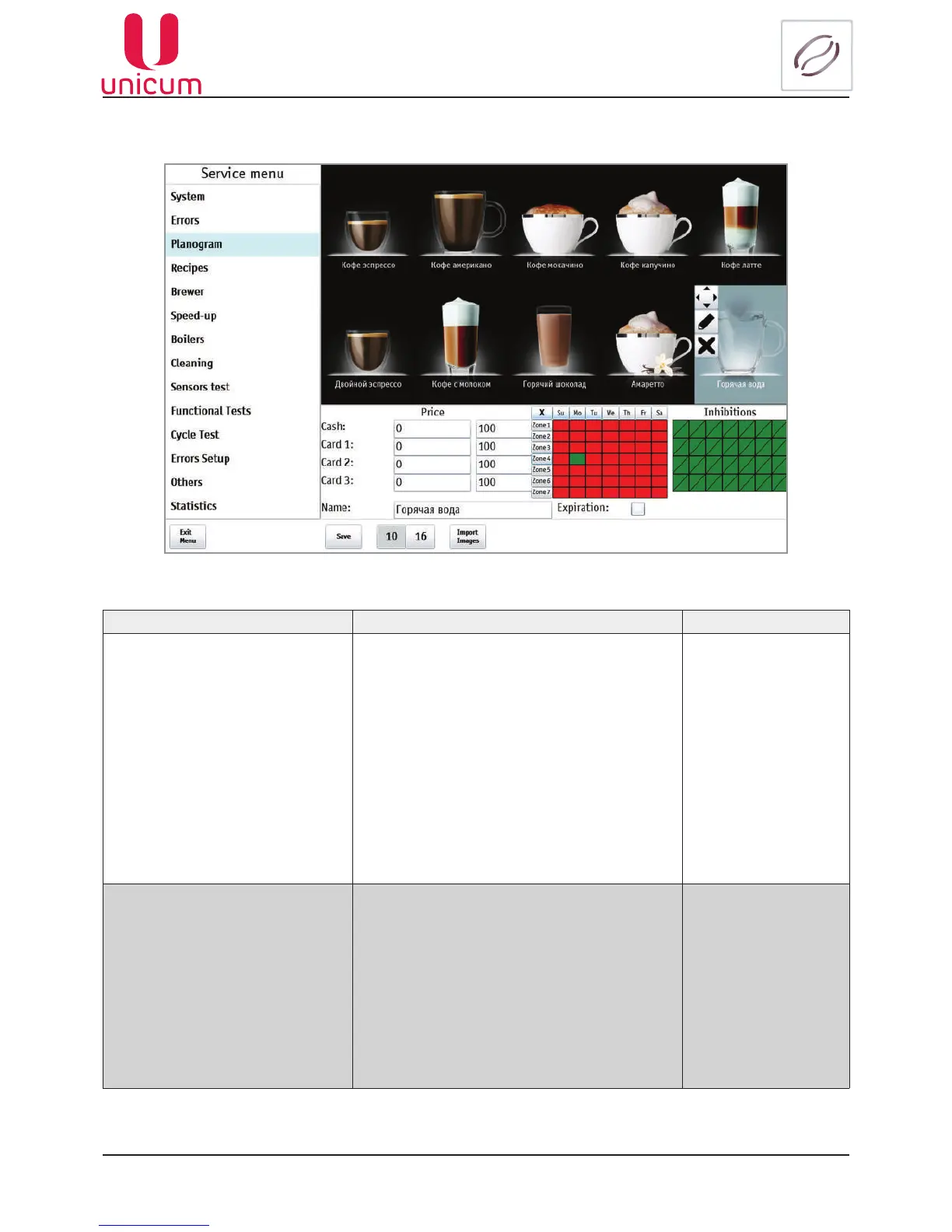
To set the discount/surcharge and prohibitions, touch the string opposite to the concerned price Cash,
Card 1, Card 2, Card 3. Then the possibility of choosing the day of week and time zone appears.
Fig.9.12.2 - Planogram (Settings)
NAME DESCRIPTION VALUE
Price Factor The discount or surcharge setting from the speci-
edsellingpriceinthesettings(Cash, Card 1...3)
in percent when buying for cash/server credit (by
card 1...3).
To set the time and period of discount/surcharge
validitytouchtheeldwiththerequiredtimezone
(Zone 1...7) for the required day of the week.
The time zones validity start and end time is set
inthe(Congurator–seethemanualattheweb-
site www.unicum.ru) program.
Upon choosing the eld is turned green -which
means that the setting is valid on the given day
oftheweekintheinterval,speciedbythetime
zone.
1...100% (discount)
101...200% (surcharge)
Inhibitions Setting the drink vending prohibition when buying
for cash/server credit (by card 1..3).
To set the time and period of prohibition touch the
eldwiththerequiredtimezone(Zone1...7)for
the required day of the week.
The time zones validity start and end time is set
inthe(Congurator–seethemanualattheweb-
site www.unicum.ru) program.
Upon choosing the eld is turned red -which
means that the drink vending prohibition is valid
on the given day of the week in the interval, spec-
iedbythetimezone.



 To Next Page