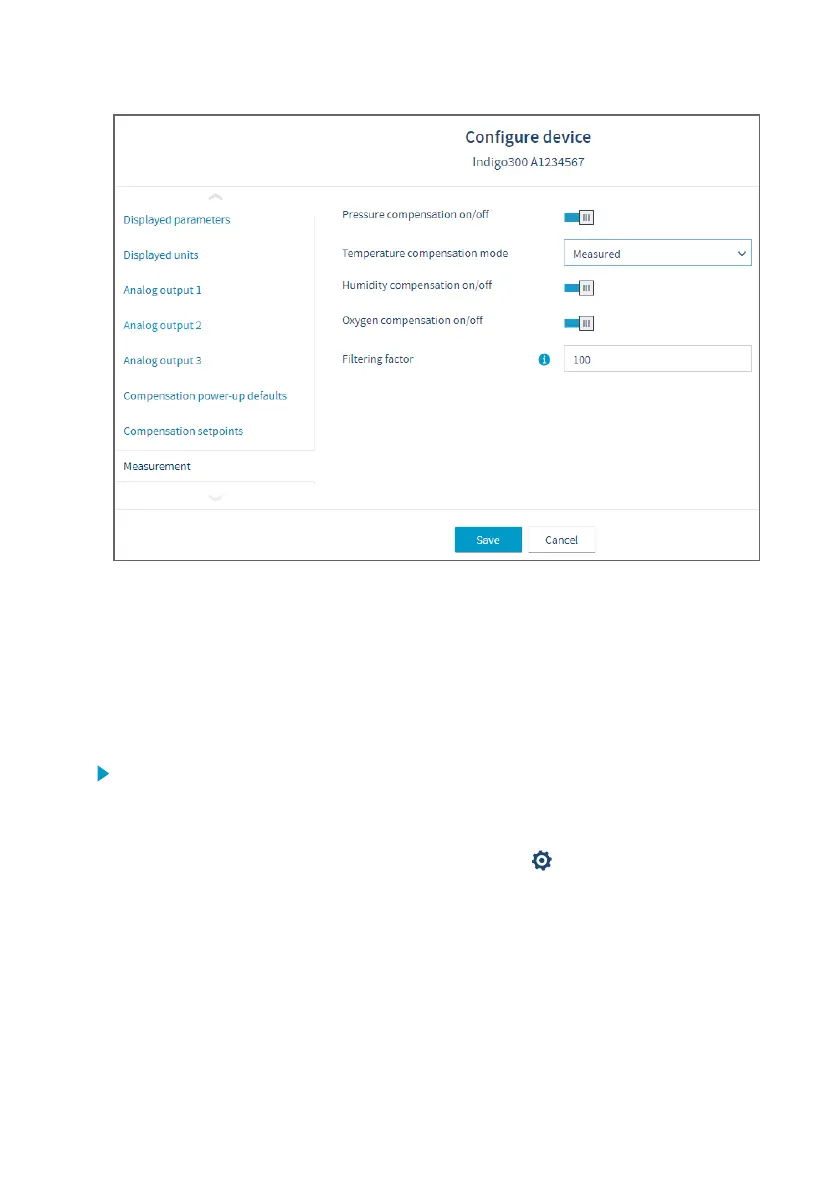
Figure 30 Insight environmental compensation configuration example with CO
2
probe
7.2.3 CO
2
probe adjustment example
Prepare a calibration gas or similar to create suitable reference conditions. See device
documentation for calibration requirements and recommendations (for example, the eect of
existing adjustments and environmental compensation settings).
To adjust the CO
2
measurement of the probe that is connected to the transmitter:
1. Before starting the adjustment, make sure that your environmental compensation settings
(for example, the relative humidity and oxygen concentration values given as the current
operating environment) are correct for your present environment. You can review and
change the environmental settings in the Configure device menu.
2. To open the Insight PC software calibration menu, select
to access Insight main menu.
In the main menu, select Calibrate.
3. Select CO₂ adjustment.
4. Insert the probe in the reference environment for the first calibration point.
5. Wait for the measurement to stabilize fully. The graph shows readings of the last 60
minutes.
6. When the measurement has stabilized, click the Reference value, point 1 text box and
enter the CO
2
level of calibration point 1. Press ENTER or click outside the text box when
done.
Chapter 7 – Calibration and adjustment
49




 To Next Page