7. Check that the measured value for point 1 is automatically inserted.
8. If you want to calibrate in more than one point, repeat the procedure for all desired
calibration points.
9. Check the dierence between each reference and measured value. Very large dierences
may be due to insucient stabilization time or unsuitable calibration setup.
If you want to adjust the device, select Activate adjustment.
To exit without taking the adjustment in use, select Close.
10. After calibrating your device, update the information in the Calibration information tab.
7.2.4 Analog output adjustment
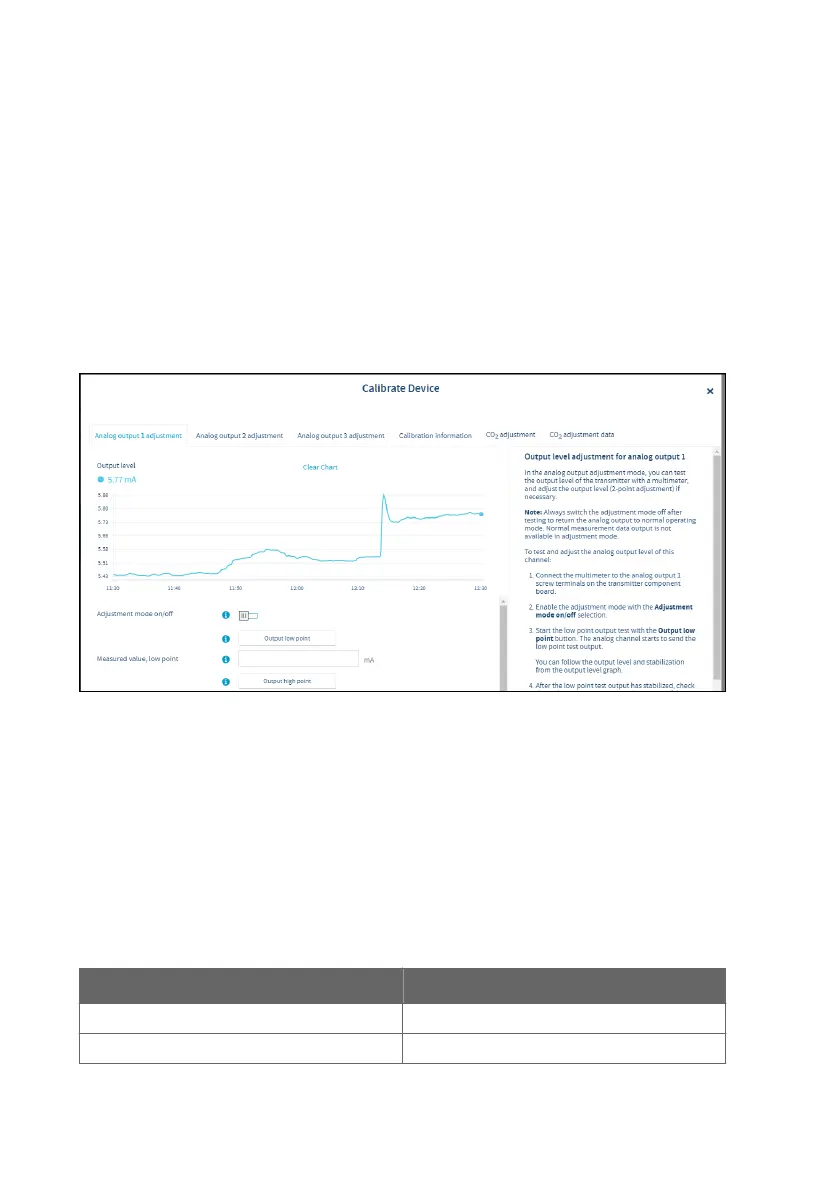
Figure 31 Insight analog output adjustment view
If the analog output appears to be inaccurate, you can test and adjust the output level in the
calibration menu of the Insight PC software. Note that each of the 3 analog output channels is
adjusted separately. To carry out the adjustment, you need a multimeter (or an alternative
method for reading the analog output level) to verify the transmitter test output level.
During the adjustment, the output of the transmitter's analog output channels is forced to a
fixed current or voltage level. The adjustment is a 2-point adjustment with a low point test
output and a high point test output: the fixed test output levels are listed in Table 6
(page 50).
Table 6 Transmitter analog channel fixed test output levels
Current and voltage test output points Fixed test output level
Low point test output for current output 4 mA
High point test output for current output 20 mA
Indigo300 User Guide M212849EN-A
50




 To Next Page