Page 83 of 244
6. When the VAKPAR screen shows, press the X-ray exposure switch.
7. Release the button when the image acqustion is 10% completed.
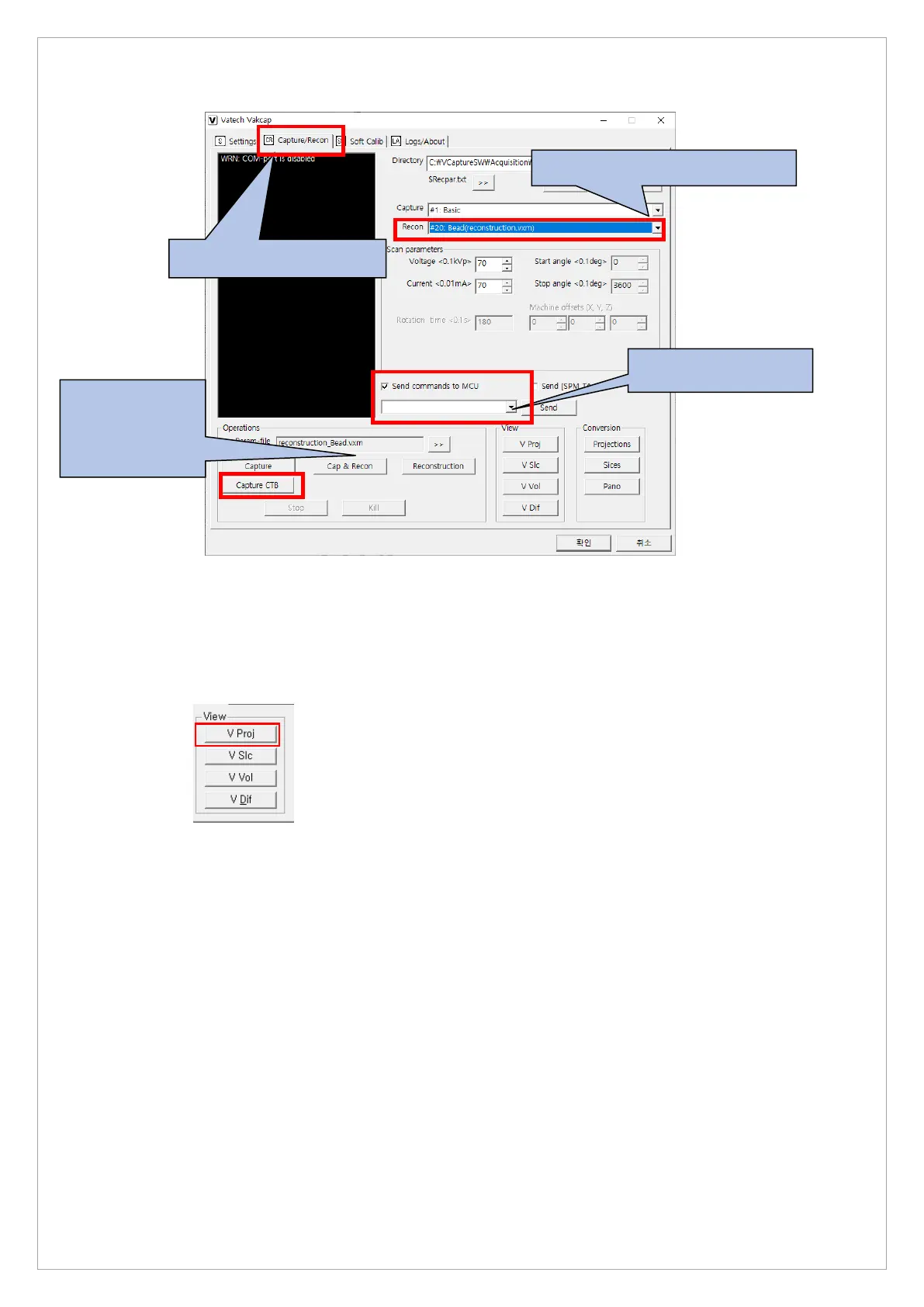
8. On the dialog box, go to View and click the V Proj to open View 16.
9. Check the height of the bead with Capture CTB.
10. Check that all 4 rows appear on the bead height.
11. If the standard is not met, adjust the column height, and acquire the image again.
12. If the height is correct, send the [SPM_ABMS] command and capture the image.
13. When the exposure is completed, select the #20: Bead(reconstruction. vxm) for Recon
type and click the Reconstruction button to reconstruct the Bead Phantom image.
14. When reconstruction is complete, click the V Vol button to check the Bead Position.
3.Set the Bead(Reconstruction.vxm)
CTB after obtaining
the Dark



 To Next Page