Page 160 of 244
Chapter 6. CEPH Image Optimization
6.1. CEPH Sensor Calibration
6.1.1. Before CEPH Sensor Calibration
Before CEPH sensor calibration, install VAKCAP.com program.
Path: C:\VCaptureSW\Acquisition\Ceph\WideCeph\Norm\ folder
Ensure to save all existing CEPH sensor calibration folder before starting
a new calibration. You can find the previous folders at
C:\VCaptureSW\Acquisition\CEPH\WideCeph\Norm\CAL
Follow the steps below to prepare the system for a CEPH sensor calibration:
1. Remove the normal chin block.
2. Remove the CEPH ear rods and fold the nasal positioner to prevent the CEPH sensor from
blocking.
3. Disassemble the tube cases following the instruction in Chapter 1.
4. Rename the CAL folder for backup.
(Path: C:\VCaptureSW\Acquisition\Ceph\WideCeph\Norm\CAL)
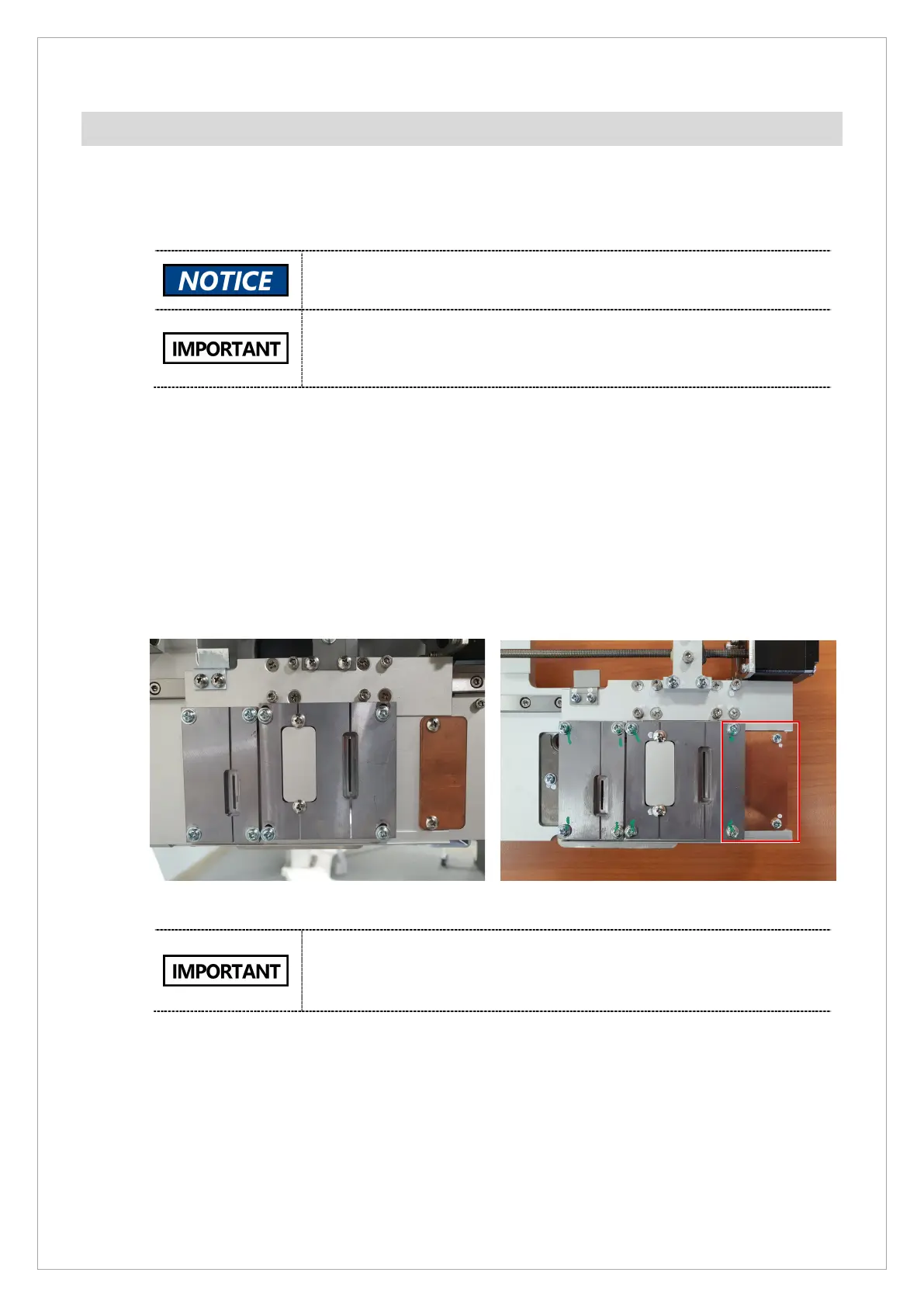
If you are using an old collimator, ensure to reassemble the cu filter as illustrated below.
Before reassembling Cu filter After reassembling Cu filter
New Collimator Information is as listed below:
Application date: 2021-08-20
Cut in S/N: 098-000155



 To Next Page